
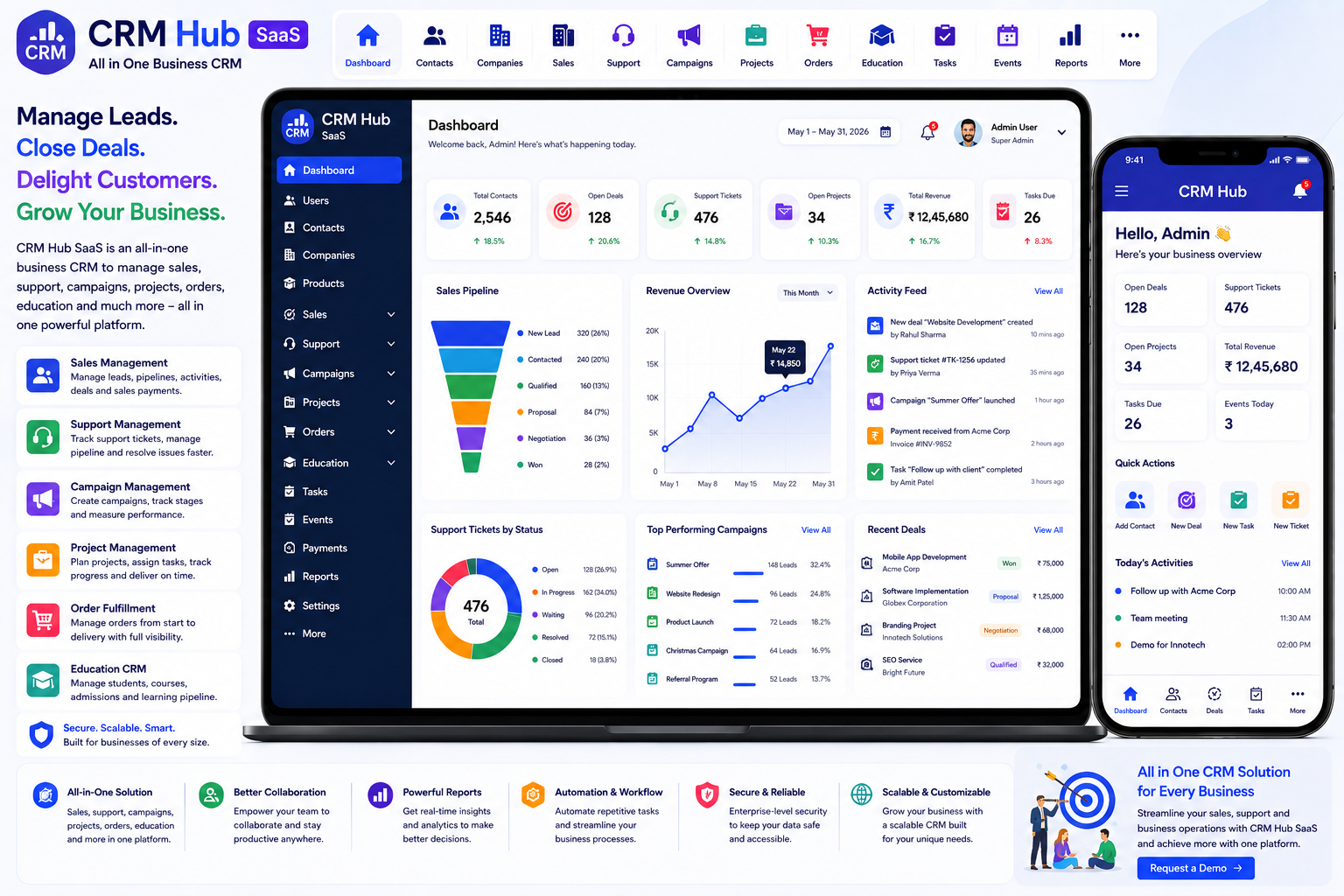
Looking for a ready-made solution?
👉 All-in-One Business CRM
https://smartwebinfotech.com/items/crm-hub-saas-all-in-one-business-crm/1041
Managing customer relationships is at the heart of every growing business. From acquiring new customers and tracking sales opportunities to handling support requests, campaigns, projects, orders, and follow-ups, businesses need a centralized system to keep their teams organized.
When customer information is spread across spreadsheets, emails, messaging apps, notebooks, and separate tools, sales opportunities can be missed and support processes can become difficult to manage.
An All-in-One Business CRM brings customer management, sales pipelines, support workflows, campaigns, projects, order fulfillment, education workflows, tasks, events, payments, reporting, and automation into one centralized platform.
CRM Hub SaaS – All in One Business CRM is designed to streamline business workflows from lead generation and client management to sales tracking, task management, customer support, team collaboration, and data-driven reporting.
Explore CRM Hub SaaS – All in One Business CRM
What Is an All-in-One Business CRM?
An All in One Business CRM is a customer relationship management platform that combines multiple business processes into a single system.
Instead of using separate applications for sales, support, campaigns, projects, tasks, and customer records, a unified CRM allows teams to manage these activities from one platform.
A typical business workflow can look like:
Lead → Contact → Sales Pipeline → Deal → Payment → Customer
For support:
Customer → Support Request → Support Pipeline → Activity → Resolution
For marketing:
Campaign → Campaign Stage → Activity → Customer Response → Conversion
For projects:
Project → Stage → Task → Progress → Completion
CRM Hub brings these types of workflows together through configurable pipelines and stages.
Why Do Businesses Need CRM Software?
As a business grows, customer information and daily activities can become increasingly difficult to manage manually.
Common problems include:
- Scattered customer information
- Missed sales opportunities
- Poor follow-up
- Unorganized sales pipelines
- Difficult support tracking
- Separate campaign records
- Lack of task visibility
- Poor team collaboration
- Manual reporting
- Difficult payment tracking
An integrated CRM helps businesses create a structured workflow around customers and business activities.
Key Features of an All-in-One Business CRM
1. Informative Dashboard
A CRM dashboard gives business owners and managers a centralized overview of important activities.
A dashboard can help monitor:
- Contacts
- Companies
- Sales
- Support
- Campaigns
- Projects
- Orders
- Tasks
- Events
- Payments
- Reports
CRM Hub includes an Informative Dashboard.
2. User Management
Businesses often have multiple team members using the CRM.
User management allows administrators to create and manage accounts for:
- Administrators
- Owners
- Managers
- Sales Representatives
- Support Staff
- Marketing Teams
- Project Teams
- Other Employees
CRM Hub includes User Management.
3. User Roles & Permissions
Different employees require different levels of system access.
For example:
Administrator: Complete system access.
Owner: Business-wide management access.
Sales Manager: Sales pipeline and team management.
Sales Representative: Assigned customer and sales records.
Support Staff: Customer support and support pipeline.
Role-based permissions help businesses control access to sensitive customer and business information.
CRM Hub includes User Roles and Permissions.
4. Company Management
B2B businesses often work with organizations rather than individual customers.
Company management allows teams to maintain company records alongside their contacts.
Information can include:
- Company Name
- Contact Information
- Address
- Associated Contacts
- Sales Information
- Support Information
- Business Activities
CRM Hub includes Company Management.
5. Contact Management
Contact management is one of the fundamental CRM features.
Businesses can maintain:
- Customer Name
- Phone
- Company
- Address
- Notes
- Sales Information
- Support History
- Activities
CRM Hub includes Contact Management.
6. Product & Product Category Management
Businesses selling products need a structured product catalog.
Product management can include:
- Product Name
- Product Category
- Pricing
- Product Details
- Sales Information
- Payment Information
CRM Hub includes Product & Product Category Management.
This helps sales and payment workflows use consistent product information.
7. Sales Pipeline Management
A sales pipeline provides a visual representation of opportunities as they move through the sales process.
For example:
New Lead → Contacted → Qualified → Proposal → Negotiation → Won / Lost
CRM Hub includes Sales Pipeline & Sales Stage Management.
A structured pipeline allows sales managers to understand where opportunities are currently positioned.
8. Sales Stage Management
Every business may have a different sales process.
For example, an IT company might use:
Inquiry → Requirement → Demo → Proposal → Negotiation → Closed
A real estate company might use:
New Inquiry → Site Visit → Negotiation → Booking → Agreement
Sales stages can be configured around the organization's workflow.
9. Sales Stage History
Knowing the current sales stage is useful, but knowing how an opportunity reached that stage can provide additional insight.
CRM Hub includes Sales Stage History Management, allowing businesses to maintain stage progression information.
10. Sales Notes Management
Sales representatives often need to record information after calls, meetings, demos, and negotiations.
Examples include:
- Customer Requirements
- Meeting Notes
- Pricing Discussions
- Follow-Up Information
- Next Steps
CRM Hub includes Sales Notes Management.
11. Sales Activity Management
Sales activity tracking helps teams maintain a history of important customer interactions.
Activities can include:
- Calls
- Meetings
- Follow-Ups
- Discussions
- Demonstrations
- Other Sales Activities
CRM Hub includes Sales Activity Management.
12. Sales Product Payment Management
Sales processes often need to connect products with payment information.
CRM Hub includes Sales Product Payment Management, helping businesses manage payment-related information associated with sales products.
13. Support Pipeline Management
Customer support can be managed through a dedicated support workflow.
For example:
New Request → Assigned → In Progress → Waiting → Resolved → Closed
CRM Hub includes Support Pipeline & Support Stage Management.
This allows businesses to manage customer support separately from their sales workflow.
14. Support Stage History
Support requests can move through multiple stages.
Stage history helps maintain information about the progression of support cases.
CRM Hub includes Support Stage History Management.
15. Support Notes
Support representatives can record important information related to customer issues.
Examples include:
- Problem Description
- Troubleshooting Information
- Customer Feedback
- Resolution Details
- Follow-Up Notes
CRM Hub includes Support Notes Management.
16. Support Activity Management
Customer support teams can track activities associated with support requests.
This can help managers understand:
- What action was taken
- Who handled the request
- Current progress
- Previous interactions
CRM Hub includes Support Activity Management.
17. Support Product Payment Management
Businesses that provide paid products or services may need to associate payment information with support cases.
CRM Hub includes Support Product Payment Management.
18. Campaign Pipeline Management
Marketing campaigns can also be organized using a pipeline.
For example:
Campaign Planning → Active → Customer Engagement → Conversion → Completed
CRM Hub includes Campaign Pipeline & Campaign Stage Management.
19. Campaign Stage History
Campaigns may move through different stages over time.
CRM Hub includes Campaign Stage History Management to maintain campaign stage progression.
20. Campaign Notes Management
Marketing teams can maintain campaign-related notes such as:
- Campaign Objectives
- Target Audience
- Promotional Details
- Customer Feedback
- Campaign Strategy
CRM Hub includes Campaign Notes Management.
21. Campaign Activity Management
Campaign activities allow teams to track actions associated with marketing campaigns.
CRM Hub includes Campaign Activity Management.
22. Campaign Product Payment Management
Businesses can associate products and payment information with campaign-related workflows.
CRM Hub includes Campaign Product Payment Management.
23. Project Tracker Pipeline & Stage Management
CRM Hub goes beyond traditional sales and support functionality by including a project tracking workflow.
Businesses can create project stages such as:
Planning → Development → Review → Testing → Completed
CRM Hub includes Project Tracker Pipeline & Stage Management.
24. Order Fulfillment Pipeline
Businesses that sell products need to track what happens after a sale.
A typical order workflow can be:
Order Received → Processing → Packed → Shipped → Delivered
CRM Hub includes Order Fulfillment Pipeline & Stage Management.
25. Education Pipeline
Education businesses and consultants can use a dedicated pipeline for student or admission workflows.
For example:
Inquiry → Counseling → Course Selection → Application → Enrollment
CRM Hub includes Education Pipeline & Stage Management.
26. Interior Design Pipeline
Interior design businesses often have long project-based sales workflows.
A possible process is:
Inquiry → Site Visit → Design Proposal → Quotation → Approval → Project
CRM Hub includes Interior Design Pipeline & Stage Management.
27. Task Management
Businesses need to manage activities that arise from sales, support, campaigns, and projects.
Tasks can include:
- Call Customer
- Send Proposal
- Prepare Quotation
- Resolve Support Issue
- Follow Up
- Schedule Meeting
- Complete Project Activity
CRM Hub includes Task Management.
28. Event Management
Businesses regularly organize meetings, appointments, presentations, demonstrations, conferences, and other events.
CRM Hub includes Event Management, providing a centralized way to organize business events.
29. Tag Management
Tags provide an additional way to categorize and organize CRM records.
Examples include:
- VIP
- High Priority
- New Customer
- Enterprise
- Follow-Up
- Important
CRM Hub includes Tag Management.
30. Business Reports
Reporting helps business owners and managers understand operational performance.
CRM Hub includes reports for:
- Sales
- Support
- Campaigns
- Project Tracker
- Order Fulfillment
- Education
These reports can help teams make more informed business decisions.
31. Transaction Management
Businesses need to maintain records of financial transactions.
Transaction management can help organize:
- Sales Payments
- Support Payments
- Campaign Payments
- Other Transactions
CRM Hub includes Manage Transaction functionality.
32. Email Notifications
CRM systems frequently need to communicate important information to users.
Email notifications can be used for:
- Sales Updates
- Support Updates
- Account Notifications
- Payment Notifications
- System Notifications
CRM Hub includes email notification settings and customizable email notification templates.
33. SMS Notifications
SMS can be useful for time-sensitive communication.
Potential uses include:
- Customer Updates
- Support Notifications
- Sales Follow-Ups
- Payment Notifications
- Important Alerts
CRM Hub includes SMS notification templates and Twilio integration for sending SMS.
34. Multi-Language Support
Businesses serving international customers may need multiple languages.
CRM Hub includes multi-language support.
This can make the application more accessible to teams operating in different regions.
35. Payment Gateway Integration
CRM Hub supports multiple payment options.
The current product page lists:
- Bank Transfer
- PayPal
- Stripe
- Flutterwave
- Paystack
Payment gateway availability depends on provider support, location, and account configuration.
36. SaaS Subscription Management
CRM Hub can be offered as a SaaS platform with subscription plans.
Software providers can create plans such as:
Starter
For small businesses.
Professional
For growing sales and support teams.
Enterprise
For organizations with more advanced CRM requirements.
CRM Hub includes Subscription Packages Management.
37. Subscription Coupon Management
Promotional coupons can help SaaS businesses attract customers.
Examples include:
- Launch Discount
- Annual Subscription Discount
- New Customer Offer
- Seasonal Promotion
CRM Hub includes Subscription Coupon & Coupon History Management.
38. Dynamic Landing Page CMS
A SaaS business needs an effective website to promote its CRM platform.
The dynamic landing page CMS can help manage:
- Homepage
- Features
- Pricing
- FAQs
- Marketing Content
- Contact Information
CRM Hub includes a Dynamic Landing Page CMS.
39. SEO Settings
SEO helps SaaS products attract organic traffic from search engines.
CRM Hub includes Site SEO Settings for managing website SEO information.
Businesses can optimize:
- Meta Titles
- Meta Descriptions
- SEO Content
- Social Sharing Information
40. Google reCAPTCHA
Public registration and inquiry forms can be exposed to automated bots.
Google reCAPTCHA adds an additional layer of protection to public-facing forms.
CRM Hub includes Google reCAPTCHA Settings.
41. Two-Factor Authentication
CRM platforms contain valuable customer, sales, support, and financial information.
Two-factor authentication provides an additional layer of account security.
CRM Hub includes 2-Factor Authentication.
42. Light & Dark Mode
Different users may prefer different interface styles.
CRM Hub provides theme settings supporting Light and Dark modes.
43. Multi-Theme Colors
Businesses can customize the appearance of the CRM to better match their brand.
CRM Hub includes Multi Theme Colors.
44. RTL & LTR Support
International businesses may require both left-to-right and right-to-left interfaces.
CRM Hub includes an RTL/LTR Theme.
45. Multi-Font Styles
Font customization can help improve the interface experience and support different languages.
CRM Hub includes Multi Font Style settings.
46. OpenAI Integration
Artificial intelligence can assist businesses with repetitive content and communication tasks.
Potential applications include:
- Customer Communication
- Sales Content
- Support Responses
- Marketing Content
- Product Descriptions
- Business Notes
- FAQ Generation
CRM Hub includes OpenAI Integration.
AI-generated content should be reviewed before being sent to customers or published.
47. n8n Workflow Automation
Modern businesses often use multiple applications.
n8n integration can provide a foundation for connecting CRM Hub with external systems and automating workflows.
For example:
New Customer → Create Contact → Assign Salesperson → Create Task → Send Email
Another workflow could be:
Support Request → Create Support Record → Assign Staff → Send Notification
CRM Hub includes n8n Integration.
48. Impersonation Feature
Authorized administrators may need to access a user's account to troubleshoot issues or provide support.
CRM Hub includes an Impersonate Feature.
This should be restricted to appropriately authorized administrators.
49. Owner Email Verification
Email verification can help ensure that owner accounts use valid email addresses.
CRM Hub provides an option to enable or disable Owner Account Email Verification.
50. Pricing Feature Controls
SaaS businesses may need flexibility over which features are included in each subscription plan.
CRM Hub includes Pricing Features Enabled/Disabled functionality.
This can help create differentiated subscription packages.
Benefits of an All in One Business CRM
Centralized Customer Information
Keep contacts, companies, sales records, support activities, and business interactions organized in one place.
Improve Sales Visibility
Sales pipelines and stages provide a clearer view of opportunities.
Improve Customer Support
Dedicated support pipelines help teams manage customer issues more systematically.
Manage Marketing Activities
Campaign pipelines provide a structured approach to campaign management.
Organize Projects
Project tracker workflows help businesses manage project stages.
Manage Order Fulfillment
Order pipelines provide visibility after a sale has been completed.
Improve Team Productivity
Tasks, events, notes, and activities help teams organize daily work.
Improve Reporting
Dedicated reports provide insight into sales, support, campaigns, projects, order fulfillment, and education workflows.
Reduce Manual Work
Automation and integrations can reduce repetitive administrative processes.
Improve Customer Experience
Having customer information and interaction history in one system allows teams to respond more efficiently.
Who Can Use an All-in-One Business CRM?
CRM software can be useful for:
- Small Businesses
- Startups
- Sales Teams
- Marketing Agencies
- Digital Agencies
- IT Companies
- Software Companies
- Real Estate Businesses
- Education Consultants
- Interior Design Companies
- Service Businesses
- B2B Companies
- E-commerce Businesses
- Customer Support Teams
- Consulting Companies
- Professional Service Firms
- Enterprises
How Different Businesses Can Use CRM Hub
IT & Software Companies
Manage leads, software products, sales opportunities, support requests, projects, and customer relationships.
Digital Marketing Agencies
Track prospects, campaigns, clients, tasks, projects, and support activities.
Real Estate
Manage property-related prospects through sales stages and maintain customer interactions.
Education Businesses
Use the dedicated Education Pipeline for inquiries, counseling, applications, and enrollment workflows.
Interior Design Companies
Track inquiries, site visits, proposals, approvals, and projects through the Interior Design Pipeline.
Product Businesses
Manage products, sales opportunities, payments, and order fulfillment.
Service Companies
Combine customer management, sales, support, tasks, events, and payments in one platform.
All in One CRM vs. Separate Business Tools
Separate Tools
All in One Business CRM
Spreadsheet for contacts
Centralized contact management
Separate sales tracker
Sales pipeline
Separate support tool
Support pipeline
Separate campaign tracker
Campaign pipeline
Separate project tracker
Project pipeline
Separate order tracker
Order fulfillment pipeline
Separate education CRM
Education pipeline
Separate task tool
Task management
Separate event calendar
Event management
Manual reports
Centralized reports
Multiple logins
One centralized platform
Data spread across tools
Unified business data
A specialized application can still be useful for highly complex enterprise requirements, but an all-in-one CRM can be particularly valuable for businesses that want multiple core workflows in one platform.
How to Choose the Best Business CRM
Before selecting CRM software, consider:
- Dashboard
- User Management
- Roles & Permissions
- Company Management
- Contact Management
- Product Management
- Product Categories
- Sales Pipeline
- Sales Stages
- Sales Stage History
- Sales Notes
- Sales Activities
- Sales Payments
- Support Pipeline
- Support Stages
- Support Stage History
- Support Notes
- Support Activities
- Support Payments
- Campaign Pipeline
- Campaign Stages
- Campaign History
- Campaign Notes
- Campaign Activities
- Campaign Payments
- Project Management
- Order Fulfillment
- Education Pipeline
- Interior Design Pipeline
- Task Management
- Event Management
- Tag Management
- Reports
- Transaction Management
- Email Notifications
- SMS Notifications
- Payment Gateways
- Subscription Plans
- Coupon Management
- AI Integration
- n8n Automation
- Multi-Language Support
- RTL/LTR
- Theme Customization
- Light/Dark Mode
- Two-Factor Authentication
- SEO Settings
- Landing Page CMS
The best CRM should match your actual business workflows rather than forcing your team into a rigid process.
Why Choose CRM Hub SaaS?
If you're looking for a ready-to-use all-in-one business CRM, CRM Hub SaaS by Smartweb Infotech combines customer relationship management with sales, support, campaigns, projects, order fulfillment, education, interior design, tasks, events, payments, reporting, and automation.
The current product page lists 58 major features, including sales and support pipelines, campaign management, project tracking, order fulfillment, education and interior design pipelines, subscriptions, payment gateways, SMS, OpenAI, n8n, reporting, security, and customization options.
Key Features
- Informative Dashboard
- User Management
- User Roles & Permissions
- Company Management
- Contact Management
- Product & Product Category Management
- Sales Pipeline & Stage Management
- Sales Stage History
- Sales Notes
- Sales Activities
- Sales Product Payment
- Support Pipeline & Stage Management
- Support Stage History
- Support Notes
- Support Activities
- Support Product Payment
- Campaign Pipeline & Stage Management
- Campaign Stage History
- Campaign Notes
- Campaign Activities
- Campaign Product Payment
- Project Tracker Pipeline
- Order Fulfillment Pipeline
- Education Pipeline
- Interior Design Pipeline
- Task Management
- Event Management
- Tag Management
- Reports
- Transaction Management
- Subscription Packages
- Subscription Coupons
- Payment Gateway Integration
- Email Notifications
- SMS Notifications
- Twilio Integration
- OpenAI Integration
- n8n Integration
- Multi-Language Support
- Multi-Theme Colors
- RTL/LTR
- Light/Dark Mode
- Multi-Font Styles
- Two-Factor Authentication
- Impersonation
- Dynamic Landing Page CMS
- SEO Settings
- Google reCAPTCHA
- Owner Email Verification
- Pricing Feature Controls
Many businesses start with:
Excel + Email + WhatsApp + Phone Calls + Separate Task Tools
As the company grows, this can become difficult to manage.
An all-in-one CRM can transform this workflow:
Scattered Contacts → Centralized Contact Management
Manual Sales Tracking → Sales Pipeline
Separate Support Register → Support Pipeline
Campaign Spreadsheet → Campaign Pipeline
Separate Project Tracker → Project Pipeline
Manual Order Tracking → Order Fulfillment Pipeline
Manual Student Tracking → Education Pipeline
Separate Design Workflow → Interior Design Pipeline
Separate Task List → Task Management
Manual Reporting → Centralized Reports
Manual Communication → Email & SMS Notifications
Multiple Integrations → n8n Automation
This creates a more connected business workflow.
Frequently Asked Questions
What is an All in One Business CRM?
An All in One Business CRM is software that combines customer management, sales, support, marketing, projects, tasks, and other business workflows in one centralized platform.
Can I manage companies and contacts?
Yes. CRM Hub includes Company Management and Contact Management.
Can I manage sales pipelines?
Yes. Sales Pipeline and Sales Stage Management are included.
Can I manage customer support?
Yes. CRM Hub includes a dedicated Support Pipeline, Support Stages, Support History, Notes, Activities, and Product Payment Management.
Can I manage marketing campaigns?
Yes. Campaign Pipeline, Campaign Stages, Campaign History, Notes, Activities, and Product Payment Management are included.
Can I manage projects?
Yes. CRM Hub includes Project Tracker Pipeline and Stage Management.
Can I manage orders?
Yes. An Order Fulfillment Pipeline and Stage Management feature is included.
Can education businesses use it?
Yes. CRM Hub includes a dedicated Education Pipeline and Stage Management feature.
Can interior design companies use it?
Yes. The platform includes an Interior Design Pipeline and Stage Management feature.
Does it support payments?
Yes. The platform includes payment settings, transaction management, and multiple payment gateway integrations.
Does it support SMS?
Yes. CRM Hub includes SMS notification templates and Twilio integration.
Does it support AI?
Yes. OpenAI integration is included.
Can I automate workflows?
Yes. n8n integration provides a foundation for connecting CRM Hub with external applications and automating workflows.
Does it support multiple languages?
Yes. Multi-language support is included.
Can I offer CRM Hub as SaaS?
Yes. CRM Hub includes subscription package management, subscription coupons, pricing feature controls, and payment integrations, providing a foundation for a SaaS business model.
Final Thoughts
Customer relationships are the foundation of long-term business growth. As companies expand, managing customers through spreadsheets, emails, messaging applications, and disconnected tools can become inefficient.
An All in One Business CRM brings customer information and multiple business workflows together in one centralized system.
With Contact Management, Company Management, Sales Pipelines, Support Pipelines, Campaign Management, Project Tracking, Order Fulfillment, Education Workflows, Interior Design Pipelines, Tasks, Events, Payments, Reports, AI, and Automation, CRM Hub provides a broad foundation for managing modern business operations.
For small businesses, startups, sales teams, agencies, service companies, IT businesses, education consultants, interior design firms, and growing enterprises, CRM Hub SaaS – All in One Business CRM can help create a more organized, connected, and scalable customer management workflow.
Comments (0)