
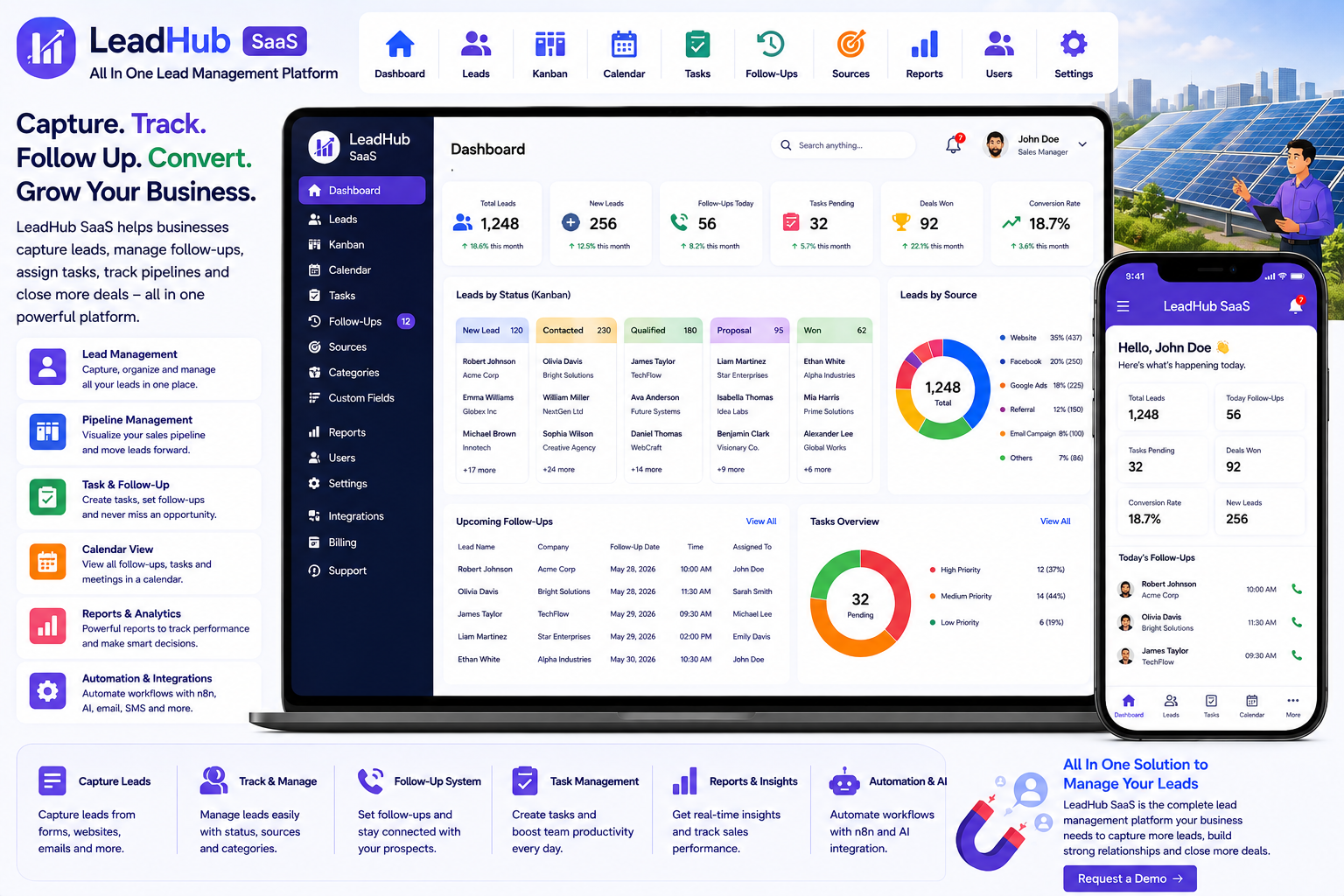
Looking for a ready-made solution?
👉 All-in-One Lead Management Platform
https://smartwebinfotech.com/items/leadhub-saas-all-in-one-lead-management-platform/1037
Managing leads effectively is one of the most important parts of growing a business. Whether leads come from websites, inquiry forms, social media, referrals, advertising campaigns, phone calls, or other sources, businesses need a reliable way to capture, organize, follow up with, and convert them.
When sales teams manage leads through spreadsheets, emails, messaging apps, and manual notes, important opportunities can easily be missed.
An All In One Lead Management Platform brings lead capture, lead tracking, follow-ups, tasks, sales pipeline management, reporting, and team collaboration into one centralized system.
In this guide, we'll explore what lead management software is, its key features, benefits, use cases, and how LeadHub SaaS – All In One Lead Management Platform can help businesses manage their complete lead lifecycle.
Explore LeadHub SaaS – All In One Lead Management Platform
What Is an All In One Lead Management Platform?
An All In One Lead Management Platform is software that helps businesses manage leads from the moment they are captured until they are converted into customers.
A typical lead lifecycle looks like:
Lead Capture → Lead Qualification → Assignment → Follow-Up → Task → Sales Pipeline → Conversion → Customer
Instead of maintaining separate records across Excel, email, WhatsApp, and CRM tools, businesses can manage the process through one centralized dashboard.
LeadHub SaaS is designed to simplify the complete lead lifecycle, allowing businesses to capture, track, and manage leads from a single dashboard. It also supports customizable lead sources and statuses so businesses can adapt the platform to their sales process.
Why Do Businesses Need Lead Management Software?
Generating leads is only the beginning of the sales process.
Businesses also need to know:
- Where did the lead come from?
- Who is responsible for the lead?
- What is the current status?
- When should the sales team follow up?
- What tasks are pending?
- How many times has the customer been contacted?
- Which leads are converting?
- Which lead sources perform best?
Without a centralized system, sales teams can lose valuable opportunities.
A lead management platform helps turn scattered inquiries into a structured sales workflow.
Key Features of an All In One Lead Management Platform
1. Informative Dashboard
A centralized dashboard provides sales managers and business owners with an overview of lead activity.
It can provide quick visibility into:
- Total Leads
- Lead Status
- Follow-Ups
- Tasks
- Lead Sources
- Lead Categories
- Sales Activities
- Reports
LeadHub includes an Informative Dashboard.
2. Lead List Management
Lead list management provides a centralized place to store and organize prospects.
Lead records can include:
- Lead Name
- Contact Details
- Lead Source
- Lead Category
- Status
- Assigned User
- Follow-Up Details
- Notes
- Custom Information
LeadHub includes Lead List Management.
3. Lead Kanban Management
A Kanban board provides a visual representation of the sales pipeline.
For example:
New Lead ↓ Contacted ↓ Qualified ↓ Proposal ↓ Negotiation ↓ Won / Lost
Sales teams can quickly understand where each lead is in the sales process.
LeadHub includes Lead Kanban Management.
4. Lead Calendar Management
Sales activities often depend on dates and scheduled follow-ups.
A lead calendar can help teams manage:
- Follow-Up Dates
- Meetings
- Calls
- Tasks
- Upcoming Activities
- Scheduled Sales Actions
LeadHub includes Lead Calendar Management.
5. Inquiry Form Management
Businesses receive inquiries from websites and other channels.
An inquiry form can capture information such as:
- Name
- Phone
- Requirements
- Message
- Product/Service Interest
LeadHub includes Inquiry Form Management, helping businesses organize incoming inquiries as part of their lead workflow.
6. Lead Source Management
Knowing where leads come from is important for marketing and sales decisions.
Common sources include:
- Website
- Google Ads
- Social Media
- Referral
- Email Campaign
- Phone
- Landing Page
- Online Advertisement
LeadHub includes Lead Category & Source Management.
This allows businesses to customize their lead sources according to their marketing strategy.
7. Lead Category Management
Different businesses have different types of prospects.
For example:
- Hot Lead
- Warm Lead
- Cold Lead
- Product Inquiry
- Service Inquiry
- Enterprise Lead
- Retail Lead
- Corporate Lead
Lead categories can help sales teams organize prospects according to business requirements.
8. Custom Lead Fields
Every business collects different information from potential customers.
For example, a real estate business may need:
- Property Type
- Budget
- Location
- Bedrooms
An automobile dealer may need:
- Vehicle Model
- Budget
- Purchase Timeline
A software company may need:
- Company Size
- Required Modules
- Number of Users
- Project Requirements
LeadHub includes Custom Field Management, allowing businesses to adapt lead records to their requirements.
9. Task Management
Lead management often requires sales teams to complete specific tasks.
Examples include:
- Call Customer
- Send Proposal
- Schedule Meeting
- Send Product Information
- Prepare Quotation
- Follow Up
- Demo Product
LeadHub includes Task Management.
10. Task Categories
Different businesses can categorize tasks according to their sales workflow.
Examples include:
- Sales Call
- Meeting
- Demo
- Proposal
- Documentation
- Follow-Up
LeadHub includes Task Category Management.
11. Task Labels
Labels can help teams quickly identify or organize tasks.
For example:
- Urgent
- High Priority
- Customer Meeting
- Proposal
- Follow-Up
LeadHub includes Task Label Management.
12. Task Status Management
Tasks can move through different stages.
For example:
Pending → In Progress → Completed
LeadHub includes Task Status Management.
This helps sales managers identify pending and completed activities.
13. First Follow-Up Management
The first follow-up after capturing a lead is often critical.
A sales representative can record:
- Follow-Up Date
- Follow-Up Notes
- Lead Status
- Communication Details
- Next Action
LeadHub includes First Follow-Up Management.
14. Repeat Follow-Up Management
Some leads require multiple interactions before making a purchase.
Repeat follow-up management can help sales teams maintain a history of ongoing communication.
For example:
First Call → Second Call → Demo → Proposal → Negotiation → Final Follow-Up
LeadHub includes Repeat Follow-Up Management.
15. Today's Follow-Up Management
Sales teams need to know which customers require attention today.
A dedicated today-follow-up view can help sales representatives prioritize their daily activities.
LeadHub includes Today Follow-Up Management.
16. Lead & Follow-Up Reports
Reports help business owners understand sales activity.
Useful information can include:
- Total Leads
- Lead Status
- Lead Sources
- Follow-Up Activity
- Completed Follow-Ups
- Pending Follow-Ups
- Sales Tasks
LeadHub includes Lead & Follow-Up Report Management and dedicated lead, follow-up, and task reports.
17. User Management
Lead management often involves multiple sales representatives and managers.
User management allows businesses to organize team accounts.
For example:
- Super Admin
- Owner
- Sales Manager
- Sales Representative
- Staff
LeadHub includes User Management.
18. User Roles & Permissions
Not every team member needs access to every part of the system.
For example:
Super Admin: Complete system access.
Owner: Manage company operations.
Sales Manager: Monitor leads and team activities.
Sales Representative: Manage assigned leads and follow-ups.
Role-based permissions help protect business data and control access.
LeadHub includes User Roles and Permissions.
19. Lead Assignment & Team Workflow
A structured lead management system can help businesses organize lead ownership.
For example:
New Inquiry → Sales Manager → Sales Representative → Follow-Up → Conversion
This makes it easier to determine who is responsible for each prospect.
20. Company Settings
Businesses can configure their company information and operating preferences.
Company settings can include:
- Company Name
- Logo
- Contact Details
- Address
- Business Information
- General Preferences
LeadHub includes Company Settings.
21. Account & Application Settings
Administrators can configure user and application preferences.
LeadHub includes:
- Account Settings
- Application Settings
- Email Settings
- Payment Settings
22. Email Notifications
Sales teams frequently need automated communication.
Email notifications can be used for:
- Lead Updates
- Follow-Up Notifications
- Account Notifications
- Task Notifications
- Subscription Updates
LeadHub includes email notification settings and customizable email notification templates.
23. SMS Notifications
SMS can provide another channel for important sales notifications.
Potential uses include:
- Follow-Up Reminders
- Lead Updates
- Task Notifications
- Customer Communication
- Subscription Notifications
LeadHub includes SMS notification templates and Twilio integration for sending SMS.
24. OpenAI Integration
Artificial intelligence can assist sales teams with repetitive content and communication tasks.
Potential use cases include:
- Follow-Up Message Drafting
- Sales Email Generation
- Lead Summaries
- Customer Communication
- Proposal Content
- Sales Content Ideas
LeadHub includes OpenAI Integration.
AI-generated sales content should be reviewed before sending to customers.
25. n8n Workflow Automation
Modern sales teams often use multiple applications.
n8n integration can help connect LeadHub with external tools and automate workflows.
For example:
New Inquiry → Create Lead → Assign Salesperson → Send Email → Create Follow-Up Task
Another workflow could be:
Lead Converted → Update CRM → Send Notification → Create Customer Record
LeadHub includes n8n Integration.
26. Subscription Package Management
Lead management software can also be offered as a SaaS product.
Software providers can create different plans for customers.
Starter
For small businesses and individual sales teams.
Professional
For growing companies with larger sales teams.
Enterprise
For organizations with advanced lead management requirements.
LeadHub includes Subscription Packages Management.
27. Subscription Coupon Management
Promotional coupons can help SaaS providers attract new customers.
Examples include:
- Launch Discount
- Annual Plan Discount
- New Customer Offer
- Seasonal Promotion
LeadHub includes Subscription Coupon & Coupon History Management.
28. Payment Gateway Integration
SaaS providers need reliable payment options for subscriptions.
LeadHub currently lists:
- Bank Transfer
- PayPal
- Stripe
- Flutterwave
- Paystack
29. Dynamic Landing Page CMS
A SaaS lead management platform needs a professional website to attract customers.
A dynamic landing page CMS can help manage:
- Homepage
- Features
- Pricing
- FAQs
- Testimonials
- Contact Information
- Marketing Content
LeadHub includes a Dynamic Landing Page CMS.
30. SEO Settings
Search engine optimization can help lead management software businesses attract organic traffic.
SEO settings can help manage:
- Meta Titles
- Meta Descriptions
- SEO Content
- Social Sharing Information
- Search Engine Settings
LeadHub includes Site SEO Settings.
31. Google reCAPTCHA
Public registration and inquiry forms can be targeted by automated bots.
Google reCAPTCHA provides an additional protection layer for public-facing forms.
LeadHub includes Google reCAPTCHA settings.
32. Multi-Language Support
Businesses operating across different regions may need multiple languages.
LeadHub includes Multi-Language support.
This can make the application more accessible to international sales teams.
33. Multi-Theme Colors
Businesses may want their CRM to match their brand identity.
LeadHub includes Multi Theme Colors, allowing businesses to customize the application's appearance.
34. RTL & LTR Support
International businesses may require both left-to-right and right-to-left interfaces.
LeadHub includes RTL/LTR Theme support.
35. Light & Dark Mode
Modern SaaS platforms can provide different interface modes based on user preferences.
LeadHub includes Light/Dark theme settings.
36. Two-Factor Authentication
Lead management platforms contain valuable customer and sales information.
Two-factor authentication adds another layer of account security.
LeadHub includes 2-Factor Authentication.
37. Impersonation Feature
SaaS administrators may need to troubleshoot customer accounts.
An authorized impersonation feature allows administrators to access an account for support purposes without requesting the user's password.
LeadHub includes an Impersonate Feature.
38. Owner Account Email Verification
Email verification can help ensure that owner accounts use valid email addresses.
LeadHub provides an option to enable or disable Owner Account Email Verification.
Benefits of an All In One Lead Management Platform
Never Lose Track of Leads
Centralized lead records make it easier to monitor every prospect.
Improve Follow-Up
Scheduled follow-ups help sales representatives stay on top of opportunities.
Shorten Response Time
Sales teams can quickly identify new inquiries and take action.
Improve Sales Team Productivity
Tasks, follow-ups, calendars, and pipeline views help salespeople organize their daily work.
Understand Lead Sources
Lead source management helps businesses identify where their prospects are coming from.
Improve Sales Visibility
Managers can see lead status and sales activity through dashboards and reports.
Reduce Manual Work
Automation and integrations can reduce repetitive administrative tasks.
Improve Team Collaboration
Shared lead and task information allows sales teams to work from a common system.
Scale Your Sales Process
A structured lead management platform can support businesses as their sales teams and lead volumes grow.
Who Can Use Lead Management Software?
An All In One Lead Management Platform can be useful for:
- Real Estate Agencies
- Insurance Agencies
- Loan & Finance Companies
- Travel Agencies
- Education Consultants
- Digital Marketing Agencies
- IT Companies
- Software Companies
- Automobile Dealers
- Construction Companies
- Solar Companies
- Healthcare Businesses
- Recruitment Agencies
- B2B Sales Teams
- Retail Businesses
- Service Companies
- Startups
- Small Businesses
- Enterprise Sales Teams
How Different Businesses Can Use Lead Management Software
Real Estate
Track property inquiries, budgets, locations, follow-ups, and customer requirements.
Insurance
Manage policy inquiries, customer details, follow-ups, and sales opportunities.
Education
Track student inquiries, course interests, admission follow-ups, and conversions.
Automobile
Manage vehicle inquiries, test-drive requests, quotations, and sales follow-ups.
Solar
Track solar installation inquiries, customer requirements, quotations, and follow-ups.
Digital Agencies
Manage prospects interested in websites, applications, SEO, marketing, and other services.
B2B Sales
Manage long sales cycles involving multiple meetings, proposals, negotiations, and follow-ups.
Lead Management vs. Traditional Spreadsheet Tracking
Traditional Spreadsheet
Lead Management Platform
Manual lead entry
Centralized lead management
Limited pipeline visibility
Kanban sales pipeline
Manual follow-up reminders
Structured follow-up management
Difficult team collaboration
Shared sales workflow
Basic filtering
Lead categories and sources
Separate task lists
Integrated task management
Manual reports
Lead, follow-up & task reports
Limited automation
n8n and other integrations
Difficult scaling
Designed for growing sales teams
A spreadsheet can be useful for basic record keeping, but dedicated lead management software provides a more structured approach to the complete sales lifecycle.
How to Choose the Best Lead Management Software
Before selecting a platform, consider:
- Lead List Management
- Lead Kanban
- Lead Calendar
- Inquiry Forms
- Lead Categories
- Lead Sources
- Custom Fields
- Task Management
- Task Categories
- Task Labels
- Task Statuses
- First Follow-Ups
- Repeat Follow-Ups
- Today's Follow-Ups
- Lead Reports
- Follow-Up Reports
- Task Reports
- User Management
- Roles & Permissions
- Email Notifications
- SMS Notifications
- Payment Gateways
- Subscription Management
- Coupon Management
- AI Integration
- Workflow Automation
- Multi-Language Support
- RTL/LTR Support
- Theme Customization
- Light/Dark Mode
- Two-Factor Authentication
- Landing Page CMS
- SEO Settings
- Google reCAPTCHA
The best platform should fit your sales process rather than forcing your sales team to completely change the way they work.
Why Choose LeadHub SaaS?
If you're looking for a ready-to-use All In One Lead Management Platform, LeadHub SaaS by Smartweb Infotech provides a centralized solution for managing leads from initial inquiry through follow-up and conversion.
The platform supports customizable lead sources and statuses and includes lead lists, Kanban management, calendars, inquiry forms, tasks, follow-ups, custom fields, reports, subscriptions, payment integrations, notifications, AI, and workflow automation.
Key Features
- Informative Dashboard
- User Management
- User Roles & Permissions
- Lead List Management
- Lead Kanban Management
- Lead Calendar Management
- Inquiry Form Management
- Task Management
- First Follow-Up Management
- Repeat Follow-Up Management
- Today Follow-Up Management
- Custom Field Management
- Lead & Follow-Up Report Management
- Lead Category & Source Management
- Task Category, Label & Status Management
- Company Settings
- Account Settings
- Application Settings
- Email Settings
- Multi-Language Support
- Payment Settings
- Transaction Management
- Subscription Packages
- Subscription Coupons
- Dynamic Landing Page CMS
- SEO Settings
- Google reCAPTCHA
- Email Notification Templates
- Twilio SMS Integration
- OpenAI Integration
- n8n Integration
- Multi-Theme Colors
- RTL/LTR Support
- Light/Dark Mode
- Multi-Font Styles
- Two-Factor Authentication
- Impersonation
- Lead, Follow-Up & Task Reports
Lead Management Software for Growing Businesses
A small business may initially manage leads using:
WhatsApp + Phone Calls + Excel + Email + Notes
As lead volume increases, this workflow can become difficult to maintain.
A centralized lead management platform can transform:
Excel Lead List → Centralized Lead Management
Manual Sales Pipeline → Lead Kanban
Scattered Follow-Ups → Structured Follow-Up Management
Paper/Notes → Digital Tasks
Manual Inquiry Collection → Inquiry Form Management
Separate Lead Categories → Lead Source & Category Management
Manual Reports → Lead, Follow-Up & Task Reports
Manual Customer Communication → Email & SMS Notifications
Separate SaaS Billing → Subscription Management
This can help businesses build a more organized and scalable sales process.
Frequently Asked Questions
What is an All In One Lead Management Platform?
It is software that helps businesses capture, organize, track, follow up with, and manage leads throughout the sales lifecycle.
Can I manage leads in a Kanban view?
Yes. LeadHub includes Lead Kanban Management.
Can I schedule follow-ups?
Yes. The platform includes first, repeat, and today's follow-up management.
Can I manage sales tasks?
Yes. LeadHub includes Task Management along with task categories, labels, and statuses.
Can I customize lead fields?
Yes. Custom Field Management allows businesses to maintain additional information according to their sales workflow.
Can I track where leads come from?
Yes. Lead Category & Source Management is included.
Can I generate lead reports?
Yes. Lead, Follow-Up, and Task reports are included.
Does it support SMS notifications?
Yes. LeadHub includes SMS notification templates and Twilio integration.
Does it support AI?
Yes. OpenAI integration is included.
Can I automate workflows?
Yes. n8n integration provides a foundation for connecting LeadHub with external applications and automating workflows.
Does it support online payments?
The product page lists Bank Transfer, PayPal, Stripe, Flutterwave, and Paystack integrations.
Can I offer the platform as SaaS?
Yes. LeadHub includes subscription packages and coupon management, providing a foundation for offering the lead management system as SaaS.
Final Thoughts
Generating leads is important, but managing those leads effectively is what turns opportunities into sales.
Without a structured system, sales teams can lose track of prospects, miss follow-ups, forget tasks, and struggle to understand which marketing channels are producing the best results.
An All In One Lead Management Platform brings lead capture, lead organization, pipeline management, follow-ups, tasks, reporting, communication, and automation into one centralized system.
For startups, small businesses, agencies, B2B sales teams, and growing enterprises, LeadHub SaaS – All In One Lead Management Platform provides a foundation for creating a more organized and scalable sales process.
With features including Lead Lists, Kanban Pipeline, Lead Calendar, Inquiry Forms, Custom Fields, Tasks, Follow-Ups, Lead Sources, Reports, SMS, OpenAI, n8n, Subscriptions, Payment Gateways, Multi-Language Support, and Security Features, LeadHub can help businesses move from scattered lead records to a structured digital sales workflow.
Comments (0)