
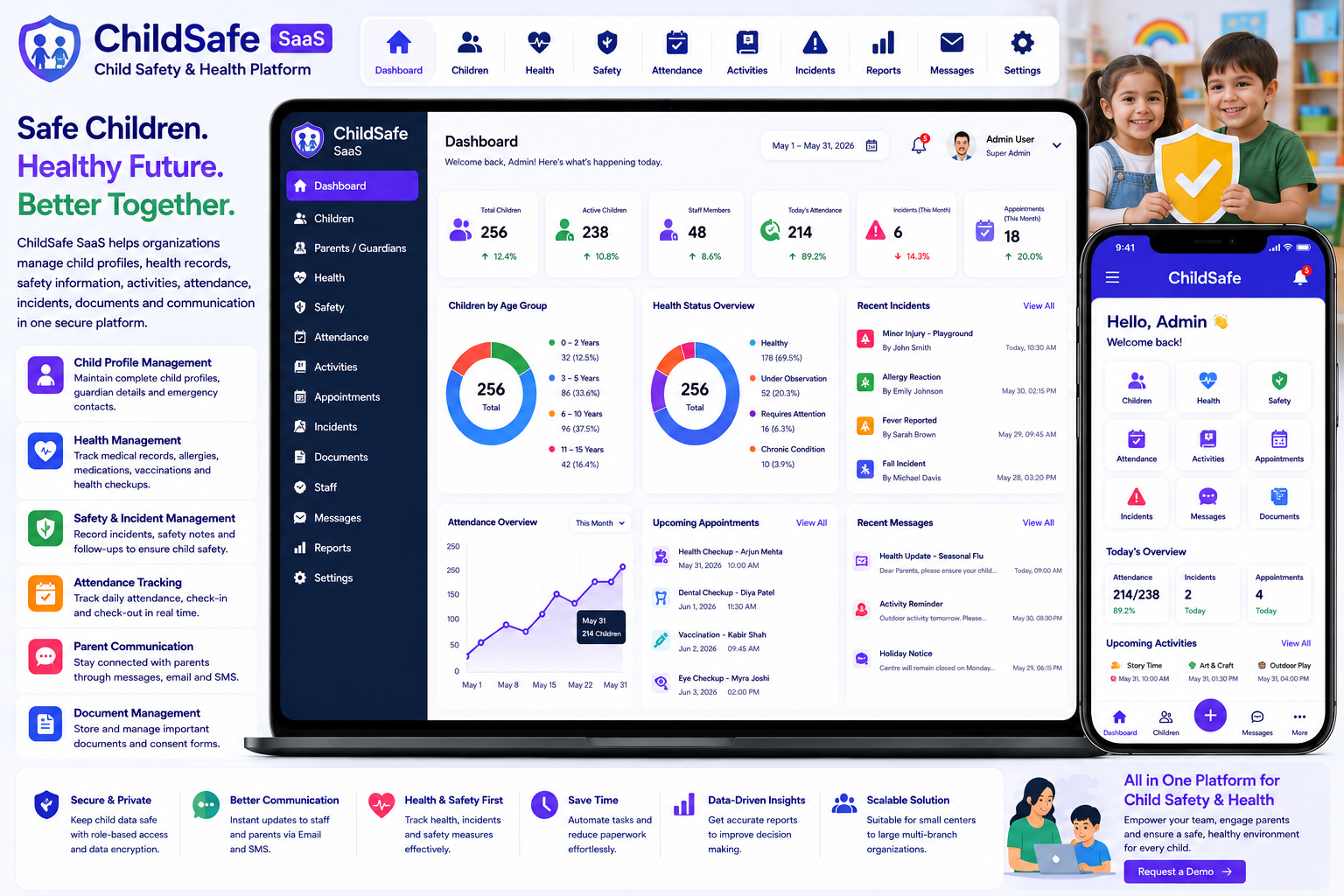
Looking for a ready-made solution?
👉Child Safety & Health Platform SaaS
https://smartwebinfotech.com/items/child-safety-health-platform-saa/1046
Children's safety and well-being require careful coordination between parents, schools, childcare organizations, healthcare teams, and administrators. Managing child profiles, health information, safety records, appointments, incidents, documents, and communication through paper files or disconnected tools can quickly become difficult.
A Child Safety & Health Platform SaaS provides a centralized digital environment for organizing child-related safety, health, care, and administrative workflows.
ChildSafe SaaS – Child Safety & Health Platform is designed to help organizations manage child profiles, health information, safety records, care-related activities, users, communication, and administrative processes from a centralized platform. (smartwebinfotech.com)
Explore Child Safety & Health Platform SaaS
What Is a Child Safety & Health Platform?
A Child Safety & Health Platform is software designed to help organizations securely manage information and workflows related to children's care, safety, health, and well-being.
Depending on the organization's workflow, the platform can help coordinate:
Child Profile → Health Information → Safety Information → Care Activities → Incident / Follow-Up → Parent Communication
For organizations managing many children, a centralized platform can make it easier to maintain structured records while controlling who can access sensitive information.
Why Do Organizations Need Child Safety & Health Software?
Childcare organizations and other child-focused services may manage a large amount of information every day.
Common challenges include:
- Paper-based child records
- Scattered health information
- Difficult document management
- Manual safety records
- Missed follow-ups
- Unorganized parent information
- Communication delays
- Difficult staff coordination
- Limited reporting
- Lack of centralized information
A digital platform can help bring these workflows into one structured system.
Key Features of Child Safety & Health Platform SaaS
1. Informative Dashboard
A centralized dashboard provides administrators with an overview of important activities.
Depending on the configured modules, a dashboard can provide visibility into:
- Children
- Parents / Guardians
- Staff
- Health Information
- Safety Records
- Activities
- Appointments
- Notifications
- Reports
An informative dashboard helps administrators quickly understand current operational activity.
2. Child Profile Management
A digital child profile provides a centralized place to maintain important information.
A profile may include:
- Child Name
- Date of Birth
- Gender
- Parent / Guardian Information
- Contact Details
- Emergency Contacts
- Health Information
- Safety Information
- Documents
- Notes
Because child-related information can be sensitive, access should be restricted to authorized users.
3. Parent & Guardian Management
Parents and guardians are important participants in child care workflows.
A centralized system can maintain:
- Parent / Guardian Details
- Contact Information
- Relationship to Child
- Emergency Contact Information
- Associated Children
- Communication Records
This can help organizations maintain clearer relationships between children and authorized guardians.
4. User Management
Child-focused organizations may have multiple types of users.
Examples include:
- Super Admin
- Owner
- Administrator
- Care Staff
- Health Staff
- Teachers
- Parents / Guardians
- Other Authorized Staff
User management allows administrators to manage accounts centrally.
5. Roles & Permissions
Not every user should have access to every child record.
For example:
Administrator: Manage the overall platform.
Care Staff: Access assigned children and relevant care information.
Health Staff: Access authorized health-related information.
Parent / Guardian: Access information relating to their own child.
Role-based permissions are particularly important when working with sensitive child and health information.
6. Child Health Management
Health information is an important part of child care.
A health management module can help maintain authorized records such as:
- Health Information
- Allergies
- Medical Notes
- Medication Information
- Health History
- Doctor Information
- Emergency Health Information
Organizations should configure health records according to their actual care workflow and applicable healthcare/privacy requirements.
7. Health Record Management
A centralized health record can help authorized staff maintain relevant information over time.
For example:
Child → Health Record → Observation → Action / Follow-Up
Maintaining structured records can help reduce reliance on paper documentation.
8. Allergy Management
Allergies can be important safety information for children.
A system can help authorized staff identify and maintain information about:
- Food Allergies
- Medication Allergies
- Environmental Allergies
- Other Known Allergies
Allergy information should be kept accurate and updated by authorized personnel.
9. Medication Management
Some children may require medication during childcare or other supervised activities.
A digital workflow can help authorized staff maintain:
- Medication Name
- Dosage Instructions
- Schedule
- Start / End Date
- Parent / Guardian Authorization
- Administration Records
Medication workflows should follow the organization's policies and applicable local regulations.
10. Emergency Contact Management
Emergency contact information should be quickly accessible to authorized staff.
Records can include:
- Parent / Guardian
- Emergency Contact
- Relationship
- Phone Number
- Alternate Contact
- Relevant Instructions
Keeping emergency information organized can support faster response during incidents.
11. Child Safety Management
Safety management helps organizations organize information related to child protection and operational safety.
Potential areas include:
- Safety Records
- Authorized Pickup
- Emergency Contacts
- Incident Records
- Safety Notes
- Follow-Up Actions
The exact workflow should be customized according to the organization's child-safety policies.
12. Incident Management
Incidents can occur in childcare and supervised environments.
A structured incident record can include:
- Child
- Date & Time
- Location
- Incident Description
- Staff Involved
- Immediate Action
- Parent / Guardian Notification
- Follow-Up
- Status
Digital incident management can make it easier to maintain an organized history.
13. Authorized Pickup Management
Child safety organizations need to know who is authorized to collect a child.
A digital system can maintain:
- Authorized Person
- Relationship
- Contact Information
- Authorization Status
- Associated Child
This can help staff verify pickup information according to organizational procedures.
14. Emergency Management
Emergency workflows may require rapid access to important child information.
A centralized system can provide authorized staff with access to:
- Emergency Contacts
- Health Alerts
- Allergies
- Relevant Medical Information
- Safety Information
Organizations should ensure that emergency access is designed around privacy and operational requirements.
15. Appointment Management
Children may have appointments with healthcare professionals or other service providers.
Appointment management can help track:
- Child
- Appointment Type
- Date
- Time
- Provider
- Notes
- Follow-Up
This creates a structured schedule for relevant activities.
16. Health Checkup Tracking
Regular health checks may be part of certain childcare or educational programs.
A platform can help organize:
- Checkup Dates
- Health Observations
- Follow-Up Requirements
- Relevant Notes
This can help staff maintain a more organized health history.
17. Vaccination Record Management
Where applicable, organizations may need to maintain vaccination information provided by parents or authorized healthcare professionals.
A vaccination record may include:
- Vaccine
- Date
- Dose
- Record / Certificate
- Follow-Up Date
Any vaccination data should be managed according to applicable privacy and healthcare requirements.
18. Document Management
Child-focused organizations may need to store various documents.
Examples include:
- Identification Documents
- Medical Documents
- Consent Forms
- Emergency Documents
- Parent Forms
- Certificates
- Other Required Records
Centralized document management can make authorized information easier to locate.
19. Consent Management
Consent is an important part of many child-related workflows.
Examples include:
- Medical Consent
- Activity Consent
- Photography Consent
- Emergency Treatment Consent
- Information Sharing Consent
Organizations should use consent workflows appropriate to their jurisdiction and legal requirements.
20. Parent Communication
Communication between organizations and parents is essential.
A centralized platform can support communication around:
- Health Updates
- Safety Notices
- Appointments
- Incidents
- Activities
- Important Announcements
Clear communication can improve coordination between caregivers and families.
21. Email Notifications
Email can be used for important administrative and operational notifications.
Potential examples include:
- Account Notifications
- Child Updates
- Appointment Notifications
- Safety Notifications
- Administrative Messages
Email templates can help organizations standardize recurring communication.
22. SMS Notifications
SMS can be useful for time-sensitive notifications.
Examples include:
- Emergency Alerts
- Appointment Reminders
- Pickup Notifications
- Important Updates
SMS should be used carefully for sensitive information, with appropriate security and privacy controls.
23. Staff Management
Childcare organizations depend on staff to supervise and support children.
A staff management module can maintain:
- Staff Profiles
- Roles
- Contact Information
- Assignments
- Work Information
- Permissions
This can help administrators coordinate staff responsibilities.
24. Activity Management
Children may participate in different activities throughout the day.
A digital system can organize:
- Activities
- Schedules
- Participants
- Staff
- Locations
- Notes
This can help organizations coordinate daily programs.
25. Attendance Management
Attendance is an important operational record for schools, childcare centers, and supervised programs.
A digital attendance workflow can track:
- Child
- Date
- Arrival Time
- Departure Time
- Attendance Status
- Authorized Pickup
This provides a structured record of attendance and movement.
26. Reports & Analytics
Reporting can help administrators understand operational activity.
Useful reports may include:
- Child Records
- Attendance
- Health Records
- Incidents
- Appointments
- Activities
- Staff
- Notifications
- Safety Information
Reports can help management identify trends and improve operational processes.
27. Company / Organization Settings
Organizations can configure their business or institution information.
Typical settings may include:
- Organization Name
- Logo
- Address
- Contact Information
- Business Details
This allows the system to be configured around the organization's identity.
28. Account Settings
Users can manage their personal account information and preferences.
Account settings may include:
- Profile
- Password
- Contact Information
- Preferences
29. Application Settings
Administrators can configure application-level preferences according to organizational requirements.
These settings can help customize the platform's behavior and appearance.
30. Multi-Language Support
Childcare and education organizations may serve families from different language backgrounds.
Multi-language support can make the system more accessible to:
- Administrators
- Staff
- Parents
- Guardians
Language availability should be configured according to the organization's target users.
31. Multi-Theme Colors
Organizations can customize the platform's appearance using different theme colors.
This can help align the interface with organizational branding.
32. Light & Dark Mode
Modern users may prefer either light or dark interfaces.
Light and dark modes can provide a more flexible user experience.
33. RTL & LTR Support
Organizations serving users of right-to-left languages may require RTL interfaces.
Supporting both RTL and LTR layouts makes the platform more adaptable for international use.
34. Multi-Font Styles
Different languages and organizations may require different font configurations.
Multi-font support can improve interface flexibility and localization.
35. Two-Factor Authentication
Child safety and health systems may contain highly sensitive information.
Two-factor authentication provides an additional security layer for user accounts.
Organizations should also consider:
- Strong passwords
- Role-based access
- Encryption
- Secure backups
- Audit logs
- Session management
- Access monitoring
36. Owner Email Verification
Email verification can help ensure that owner accounts use valid email addresses.
This can provide an additional account-security measure during registration.
37. Impersonation Feature
Authorized administrators may need to access a user's account to troubleshoot problems or provide support.
If impersonation is available, it should be restricted to appropriately authorized administrators and logged for accountability, especially in systems containing sensitive child information.
38. Payment Settings
Organizations operating the platform as a SaaS business may need configurable payment settings.
Payment configuration can support different subscription and billing workflows depending on the provider and deployment model.
39. Online Payment Gateways
A SaaS platform may support payment providers for subscription purchases.
Potential payment options can include:
- Bank Transfer
- PayPal
- Stripe
- Flutterwave
- Other Supported Gateways
Availability depends on the selected provider, country, and account configuration.
40. SaaS Subscription Management
The SaaS model allows software providers to offer the platform to different organizations through subscription plans.
Possible plans could include:
Starter
For small childcare centers.
Professional
For growing organizations.
Enterprise
For larger childcare or education networks.
Subscription plans can be designed around:
- Number of children
- Number of staff
- Storage
- Features
- Reporting
- Communication
- Additional services
41. Subscription Coupon Management
Coupons can be used to create promotional offers.
Examples include:
- New Customer Discount
- Annual Plan Discount
- Launch Offer
- Seasonal Promotion
A coupon-history system can help administrators maintain records of promotional usage.
42. Pricing Feature Controls
SaaS providers may want to control which features are available in each subscription plan.
For example:
Basic: Child + Parent + Attendance
Professional: Health + Safety + Documents + Reports
Enterprise: Advanced workflows + integrations + extended management
Feature-based pricing can make the SaaS offering more flexible.
43. Dynamic Landing Page CMS
A SaaS provider needs a professional website to promote its child safety and health platform.
A landing page CMS can help manage:
- Homepage
- Features
- Pricing
- FAQs
- Benefits
- Contact Information
- Marketing Content
44. SEO Settings
SEO can help the platform reach organizations searching for child safety, childcare, and health management software.
Important SEO elements include:
- Page Titles
- Meta Descriptions
- Keywords
- Structured Content
- Social Sharing Information
45. Google reCAPTCHA
Public registration and contact forms can attract automated spam.
Google reCAPTCHA provides an additional protection layer for public-facing forms.
46. OpenAI Integration
Artificial intelligence can assist with certain administrative and content-related workflows.
Potential applications include:
- Announcement Drafts
- Parent Communication Drafts
- FAQ Content
- Activity Descriptions
- Administrative Content
- General Documentation Assistance
AI should not be used as a replacement for qualified medical, child-protection, or emergency professionals.
47. n8n Workflow Automation
Childcare organizations may use multiple external applications for communication, accounting, attendance, reporting, or other operations.
n8n integration can provide a foundation for connecting the platform with external applications.
For example:
New Incident → Create Follow-Up Task → Notify Authorized Staff
Another workflow could be:
Appointment Created → Send Parent Reminder → Update Calendar
Automation should be designed carefully when handling sensitive child or health information.
Benefits of Child Safety & Health Management Software
Better Child Information Management
Keep authorized child information organized in a centralized platform.
Improved Safety Processes
Structured safety and incident workflows can help organizations maintain better records.
Better Health Information Access
Authorized staff can access relevant health information when needed.
Faster Emergency Access
Important emergency contacts and relevant alerts can be made available to authorized personnel.
Better Parent Communication
Centralized communication can improve coordination with families.
Reduced Paperwork
Digital records can reduce dependence on physical files.
Better Staff Coordination
Staff assignments, activities, attendance, and operational information can be organized in one system.
Improved Reporting
Management can use structured reports to understand operational activity.
Better Data Organization
A centralized system reduces the need to search across multiple disconnected files.
Who Can Use a Child Safety & Health Platform?
A platform of this type can potentially be used by:
- Childcare Centers
- Daycare Centers
- Preschools
- Nursery Schools
- Schools
- Child Development Centers
- After-School Programs
- Children's Activity Centers
- Family Care Organizations
- Child Welfare Organizations
- Healthcare-Integrated Childcare Programs
- Educational Institutions
- Child-Focused NGOs
The appropriate functionality will depend on the organization's specific workflow and regulatory environment.
How Different Organizations Can Use Child Safety Software
Daycare Centers
Manage child profiles, guardians, attendance, safety information, activities, and communication.
Preschools
Coordinate child information, attendance, activities, parent communication, and health-related records.
Schools
Maintain authorized student information, emergency contacts, attendance, safety records, and parent communication.
Childcare Networks
Centralize management across multiple childcare locations where the software architecture and access controls support that deployment.
Child Development Centers
Organize child profiles, activities, appointments, and relevant health information.
Child Safety Software vs. Manual Records
Manual Management
Digital Child Safety Platform
Paper child files
Digital child profiles
Separate parent records
Parent & guardian management
Paper health records
Structured health records
Manual emergency contacts
Centralized emergency contacts
Paper incident forms
Incident management
Manual attendance register
Digital attendance
Separate appointment diary
Appointment management
Physical documents
Document management
Phone-based communication
Centralized notifications
Manual reports
Digital reports
Multiple spreadsheets
Centralized platform
Limited access control
Roles & permissions
How to Choose the Best Child Safety & Health Platform
Before selecting software, organizations should evaluate:
- Child Profile Management
- Parent / Guardian Management
- User Management
- Roles & Permissions
- Health Records
- Allergy Management
- Medication Management
- Emergency Contacts
- Safety Management
- Incident Management
- Authorized Pickup
- Appointment Management
- Health Checkups
- Vaccination Records
- Document Management
- Consent Management
- Parent Communication
- Staff Management
- Activity Management
- Attendance
- Reports
- Email Notifications
- SMS Notifications
- Multi-Language Support
- RTL/LTR
- Theme Customization
- Light/Dark Mode
- Two-Factor Authentication
- Payment Settings
- SaaS Subscriptions
- Coupon Management
- Feature-Based Pricing
- Landing Page CMS
- SEO Settings
- Google reCAPTCHA
- AI Integration
- Workflow Automation
Most importantly, organizations should evaluate privacy, access control, security, data retention, consent, auditability, and applicable child-protection and healthcare regulations before deploying the platform in a real-world environment.
Why Choose a Child Safety & Health Platform SaaS?
A centralized SaaS platform can provide organizations with a practical way to digitize child-related operational workflows without maintaining disconnected spreadsheets and paper files.
A well-designed system can connect:
Child → Parent / Guardian → Health → Safety → Attendance → Activities → Communication → Reports
This creates a more structured information flow while giving administrators and authorized staff a centralized management environment.
Modern Child Safety & Health Management Workflow
A traditional workflow may look like:
Paper Child File + Attendance Register + Medical File + Emergency Contacts + Phone Calls + Incident Forms
A centralized digital workflow can become:
Child Profile → Guardian → Health Information → Safety → Attendance → Activity → Incident → Follow-Up → Communication
For emergency situations:
Child → Emergency Alert → Authorized Staff → Emergency Contact → Follow-Up Record
For routine care:
Child → Activity → Attendance → Health Observation → Parent Communication
This approach can help organizations create a more organized and traceable operational process.
Frequently Asked Questions
What is a Child Safety & Health Platform?
It is software designed to help organizations manage child profiles, safety information, health records, attendance, activities, communication, documents, and related administrative workflows.
Who can use child safety management software?
Childcare centers, daycare centers, preschools, schools, child development centers, and other child-focused organizations may benefit from this type of software.
Can I manage parent and guardian information?
Yes. A centralized system can associate parents or guardians with children's profiles and maintain authorized contact information.
Can I manage child health information?
A child health module can maintain relevant health information for authorized users. Organizations should configure the system according to their healthcare and privacy requirements.
Can I manage allergies?
Yes, allergy information can be maintained as part of a structured child health and safety workflow.
Can I manage medication information?
Medication records can be organized for authorized users, subject to organizational policies and applicable regulations.
Can I manage emergency contacts?
Yes. Emergency contact information can be maintained alongside child profiles.
Can I manage incidents?
A digital incident workflow can record incidents, actions, notifications, and follow-up information.
Can I manage attendance?
Attendance management can provide structured arrival, departure, and attendance records.
Can parents access information?
A parent/guardian portal can provide access to information relating to their child, subject to the organization's permissions and privacy policies.
Does the platform support multiple languages?
Multi-language functionality can make the system more accessible to organizations serving multilingual users.
Does it support SMS?
SMS functionality can be used for appropriate notifications and reminders when configured with a supported SMS provider.
Does it support online payments?
SaaS deployments can use supported payment gateways for subscription billing, depending on the provider and account configuration.
Does it support AI?
OpenAI integration can assist with selected administrative and content-related workflows. It should not replace qualified medical, child-care, or child-protection professionals.
Can workflows be automated?
Yes. n8n integration can provide a foundation for connecting the platform with external systems and automating selected workflows.
Can it be offered as SaaS?
Yes. A subscription-based SaaS model can allow the platform provider to offer different plans to childcare, education, and other child-focused organizations.
Final Thoughts
Child safety and health management require more than simply storing child information. Organizations need to coordinate children, parents, health records, safety information, emergency contacts, attendance, activities, staff, incidents, documents, communication, and reporting.
A centralized Child Safety & Health Platform SaaS can help transform fragmented paper-based processes into structured digital workflows.
The goal is simple:
Better Organization + Better Communication + Better Safety + Better Information Access
For daycare centers, childcare organizations, preschools, schools, child development centers, and other child-focused organizations, a dedicated platform can provide a foundation for managing daily operations while keeping sensitive information under controlled access.
Learn more about Child Safety & Health Platform SaaS
Important: Child and health information can be highly sensitive. Before using any platform with real children's data, organizations should review applicable privacy, child-protection, healthcare, consent, security, hosting, retention, and data-access requirements in their jurisdiction.
Comments (0)