
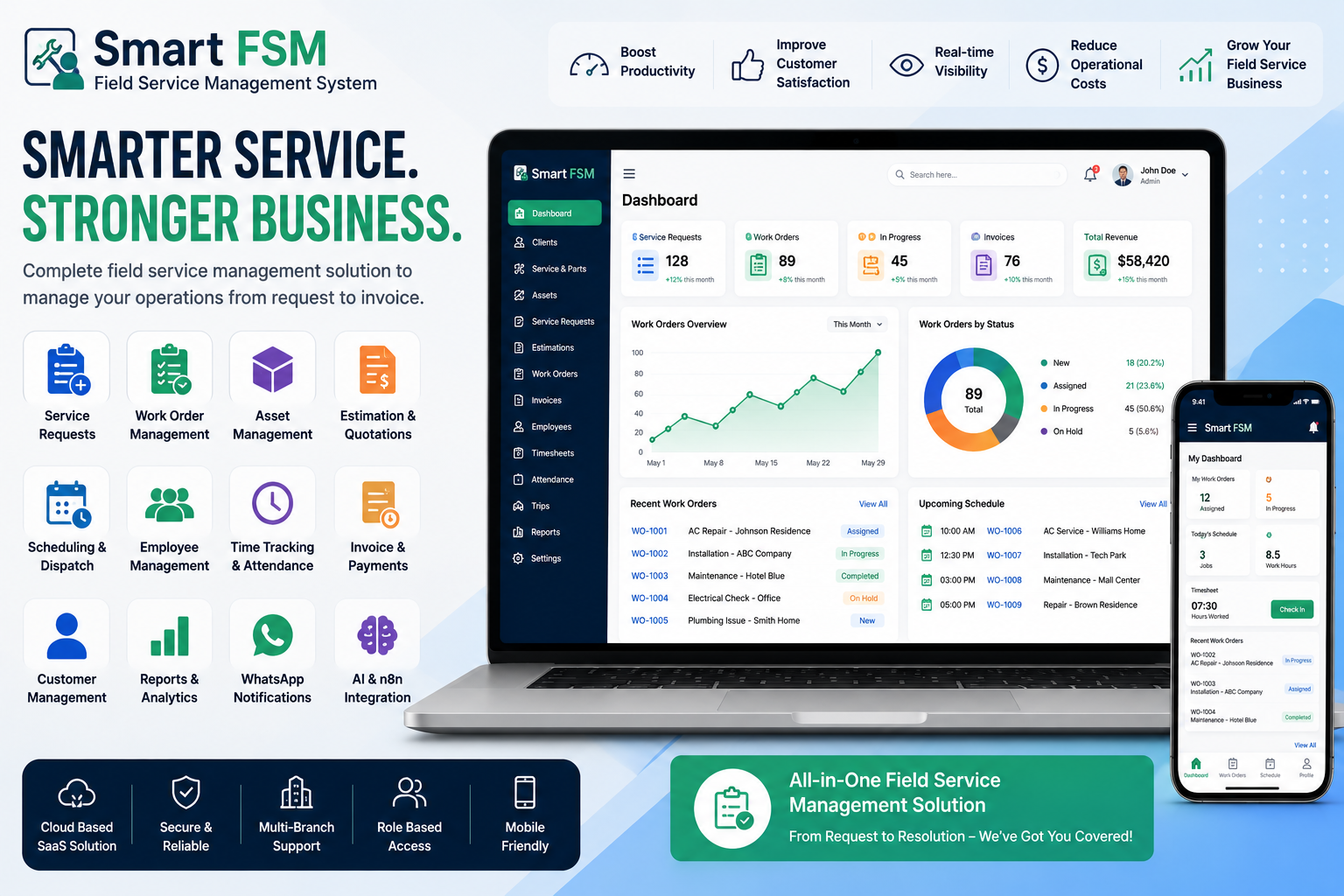
Looking for a ready-made solution?
👉 Field Service Management System
https://smartwebinfotech.com/items/smart-fsm-saas-field-service-management-system/1017
Businesses that provide installation, repair, maintenance, inspection, or technical services often have teams working at customer locations. Managing these field operations manually can quickly become complicated.
Service requests need to be received, employees need to be assigned, work orders need to be tracked, customers need updates, parts may need to be managed, and completed work must eventually be invoiced.
A Field Service Management System (FSM) brings these processes together in one centralized platform.
In this guide, we'll explain what Field Service Management Software is, why businesses need it, the most important features to look for, and how a modern FSM solution can help improve field service operations.
What is a Field Service Management System?
A Field Service Management System is software designed to help businesses manage employees, customers, service requests, work orders, assets, estimates, invoices, and other activities related to services performed at customer locations.
Instead of managing field operations through spreadsheets, phone calls, emails, and separate applications, businesses can manage the complete service workflow from one platform.
A typical FSM workflow can include:
Service Request → Estimation → Work Order → Field Service → Completion → Invoice → Payment
This centralized approach can help businesses improve visibility, reduce administrative work, and provide better customer service.
Who Uses Field Service Management Software?
Field Service Management Software can be useful for businesses that send employees or technicians to customer locations.
Common industries include:
- Equipment Maintenance
- HVAC Services
- Electrical Services
- Plumbing Services
- IT & Technical Support
- Telecommunications
- Construction Services
- Manufacturing Maintenance
- Facility Management
- Cleaning Services
- Security Services
- Healthcare Services
- Appliance Repair
- Installation Services
The exact workflow may differ between industries, but the need to coordinate customers, employees, service requests, and work orders is common.
Why Do Businesses Need Field Service Management Software?
Managing field operations manually can create several challenges.
Common problems include:
- Lost service requests
- Poor employee coordination
- Delayed work orders
- Difficulty tracking service progress
- Inaccurate timesheets
- Manual invoice creation
- Poor visibility into employee activities
- Difficulty tracking customer assets
- Delayed customer communication
- Limited operational reporting
A Field Service Management System helps bring these activities together and provides managers with a centralized view of field operations.
Key Features of a Field Service Management System
1. Dashboard
A centralized dashboard gives managers an overview of important business activities.
Depending on the system, the dashboard can provide information about:
- Service requests
- Work orders
- Estimates
- Invoices
- Customers
- Employees
- Attendance
- Payments
- Business reports
This allows managers to quickly understand what is happening across their service operation.
2. Client Management
Maintain complete customer records in one place.
A client management module can store:
- Customer Information
- Contact Details
- Service History
- Assigned Assets
- Work Orders
- Estimates
- Invoices
- Notes
Having centralized customer information helps service teams provide faster and more consistent support.
3. Service & Parts Management
Field service businesses often require specific services and replacement parts.
A management system can help organize:
- Services
- Service Categories
- Parts
- Part Information
- Pricing
- Service Details
This makes it easier to include required services and parts when preparing estimates or work orders.
4. Asset Management
Many service businesses maintain equipment or assets belonging to their customers.
Asset management helps organizations maintain records related to customer equipment.
Businesses can use asset information to understand:
- Which customer owns an asset
- Asset details
- Service history
- Related work orders
- Maintenance requirements
This is particularly useful for equipment maintenance and technical service companies.
5. Work Order Request Management
A work order request is often the starting point of a field service process.
Businesses can receive and manage requests before converting them into formal work orders.
This helps teams organize incoming service requirements and prioritize work.
A modern FSM system can also provide Kanban-style views for easier visual tracking of work order requests.
6. Estimation Management
Before beginning certain jobs, businesses may need to provide customers with an estimate.
Estimation management helps create and track quotations for requested services.
A typical estimate can include:
- Customer Information
- Services
- Parts
- Quantities
- Pricing
- Taxes
- Total Amount
- Status
Once approved, an estimate can become part of the next stage of the service workflow.
7. Work Order Management
Work orders are at the center of field service operations.
A work order can contain information such as:
- Customer
- Service Location
- Assigned Employee
- Service Type
- Required Parts
- Work Details
- Schedule
- Status
- Notes
- Timesheet Information
Managers can track work orders from creation through completion.
Kanban views can also provide a visual way to monitor work-order status.
8. Employee Management
Field service businesses depend heavily on technicians and employees.
Employee management helps administrators maintain employee profiles and assign responsibilities.
The system can also provide dedicated employee dashboards so field staff can access relevant work information.
9. Employee Timesheets
Tracking the time employees spend on work orders can be important for service businesses.
Timesheet management can help record working time associated with specific work orders.
This can improve visibility into:
- Employee Work Hours
- Work Order Duration
- Productivity
- Service Costs
Accurate timesheets can also help businesses analyze operational efficiency.
10. Attendance Management
Field employees need reliable attendance tracking.
An attendance module can help businesses maintain records of employee attendance and working schedules.
Combining attendance information with work-order and timesheet data provides managers with a better understanding of workforce utilization.
11. Trip Management
Field technicians may need to travel to multiple customer locations during the day.
A trip management module can help businesses organize field-related travel activities and associate trips with their service operations.
This can be particularly useful for businesses with employees frequently traveling between customer locations.
12. Invoice Management
Once a service has been completed, businesses need to bill customers.
Invoice management helps create and track invoices related to completed work.
Businesses can manage:
- Invoice Details
- Services
- Parts
- Amounts
- Payment Status
- Customer Information
Connecting work orders with invoicing can reduce manual data entry and make billing more organized.
13. Payment & Transaction Management
Field service businesses need to track payments received from customers.
A payment management system can help maintain transaction records and monitor outstanding amounts.
Depending on the business configuration, payment gateways can also be integrated into the platform.
14. Work Order Feedback
Customer feedback provides valuable information about service quality.
A work-order feedback feature allows businesses to collect customer feedback after service completion.
This can help management understand:
- Customer Satisfaction
- Service Quality
- Employee Performance
- Areas for Improvement
Customer feedback can also help businesses build stronger long-term relationships.
15. Reports & Analytics
Operational reports help managers make data-driven decisions.
Useful reports can include:
- Work Order Reports
- Service Request Reports
- Estimation Reports
- Invoice Reports
- Attendance Reports
- Leave Reports
- Employee Performance
- Payment Reports
Instead of relying on manually prepared spreadsheets, managers can access centralized operational information.
16. Notifications & WhatsApp Integration
Communication is an important part of field service management.
Modern FSM platforms can integrate notification channels to keep customers and employees informed.
Smart FSM SaaS includes WhatsApp notification integration, helping businesses communicate important service updates through a widely used messaging channel.
This can be useful for notifications related to service requests, work orders, invoices, payments, and other business events.
17. AI Integration
Artificial intelligence is becoming increasingly useful in business software.
Smart FSM SaaS includes OpenAI integration, which can provide opportunities for AI-assisted workflows and automation within the platform.
AI capabilities can potentially help businesses reduce repetitive work and improve how information is processed.
18. n8n Integration
Automation platforms can connect different business applications and workflows.
Smart FSM SaaS includes n8n integration, allowing businesses to build automation workflows between the FSM platform and other compatible services.
This can be useful for businesses that want to automate repetitive processes across their technology stack.
19. SaaS & Subscription Management
For software entrepreneurs, a field service platform can also be offered as a SaaS business.
Smart FSM SaaS includes subscription package management, coupon management, landing-page controls, payment settings, and other SaaS-related functionality.
This allows entrepreneurs to build a subscription-based field service software business instead of creating an entire SaaS platform from scratch.
Benefits of Using a Field Service Management System
Implementing FSM software can provide several benefits.
Improve Operational Efficiency
Centralize service requests, employees, work orders, estimates, and invoices in one system.
Reduce Manual Work
Automate repetitive administrative processes and reduce dependence on spreadsheets.
Improve Employee Coordination
Give employees access to their relevant work orders and schedules.
Improve Customer Service
Keep customers informed and collect feedback after completed services.
Improve Billing Accuracy
Connect services, parts, work orders, and invoices to create a more organized billing process.
Get Better Business Visibility
Use dashboards and reports to understand service operations and employee activity.
How to Choose the Best Field Service Management Software
Before selecting an FSM solution, consider the following:
- Client management
- Work order management
- Service request management
- Asset management
- Employee management
- Timesheets
- Attendance
- Estimation
- Invoice management
- Payment management
- Reports
- Customer feedback
- Mobile responsiveness
- Notification integrations
- Automation capabilities
- SaaS support
- Role-based permissions
- Customization options
Choose software based on your actual workflow rather than simply selecting the platform with the longest feature list.
Why Choose Smart FSM SaaS?
If you're looking for a ready-to-use Field Service Management System, Smart FSM SaaS by Smartweb Infotech provides a centralized platform for managing field service operations.
The platform combines customer management, services and parts, assets, work-order requests, estimates, work orders, invoices, employee operations, attendance, timesheets, trips, feedback, reports, and SaaS management in one solution.
Key Features
- Informative Dashboard
- Client Management
- Services & Parts Management
- Asset Management
- Work Order Requests
- Estimation Management
- Work Order Management
- Invoice Management
- Employee Dashboard
- Client Dashboard
- Employee Timesheets
- Attendance Management
- Trip Management
- Work Order Feedback
- Reports & Analytics
- Kanban Work Order View
- WhatsApp Integration
- OpenAI Integration
- n8n Integration
- Payment Gateway Integration
- Subscription Packages
- Coupon Management
- Multi-Language Support
- Role-Based Permissions
- Two-Factor Authentication
- Responsive Interface
The product is built with Laravel and supports PHP 8.x and MySQL, according to its current product listing.
Frequently Asked Questions
What is Field Service Management Software?
Field Service Management Software helps businesses manage service operations performed at customer locations, including service requests, employees, work orders, assets, estimates, invoices, and customer communication.
Who needs a Field Service Management System?
Businesses that provide installation, repair, maintenance, inspection, or technical services at customer locations can benefit from FSM software.
What is a work order in field service management?
A work order is a structured record containing the details of a service job, including the customer, assigned employee, services, parts, schedule, status, and other job information.
Can FSM software manage employees?
Yes. Field Service Management Software can include employee profiles, work assignments, timesheets, attendance, and employee dashboards.
Can Field Service Management Software manage customer assets?
Yes. Asset management allows businesses to maintain information about equipment or assets associated with customers and their service history.
Can field service software generate invoices?
Yes. Invoice management features allow businesses to create and track invoices related to services and work orders.
Can FSM software support WhatsApp notifications?
Some FSM platforms support WhatsApp integration. Smart FSM SaaS currently includes WhatsApp integration for sending notifications.
Can I use FSM software as a SaaS business?
Yes. SaaS-enabled FSM software can allow entrepreneurs to offer field service management capabilities to multiple organizations through subscription plans. Smart FSM SaaS includes subscription management functionality.
Final Thoughts
Field service businesses need to coordinate customers, employees, service requests, work orders, assets, estimates, invoices, and payments every day. Managing these processes manually can become increasingly difficult as the business grows.
A modern Field Service Management System provides a centralized solution for organizing these operations, improving employee coordination, simplifying billing, and delivering better customer experiences.
For businesses looking for a ready-to-use platform, Smart FSM SaaS – Field Service Management System provides a broad set of tools for managing field operations and can also support entrepreneurs looking to build a SaaS-based field service management business.
Comments (0)