
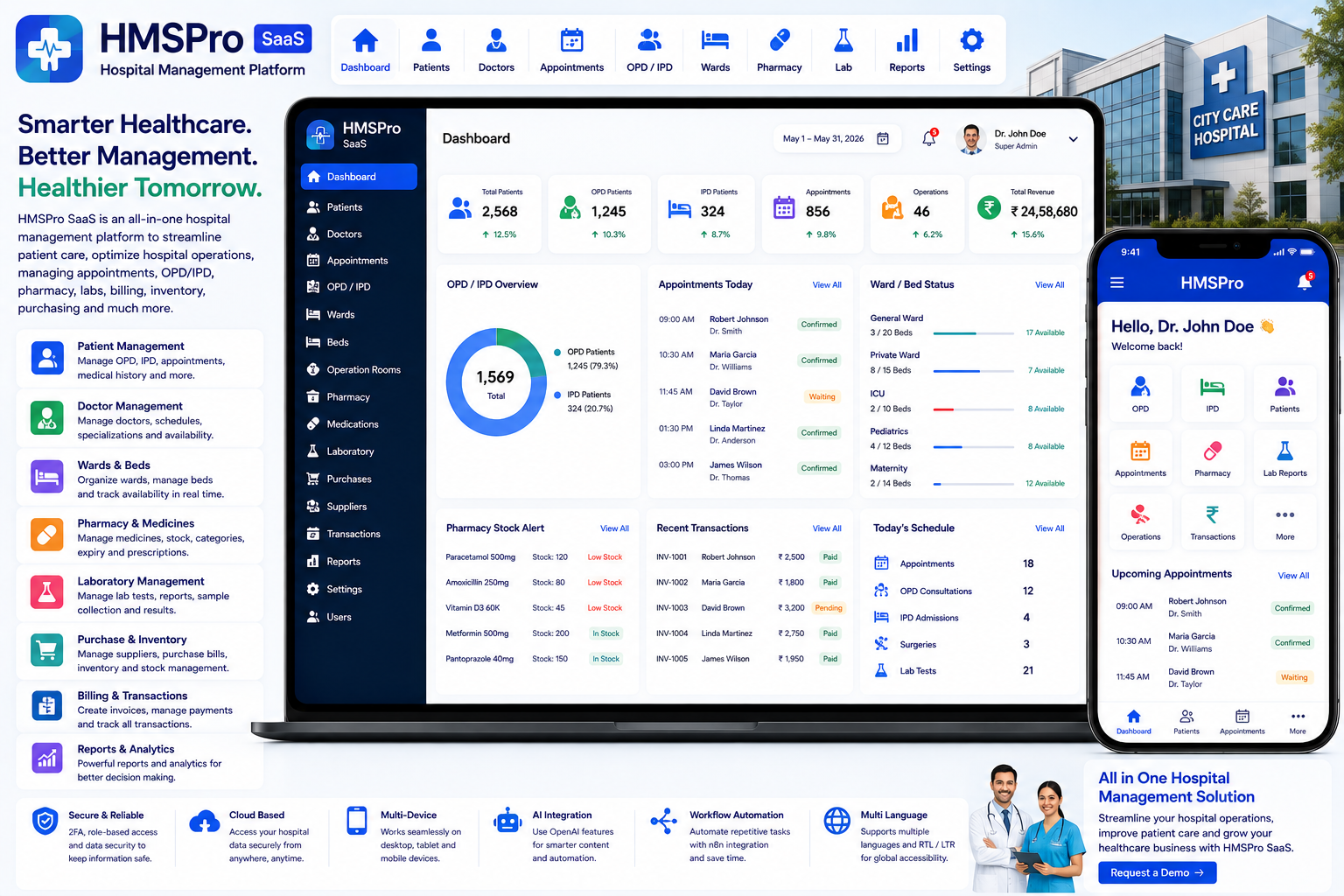
Looking for a ready-made solution?
👉Hospital Management Platform
https://smartwebinfotech.com/items/hmspro-saas-hospital-management-platform/1043
Managing a hospital involves coordinating patients, doctors, nurses, appointments, wards, beds, operation rooms, laboratories, pharmacies, suppliers, medicines, billing, and administrative activities.
When these processes are managed through paper records, spreadsheets, disconnected applications, and manual communication, it can become difficult to maintain accurate patient information and efficient hospital operations.
A Hospital Management Platform provides a centralized digital system for managing clinical, operational, administrative, and financial workflows.
HMSPro SaaS – Hospital Management Platform is designed for hospitals, clinics, and healthcare networks, providing functionality for patient management, appointments, health centers, wards, beds, operation rooms, medicines, pharmacy, operations, purchasing, suppliers, transactions, and more.
Explore HMSPro SaaS – Hospital Management Platform
What Is a Hospital Management Platform?
A Hospital Management Platform is software that helps healthcare organizations digitize and manage their day-to-day hospital operations.
A typical workflow can be:
Patient Registration → Appointment → Doctor Consultation → Diagnosis → Operation / Treatment → Medicine → Billing → Follow-Up
For inpatient care, the workflow may be:
Patient Admission → Ward / Bed Assignment → Treatment → Medicine → Operation → Discharge
HMSPro is positioned as an all-in-one cloud-based platform covering clinical, operational, and financial workflows, including outpatient and inpatient management, lab reports, pharmacy, and electronic medical record-related functionality.
Why Do Hospitals Need Hospital Management Software?
Hospitals handle large amounts of sensitive and operationally important information every day.
Manual processes can result in:
- Long patient registration processes
- Difficult appointment scheduling
- Duplicate patient records
- Poor doctor coordination
- Complicated ward and bed management
- Difficult medicine stock tracking
- Manual purchase records
- Unorganized supplier information
- Difficulty managing operations
- Manual financial tracking
- Limited reporting
- Communication delays
A centralized hospital management platform can help connect different departments and provide authorized users with access to the information they need.
Key Features of Hospital Management Software
1. Informative Dashboard
A hospital dashboard provides administrators with an overview of important activities.
It can bring together information related to:
- Patients
- Doctors
- Appointments
- Wards
- Beds
- Operations
- Medicines
- Pharmacy
- Purchases
- Suppliers
- Transactions
HMSPro includes an Informative Dashboard.
2. User Management
Hospitals have many different types of users.
Examples include:
- Super Admin
- Hospital Owner
- Doctor
- Patient
- Radiologist
- Pathologist
- Pharmacist
- Other Staff
HMSPro includes User Management.
3. User Roles & Permissions
Healthcare organizations need controlled access to patient and operational information.
Role-based permissions can help ensure that users only access functionality appropriate to their responsibilities.
For example:
Administrator: Manage the overall hospital system.
Doctor: Access assigned patient and clinical workflows.
Pharmacist: Manage medicine-related activities.
Radiologist: Access radiology-related workflows.
Pathologist: Manage pathology-related activities.
Patient: Access permitted patient information.
HMSPro includes User Roles and Permissions.
4. Health Center Management
Healthcare organizations may operate multiple health centers or facilities.
Health center management can help organize hospital operations around the relevant healthcare facility.
HMSPro includes management for Health Center, Building, Ward, Bed, and Operation Room.
5. Building Management
Large hospitals may contain multiple buildings or blocks.
Building management helps organize the hospital's physical infrastructure.
For example:
Hospital → Building → Floor / Area → Ward → Bed
This structure can make hospital resource management more organized.
6. Ward Management
Ward management is essential for inpatient operations.
A hospital can maintain different ward types, such as:
- General Ward
- Private Ward
- ICU
- Emergency
- Pediatric Ward
- Maternity Ward
- Surgical Ward
HMSPro includes Ward Management as part of its health center and facility management functionality.
7. Bed Management
Bed availability is an important operational requirement for hospitals.
A digital bed management system can help track:
- Available Beds
- Occupied Beds
- Ward
- Patient
- Bed Assignment
This can make it easier for hospital administrators to understand current capacity.
HMSPro includes Bed Management.
8. Operation Room Management
Hospitals performing surgeries and procedures need to coordinate operation rooms.
Operation room management can help organize:
- Operation Rooms
- Scheduled Operations
- Assigned Patients
- Doctors
- Timing
- Operation Information
HMSPro includes Operation Room Management.
9. Doctor Management
Doctors are central to hospital operations.
Doctor management can maintain information such as:
- Doctor Profile
- Specialty
- Contact Information
- Assigned Activities
- Patient Information
- Appointment Information
HMSPro includes Doctor Management.
10. Patient Management
Patient management is one of the core components of hospital software.
A patient profile can contain relevant information such as:
- Patient Details
- Contact Information
- Medical Information
- Appointment History
- Treatment Information
- Admission Information
- Other Healthcare Records
HMSPro supports both In Patient and Out Patient Management.
11. Outpatient Management
Outpatient departments handle patients who receive treatment without being admitted to the hospital.
A typical OPD workflow can be:
Patient → Appointment → Doctor → Consultation → Treatment → Medicine / Follow-Up
HMSPro includes patient management covering Out Patient workflows.
12. Inpatient Management
Inpatient management covers patients admitted to the hospital.
The workflow can include:
Admission → Ward → Bed → Treatment → Operation / Medicine → Discharge
HMSPro includes In Patient Management.
13. Appointment Management
Appointment scheduling helps hospitals organize doctor consultations and patient visits.
Appointment records can include:
- Patient
- Doctor
- Date
- Time
- Appointment Status
- Related Information
HMSPro includes Appointment Management.
14. Medicine Company Management
Hospitals and pharmacies work with multiple medicine manufacturers and companies.
Medicine company management helps maintain supplier/manufacturer information related to medicines.
HMSPro includes Medicine Company Management.
15. Medicine Stock Management
Medicine inventory needs to be monitored carefully to avoid stock shortages and operational issues.
Medicine stock management can help track:
- Medicines
- Available Stock
- Stock Movement
- Categories
- Related Suppliers
- Purchase Information
HMSPro includes Medicine Stock Management.
16. Medicine Category Management
Hospitals and pharmacies may manage hundreds or thousands of medicines.
Categories can help organize medicines according to their type and purpose.
HMSPro includes Medicine Category Management.
17. Pharmacy Management
Pharmacy workflows need to connect medicine information with hospital operations.
A centralized platform can help pharmacy staff manage medicine information and stock more efficiently.
HMSPro provides pharmacy-related workflows and a dedicated Pharmacist Dashboard.
18. Purchase Bill Management
Hospitals regularly purchase medicines, medical supplies, and other materials.
Purchase bill management helps maintain records of purchases.
HMSPro includes Purchase Bill Management.
19. Supplier Management
Hospitals work with suppliers for medicines, equipment, and other materials.
Supplier management can maintain:
- Supplier Name
- Contact Details
- Purchase Information
- Bills
- Transactions
- Supplier History
HMSPro includes Supplier Management.
20. Operation Management
Hospitals performing surgeries and medical procedures need to maintain operation-related records.
Operation management can help organize:
- Patient
- Operation Type
- Doctor
- Operation Room
- Date
- Related Information
HMSPro includes Operation Management.
21. Operation Type Management
Hospitals may perform different types of procedures.
Operation type management allows administrators to organize these procedures into structured categories.
HMSPro includes Operation Type Management.
22. Newborn & Death Management
Hospitals may need dedicated records for significant events such as births and deaths.
HMSPro includes New Born & Death Management.
Such records should be managed according to applicable healthcare, privacy, and regulatory requirements.
23. Pathology Dashboard
Pathology departments require access to relevant patient and laboratory workflows.
HMSPro includes a dedicated Pathology Dashboard.
This can provide pathology staff with an interface focused on their department's activities.
24. Radiologist Dashboard
Radiology departments have specialized workflows and responsibilities.
HMSPro includes a dedicated Radiologist Dashboard.
25. Pharmacist Dashboard
Pharmacists need access to medicine and pharmacy-related information.
HMSPro includes a dedicated Pharmacist Dashboard.
26. Doctor Dashboard
Doctors require a focused view of their assigned healthcare activities.
HMSPro includes a dedicated Doctor Dashboard.
27. Patient Dashboard
Patients can have their own login experience for accessing permitted information.
HMSPro includes a dedicated Patient Dashboard.
28. Electronic Medical Records
Modern hospital platforms can centralize patient-related records to provide authorized healthcare professionals with better access to relevant information.
HMSPro's product overview specifically references electronic medical records (EMR) alongside outpatient, inpatient, laboratory, and pharmacy workflows.
29. Transaction Management
Hospitals process different financial transactions.
These may include:
- Patient Payments
- Purchase Transactions
- Other Hospital Transactions
HMSPro includes Manage Transaction functionality.
30. Payment Settings
Hospital management platforms may need configurable payment options for different business requirements.
HMSPro includes Payment Settings and lists support for:
- Bank Transfer
- PayPal
- Stripe
- Flutterwave
Payment provider availability depends on the provider, country, and account configuration.
31. Email Notifications
Hospitals may need automated email communication for various administrative workflows.
Potential uses include:
- Appointment Notifications
- Account Notifications
- Payment Notifications
- System Updates
HMSPro includes email notification controls and customizable Email Notification Templates.
32. SMS Notifications
SMS can be useful for time-sensitive communication.
Potential applications include:
- Appointment Reminders
- Patient Notifications
- Account Notifications
- Important Updates
HMSPro includes Twilio SMS Templates and Twilio Integration for sending SMS.
33. Multi-Language Support
Healthcare organizations may serve patients and staff from different language backgrounds.
HMSPro includes Multi Languages support.
This can make the platform more accessible for different users and regions.
34. Multi-Theme Colors
Healthcare organizations may want to customize the visual appearance of their management platform.
HMSPro includes Multi Theme Colors.
35. RTL & LTR Support
International healthcare organizations may require both left-to-right and right-to-left interfaces.
HMSPro includes an RTL/LTR Theme.
36. Light & Dark Mode
Modern applications can provide users with different interface modes.
HMSPro includes Light / Dark Theme Mode.
37. Multi-Font Styles
Font customization can improve accessibility and support different languages.
HMSPro includes Multi Font Style settings.
38. Two-Factor Authentication
Hospital systems contain sensitive patient, operational, and financial information.
Two-factor authentication adds an additional security layer to user accounts.
HMSPro includes 2-Factor Authentication.
Healthcare organizations should also implement appropriate security, privacy, access-control, backup, and compliance practices based on their jurisdiction and use case.
39. Owner Email Verification
Email verification can help ensure that owner accounts are associated with valid email addresses.
HMSPro includes an option to enable or disable Owner Account Email Verification.
40. Impersonation Feature
Authorized administrators may need to access a user's account for troubleshooting and support.
HMSPro includes an Impersonate Feature.
Because hospital systems can contain sensitive information, impersonation should be restricted to appropriately authorized administrators and audited.
41. SaaS Subscription Management
HMSPro is designed as a SaaS product, allowing the software provider to offer hospital management functionality through subscription packages.
Subscription plans can be structured for:
Clinic
For small clinics and healthcare practices.
Hospital
For medium-sized hospitals.
Enterprise
For larger healthcare organizations or networks.
HMSPro includes Subscription Packages Management.
42. Subscription Coupon Management
Promotional coupons can help SaaS providers attract new healthcare businesses.
Examples include:
- New Customer Discount
- Annual Subscription Offer
- Launch Promotion
- Seasonal Discount
HMSPro includes Subscription Coupon & Coupon History Management.
43. Dynamic Landing Page CMS
A SaaS hospital management product needs a professional website to communicate its features and value.
The dynamic landing page CMS can be used to manage:
- Homepage
- Features
- Pricing
- FAQs
- Marketing Content
- Contact Information
HMSPro includes a Dynamic Landing Page CMS.
44. SEO Settings
SEO can help hospital management software reach clinics, hospitals, and healthcare organizations searching online.
HMSPro includes Site SEO Settings.
SEO configuration can include:
- Meta Titles
- Meta Descriptions
- SEO Content
- Social Sharing Information
45. Google reCAPTCHA
Public registration and inquiry forms can be exposed to automated bots.
HMSPro includes Google reCAPTCHA Settings to provide an additional layer of protection for public-facing forms.
46. OpenAI Integration
Artificial intelligence can assist with certain administrative and content-related workflows.
Potential applications include:
- Hospital Communication Drafts
- Patient Education Content
- FAQ Creation
- Service Descriptions
- Administrative Content
- Marketing Content
HMSPro includes OpenAI Integration.
AI-generated healthcare content should not be treated as medical advice or clinical decision-making without appropriate professional review.
47. n8n Workflow Automation
Healthcare organizations may use multiple external applications for communication, accounting, reporting, and operational workflows.
n8n integration can provide a foundation for connecting HMSPro with external services and automating workflows.
For example:
New Appointment → Create Workflow → Notify Staff → Send Patient Confirmation
Another example:
Medicine Stock Update → Trigger Workflow → Notify Pharmacy Manager
HMSPro includes n8n Integration.
Benefits of Hospital Management Software
Centralized Patient Information
Authorized staff can access relevant patient information through a centralized platform.
Better Appointment Management
Digital appointment management can help organize doctor schedules and patient visits.
Improved Bed Visibility
Bed management can provide better visibility into available and occupied resources.
Better Medicine Stock Management
Digital stock records can help pharmacy teams monitor medicine inventory.
Improved Supplier Management
Purchase and supplier records can be maintained in a structured system.
Better Department Coordination
Dedicated dashboards can provide doctors, pharmacists, radiologists, pathologists, and patients with relevant interfaces.
Reduced Administrative Work
Digitizing repetitive workflows can reduce dependence on manual records.
Better Financial Visibility
Payment and transaction management can help organize hospital financial activities.
Better Reporting & Administration
Centralized data can support management decisions and operational analysis.
Who Can Use a Hospital Management Platform?
A hospital management platform can be useful for:
- Hospitals
- Multi-Specialty Hospitals
- General Hospitals
- Private Hospitals
- Clinics
- Medical Centers
- Healthcare Networks
- Diagnostic Centers
- Specialty Clinics
- Surgical Centers
- Pharmacy-Integrated Healthcare Facilities
- Healthcare Administration Companies
How Different Healthcare Organizations Can Use HMS Software
Small Clinics
Manage doctors, patients, appointments, and basic administrative workflows.
Multi-Specialty Hospitals
Coordinate doctors, patients, wards, beds, operations, pharmacy, and multiple departments.
Diagnostic Centers
Use specialized dashboards and patient-related workflows for diagnostic operations.
Surgical Centers
Manage operation rooms, doctors, patients, procedures, and scheduling.
Healthcare Networks
Use centralized software to organize multiple healthcare facilities and administrative processes.
Hospital Management Software vs. Manual Management
Manual Management
Hospital Management Platform
Paper patient records
Centralized patient management
Phone-based appointments
Appointment management
Manual ward register
Ward management
Manual bed records
Bed management
Separate operation schedules
Operation room management
Manual medicine register
Medicine stock management
Paper purchase bills
Purchase bill management
Separate supplier files
Supplier management
Manual transactions
Digital transaction management
Separate department records
Department-specific dashboards
Manual notifications
Email & SMS notifications
Multiple disconnected workflows
Centralized hospital platform
How to Choose the Best Hospital Management Software
Before selecting a hospital management platform, consider:
- Dashboard
- User Management
- Roles & Permissions
- Health Center Management
- Building Management
- Ward Management
- Bed Management
- Operation Room Management
- Doctor Management
- Patient Management
- OPD Management
- IPD Management
- Appointment Management
- Medicine Company Management
- Medicine Stock Management
- Medicine Categories
- Pharmacy Management
- Purchase Bill Management
- Supplier Management
- Operation Management
- Operation Types
- Newborn Management
- Death Management
- Doctor Dashboard
- Patient Dashboard
- Radiologist Dashboard
- Pathologist Dashboard
- Pharmacist Dashboard
- Transaction Management
- Payment Settings
- Email Notifications
- SMS Notifications
- Twilio Integration
- Multi-Language Support
- RTL/LTR
- Theme Customization
- Light/Dark Mode
- Two-Factor Authentication
- OpenAI Integration
- n8n Automation
- SaaS Subscription Management
- Coupon Management
- Landing Page CMS
- SEO Settings
- Google reCAPTCHA
The right platform should match the organization's size, departments, workflows, patient volume, staffing structure, and applicable healthcare requirements.
Why Choose HMSPro SaaS?
If you're looking for a ready-to-use Hospital Management Platform, HMSPro SaaS by Smartweb Infotech brings together patient, doctor, appointment, facility, ward, bed, operation, medicine, pharmacy, purchase, supplier, transaction, and administrative workflows.
The current product listing includes 46 main features, including dedicated dashboards for radiologists, pharmacists, patients, doctors, and pathology users, as well as multilingual support, payment integrations, SMS, OpenAI, n8n, security features, and SaaS subscription management.
Key Features
- Informative Dashboard
- User Management
- User Roles & Permissions
- Health Center Management
- Building Management
- Ward Management
- Bed Management
- Operation Room Management
- Medicine Company Management
- Doctor Management
- Inpatient Management
- Outpatient Management
- Appointment Management
- Purchase Bill Management
- Supplier Management
- Medicine Stock Management
- Operation Management
- Newborn & Death Management
- Medicine Category Management
- Operation Type Management
- Company Settings
- Account Settings
- Application Settings
- Email Settings
- Multi-Language Support
- Payment Settings
- Transaction Management
- Subscription Packages
- Subscription Coupons
- Landing Page Controls
- Dynamic Landing Page CMS
- SEO Settings
- Google reCAPTCHA
- Bank Transfer, PayPal, Stripe & Flutterwave
- Email Notification Templates
- Twilio SMS Integration
- Doctor Dashboard
- Patient Dashboard
- Radiologist Dashboard
- Pharmacist Dashboard
- Pathology Dashboard
- Two-Factor Authentication
- Light/Dark Mode
- Multi-Font Styles
- RTL/LTR Theme
- Multi-Theme Colors
- OpenAI Integration
- n8n Integration
- Impersonation
- Owner Email Verification
Hospital Management Software for Modern Healthcare Organizations
A traditional healthcare workflow may look like:
Paper Patient File + Appointment Register + Ward Register + Medicine Register + Purchase Files + Manual Billing
A digital platform can transform this into:
Patient → Appointment → Doctor → Treatment → Medicine → Payment → Patient History
For inpatient care:
Admission → Ward → Bed → Treatment → Operation → Medicine → Discharge
For pharmacy:
Medicine → Stock → Purchase → Supplier → Pharmacy
For hospital administration:
Users → Roles → Transactions → Reports → Settings
This connected approach can help healthcare organizations reduce administrative complexity and improve operational visibility.
Frequently Asked Questions
What is a Hospital Management Platform?
A Hospital Management Platform is software designed to manage hospital operations including patients, doctors, appointments, wards, beds, operations, medicines, pharmacy, suppliers, purchases, and transactions.
Can I manage both inpatient and outpatient patients?
Yes. HMSPro includes both In Patient and Out Patient Management.
Can I manage doctors?
Yes. Doctor Management is included.
Can I manage hospital wards and beds?
Yes. HMSPro includes Health Center, Building, Ward, Bed, and Operation Room management.
Can I manage appointments?
Yes. Appointment Management is included.
Can I manage medicines?
Yes. The platform includes Medicine Company Management, Medicine Stock Management, Medicine Categories, and pharmacy-related functionality.
Can I manage suppliers and purchase bills?
Yes. Supplier Management and Purchase Bill Management are included.
Does it have department-specific dashboards?
Yes. HMSPro lists dashboards for Radiologist, Pharmacist, Patient, Doctor, and Pathology users.
Does it support SMS?
Yes. Twilio SMS templates and Twilio integration are included.
Does it support online payments?
The current product page lists Bank Transfer, PayPal, Stripe, and Flutterwave integrations.
Does it support multiple languages?
Yes. Multi-language support is included.
Does it support AI?
Yes. OpenAI integration is listed as a feature.
Can I automate workflows?
Yes. n8n integration is included, providing a foundation for connecting the platform with external applications and workflows.
Can HMSPro be offered as SaaS?
Yes. The platform includes subscription package and coupon management, allowing it to be offered as a SaaS solution.
Final Thoughts
Modern healthcare organizations need to manage much more than patient appointments. Patients, doctors, wards, beds, operation rooms, medicines, pharmacy, suppliers, purchases, transactions, and administrative workflows all need to work together.
A centralized Hospital Management Platform can help transform disconnected manual processes into structured digital workflows.
With features covering OPD, IPD, appointments, doctors, patients, wards, beds, operation rooms, pharmacy, medicine stock, purchases, suppliers, department dashboards, transactions, notifications, payments, AI, and automation, HMSPro SaaS – Hospital Management Platform provides a broad foundation for digitizing hospital administration and healthcare operations.
For hospitals, clinics, diagnostic centers, surgical facilities, healthcare networks, and other healthcare organizations, HMSPro can help bring important operational processes together in one platform.
Explore HMSPro SaaS – Hospital Management Platform
Important: Hospital software handles sensitive healthcare information. Before deployment in a real clinical environment, organizations should evaluate applicable privacy, security, data-retention, audit, hosting, and healthcare regulatory requirements in their jurisdiction.
Comments (0)