
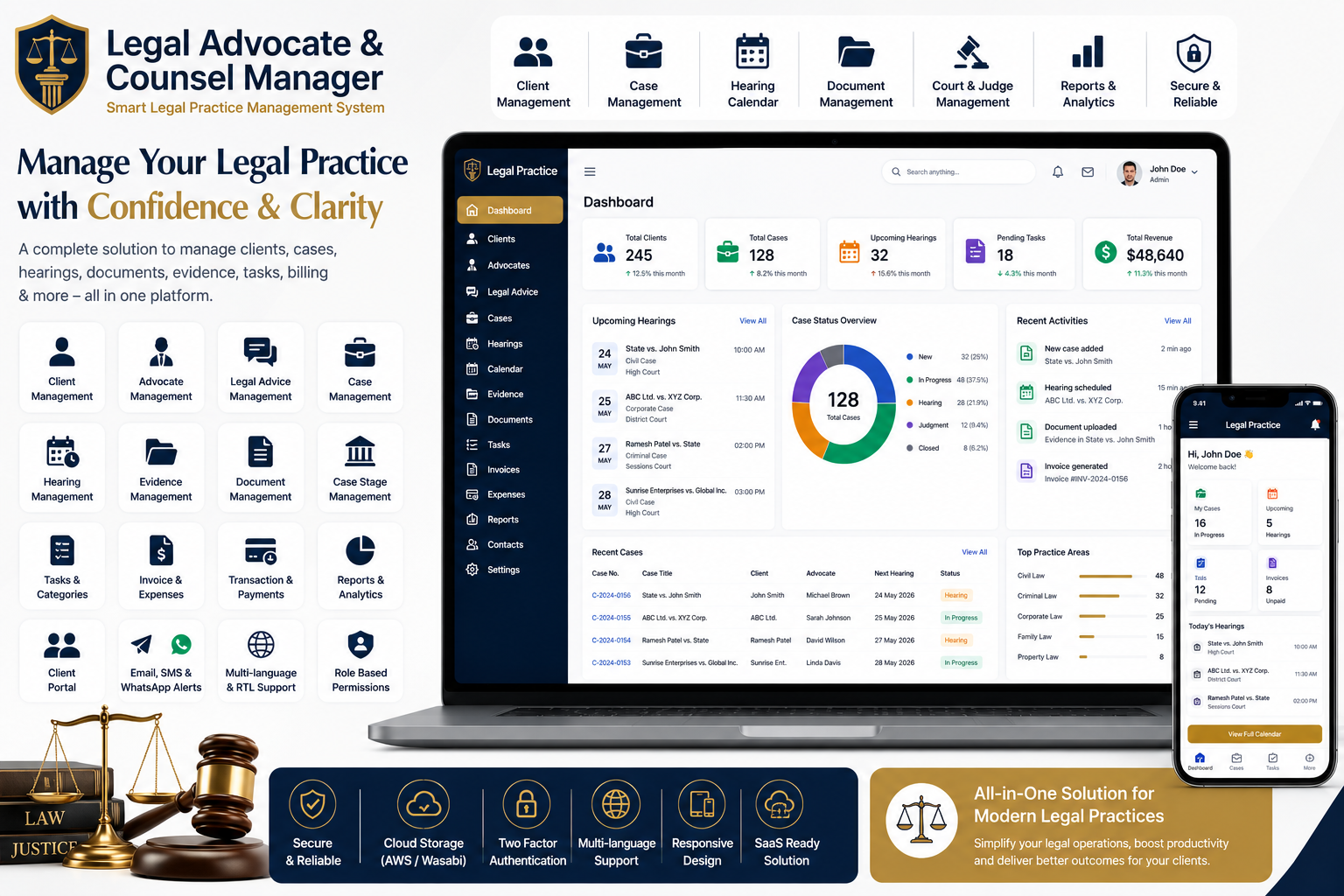
Looking for a ready-made solution?
👉 Legal Advocate & Counsel Manager
https://smartwebinfotech.com/items/law-practice-saas-legal-advocate-counsel-manager/1023
Managing a law practice involves much more than handling court cases. Advocates, lawyers, and law firms need to manage clients, cases, hearings, evidence, documents, tasks, court information, billing, expenses, and communication—often across many matters at the same time.
A Legal Advocate & Counsel Manager helps bring these activities into one centralized platform. Instead of maintaining separate spreadsheets, paper files, calendars, and document folders, legal professionals can manage their practice digitally.
In this guide, we'll explore what legal practice management software is, its key features, benefits, and how a modern system can help advocates and law firms organize their daily operations.
What Is Legal Practice Management Software?
Legal Practice Management Software is a digital platform designed to help lawyers, advocates, attorneys, and law firms manage their legal work from one place.
A complete system can support the lifecycle of a legal matter from client intake and advice to case management, hearings, evidence, documents, expenses, and reporting. Smartweb Infotech's Legal Advocate & Counsel Manager is specifically designed around these workflows.
It can be useful for:
- Individual Advocates
- Lawyers
- Attorneys
- Law Firms
- Legal Consultants
- Legal Departments
- Small and Medium Law Practices
- Multi-User Legal Organizations
Why Do Lawyers Need a Legal Management System?
Traditional legal practice management can involve multiple tools and manual processes.
For example, an advocate may maintain:
- Client information in spreadsheets
- Case details in separate files
- Hearing dates in a calendar
- Evidence in physical folders
- Documents on a computer
- Expenses in accounting software
- Client communication through email or WhatsApp
When the number of cases increases, finding and updating information becomes difficult.
A centralized Legal Management Software can help organize these activities in one system and provide better visibility into ongoing legal work.
Key Features of a Legal Advocate & Counsel Manager
1. Informative Dashboard
A centralized dashboard gives legal professionals a quick overview of their practice.
Instead of checking multiple modules individually, users can access important information from a single interface.
A dashboard can help monitor activities related to clients, cases, hearings, documents, invoices, and expenses.
2. Client Management
Client information is at the center of every legal practice.
A client management module helps maintain organized records including:
- Client Details
- Contact Information
- Related Cases
- Legal Advice
- Documents
- Hearing Information
- Transactions
Centralized client records make it easier to understand a client's complete history.
3. Advocate Management
Law firms with multiple advocates or legal professionals need an organized way to manage their team.
Advocate management can help administrators maintain advocate profiles and associate legal professionals with relevant cases and activities.
This can be particularly useful for firms handling multiple cases simultaneously.
4. Legal Advice Management
Not every client interaction begins with a formal court case.
Lawyers often provide consultations and legal advice before or independently of litigation.
An Advice Management module helps maintain records of legal consultations and advice provided to clients.
This creates a more complete record of client interactions.
5. Case Management
Case management is one of the most important components of legal practice software.
A centralized case module can help lawyers manage:
- Case Details
- Client
- Advocate
- Court
- Judge
- Practice Area
- Police Station
- Case Stage
- Related Documents
- Evidence
- Hearings
- Tasks
Keeping this information together makes it easier to track the complete lifecycle of a case.
6. Case Hearing Management
Legal professionals need to keep track of important hearing dates.
A hearing management module can help organize:
- Case
- Hearing Date
- Hearing Details
- Court
- Related Notes
- Hearing Status
This provides a centralized record of past and upcoming hearings.
7. Hearing Calendar
A dedicated Hearing Calendar provides a visual overview of scheduled hearings.
Instead of relying only on a personal calendar or paper diary, advocates can manage hearing-related information directly within the legal management system.
This is particularly useful for lawyers handling multiple cases with different hearing dates.
8. Automatic Hearing Reminders
Missing an important hearing date can have serious consequences for a legal practice.
The system supports automated notifications through scheduled cron jobs for upcoming hearing reminders to clients.
This can help keep clients informed about upcoming hearings and reduce dependence on manual reminders.
9. Case Evidence Management
Evidence can be an important component of many legal cases.
An evidence management module allows legal teams to organize evidence associated with individual cases.
This can make it easier to maintain a structured record of case-related materials.
10. Case Document Management
Legal practices deal with a large volume of documents.
These may include:
- Case Documents
- Agreements
- Court Documents
- Evidence Files
- Client Documents
- Legal Correspondence
- Supporting Documents
A centralized document management module makes these files easier to organize and access.
The system also supports cloud storage integrations such as AWS and Wasabi.
11. Case Stage Management
Legal cases can move through different stages during their lifecycle.
Case stage management helps lawyers track where a particular matter currently stands.
For example:
New Case → Investigation → Filing → Hearing → Evidence → Judgment → Closed
The actual stages can be configured according to the firm's workflow.
12. Case & Task Categories
A law firm may handle different types of cases and tasks.
Category management helps organize cases and related work into a structured system.
This can improve filtering, reporting, and day-to-day organization.
13. Court & Judge Management
Legal practices frequently work with different courts and judges.
The platform provides management capabilities for:
- Courts
- Judges
- Practice Areas
- Police Stations
Keeping these records centralized can simplify case creation and reporting.
14. Matter & Tag Management
Tags can help legal professionals categorize and quickly identify matters.
For example, firms could organize matters by:
- Client Type
- Practice Area
- Priority
- Case Type
- Internal Department
A structured tagging system can make large case portfolios easier to manage.
15. Case Feedback
Client feedback can help law firms understand service quality.
A case feedback module allows firms to collect feedback associated with legal services and matters.
This can provide useful insights into client satisfaction and areas where the firm can improve.
16. Invoice & Expense Reports
Financial management is an important part of running a law practice.
The platform includes reporting for areas such as:
- Invoices
- Expenses
- Cases
- Hearings
- Evidence
- Documents
- Legal Advice
These reports can help law firm owners better understand their operational and financial activity.
17. Payment & Transaction Management
Legal businesses need to maintain accurate transaction records.
The system includes payment settings and transaction management, allowing administrators to manage financial activities within the platform.
Supported payment integrations include options such as:
- Bank Transfer
- PayPal
- Stripe
- Flutterwave
- Paystack
- Razorpay
Availability and configuration depend on the selected payment setup.
18. Role-Based Permissions
Different members of a law firm may require different levels of access.
For example:
- Super Admin
- Law Firm Owner
- Advocate
- Staff Member
- Client
Role and permission management helps administrators control what each user can access and manage.
19. Client Portal
A client-facing account can provide clients with access to relevant information without requiring the law firm to manually send every update.
This can improve communication and give clients better visibility into their legal matters.
20. Multi-Language & RTL/LTR Support
Law firms serving clients in different regions may require multilingual functionality.
The system supports multi-language functionality as well as RTL/LTR themes, making it more adaptable to different markets and languages.
21. WhatsApp, SMS & Email Notifications
Communication is an important part of legal practice management.
The platform includes:
- Email Notifications
- SMS Templates
- Twilio Integration
- WhatsApp Notifications
These channels can be used to keep users informed about relevant activities and reminders.
22. AI & Automation Integrations
Modern legal software can benefit from automation.
The Legal Advocate & Counsel Manager includes integrations for:
- ChatGPT
- n8n
- Twilio
These integrations can provide opportunities for AI-assisted workflows and business process automation, depending on how the system is configured.
23. SaaS Subscription Management
For entrepreneurs who want to offer legal practice software as a SaaS business, subscription functionality can be important.
The platform includes:
- Subscription Packages
- Coupon Management
- Coupon History
- Pricing Feature Controls
- Landing Page Management
- Registration Page Controls
This makes the product suitable not only for individual law firms but also for entrepreneurs planning to launch a legal SaaS platform.
24. Security Features
Legal software can contain sensitive client and case information.
The system includes security-oriented features such as:
- Two-Factor Authentication
- Google reCAPTCHA
- Role-Based Permissions
- Owner Email Verification
- Cloud Storage Options
These features can help organizations build stronger access and account-management controls.
Benefits of Legal Practice Management Software
Using a centralized legal management platform can help law firms:
Save Administrative Time
Reduce repetitive work associated with maintaining case information across different systems.
Improve Case Organization
Keep cases, hearings, documents, evidence, and tasks connected.
Reduce Missed Hearing Risks
Use hearing calendars and automated reminders to keep clients informed about upcoming dates.
Improve Client Communication
Provide structured access to client information and use digital notifications.
Protect Sensitive Information
Use permissions and authentication features to control access.
Improve Financial Visibility
Track transactions, invoices, and expenses through centralized records.
Support Business Growth
A scalable legal management platform can help firms manage more clients and cases without relying entirely on manual processes.
How to Choose the Best Legal Practice Management Software
Before selecting a legal management platform, consider:
- Client management
- Case management
- Hearing calendar
- Hearing reminders
- Evidence management
- Document management
- Advocate management
- Court and judge management
- Task management
- Invoice and expense tracking
- Client portal
- Notifications
- Role-based permissions
- Cloud storage
- Reporting
- Payment integration
- Mobile responsiveness
- SaaS capabilities
- Customization options
The best software is not necessarily the one with the most features. It should be the platform that fits your firm's actual workflow.
Why Choose Legal Advocate & Counsel Manager?
If you're looking for a ready-to-use Legal Practice Management Software, Smartweb Infotech's Legal Advocate & Counsel Manager provides a centralized platform for managing clients, advocates, advice, cases, hearings, evidence, documents, tasks, transactions, and reports.
The platform is designed to support the complete legal case lifecycle while also providing SaaS features for entrepreneurs who want to offer legal management software to multiple organizations.
Key Features
- Client Management
- Advocate Management
- Legal Advice Management
- Case Management
- Case Hearing Management
- Hearing Calendar
- Case Evidence Management
- Case Document Management
- Case Stage Management
- Court & Judge Management
- Practice Area Management
- Police Station Management
- Matter & Tag Management
- Case & Task Categories
- Case Feedback
- Invoice & Expense Reports
- Transaction Management
- Role-Based Permissions
- Multi-Language Support
- RTL/LTR Support
- Email, SMS & WhatsApp Notifications
- Twilio Integration
- Cloud Storage with AWS/Wasabi
- ChatGPT Integration
- n8n Integration
- Razorpay & Other Payment Integrations
- Two-Factor Authentication
- SEO & Landing Page CMS
- SaaS Subscription Management
- Automatic Upcoming Hearing Notifications
Frequently Asked Questions
What is Legal Advocate Management Software?
Legal Advocate Management Software is a digital platform that helps advocates and law firms manage clients, cases, hearings, documents, evidence, tasks, billing, and other legal practice activities.
Who can use a Legal Practice Management System?
Individual advocates, lawyers, attorneys, law firms, legal consultants, and organizations managing multiple legal matters can use legal practice management software.
Can the software manage court hearings?
Yes. A legal management system can maintain hearing information and provide a dedicated hearing calendar. The Legal Advocate & Counsel Manager also supports automated upcoming-hearing notifications.
Can lawyers manage case documents digitally?
Yes. The platform includes case document management and document modules, along with cloud storage integrations such as AWS and Wasabi.
Can clients access the system?
Yes. The product provides separate user roles including client and advocate accounts, allowing organizations to structure access according to their workflow.
Can this software be used as a SaaS platform?
Yes. The platform includes subscription packages, coupons, pricing controls, landing-page settings, and other SaaS-oriented functionality.
Can the system send WhatsApp notifications?
Yes. WhatsApp notification integration is included, along with SMS/Twilio and email notification functionality.
Final Thoughts
Modern law firms need more than document storage. They need an organized way to manage clients, cases, hearings, evidence, documents, tasks, financial records, and communication.
A Legal Advocate & Counsel Manager brings these workflows together in one platform, helping legal professionals improve organization, reduce administrative work, and maintain better visibility over their practice.
For advocates, lawyers, law firms, and entrepreneurs looking for a ready-to-use legal practice management platform, Legal Advocate & Counsel Manager by Smartweb Infotech provides a broad foundation that can be used directly or customized according to specific business requirements.
Comments (0)