
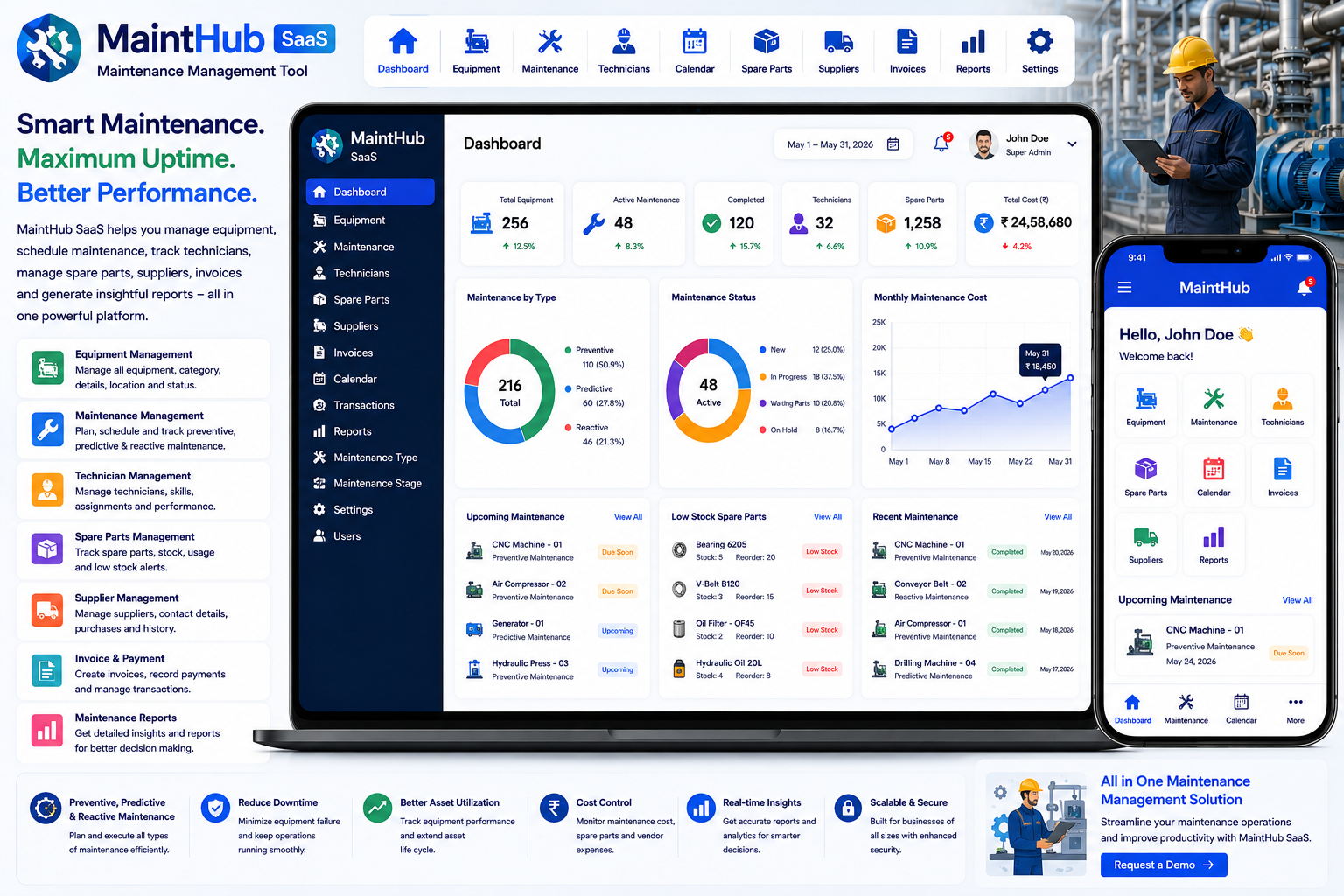
Looking for a ready-made solution?
👉Maintenance Management Tool
https://smartwebinfotech.com/items/mainthub-saas-maintenance-management-tool/1044
Maintaining machines, equipment, tools, and industrial assets is essential for keeping operations running efficiently. Unexpected equipment breakdowns can lead to production delays, higher repair costs, safety risks, and lost productivity.
For many factories and workshops, maintenance is still managed through spreadsheets, paper registers, phone calls, and manual reminders. As the number of machines and maintenance activities increases, this approach becomes difficult to manage.
A Maintenance Management Tool helps businesses organize preventive, predictive, and reactive maintenance from a centralized platform.
MaintHub SaaS – Maintenance Management Tool is designed for industrial environments, workshops, manufacturing plants, and businesses that need to manage equipment, technicians, suppliers, maintenance activities, spare parts, invoices, payments, and maintenance reporting. The product specifically describes itself as suitable for both small workshops and large manufacturing plants.
Explore MaintHub SaaS – Maintenance Management Tool
What Is a Maintenance Management Tool?
A Maintenance Management Tool is software that helps businesses plan, schedule, track, and manage maintenance activities for machines, equipment, tools, and other assets.
A typical maintenance workflow can be:
Equipment → Maintenance Schedule → Technician → Maintenance Activity → Spare Parts → Invoice → Payment → Report
For preventive maintenance:
Equipment → Scheduled Date → Technician → Maintenance → Completion
For reactive maintenance:
Equipment Breakdown → Maintenance Request → Technician Assignment → Repair → Completion
MaintHub is designed to support preventive, predictive, and reactive maintenance operations.
Why Do Businesses Need Maintenance Management Software?
Equipment downtime can directly affect business productivity.
Manual maintenance processes can create problems such as:
- Missed maintenance schedules
- Unexpected machine breakdowns
- Poor technician coordination
- Difficult equipment history tracking
- Unorganized spare-parts records
- Supplier information scattered across files
- Manual invoice tracking
- Payment tracking difficulties
- Limited maintenance reporting
- Lack of visibility into maintenance activities
A centralized maintenance management system can help businesses move from reactive maintenance toward a more organized and planned maintenance process.
Preventive vs. Predictive vs. Reactive Maintenance
Preventive Maintenance
Preventive maintenance is performed at planned intervals to reduce the possibility of equipment failure.
Examples:
- Monthly machine inspection
- Quarterly servicing
- Oil replacement
- Filter replacement
- Equipment calibration
Predictive Maintenance
Predictive maintenance focuses on identifying potential equipment problems before they become serious failures.
Examples can include monitoring:
- Equipment condition
- Performance indicators
- Maintenance history
- Recurring failures
Reactive Maintenance
Reactive maintenance happens after a machine or equipment problem occurs.
Typical workflow:
Breakdown → Maintenance Request → Technician → Repair → Equipment Back in Service
A strong maintenance platform can help businesses organize all three maintenance approaches.
Key Features of Maintenance Management Software
1. Informative Dashboard
A centralized maintenance dashboard gives managers a quick overview of maintenance operations.
It can help monitor:
- Equipment
- Maintenance
- Technicians
- Suppliers
- Spare Parts
- Invoices
- Payments
- Maintenance stages
- Maintenance types
- Reports
MaintHub includes an Informative Dashboard.
2. User Management
Maintenance operations may involve different types of users.
Examples include:
- Super Admin
- Owner
- Manager
- Technician
- Maintenance Staff
MaintHub includes User Management.
3. User Roles & Permissions
Not every user should have access to every maintenance or financial record.
For example:
Administrator: Full system management.
Owner: Business-wide access.
Maintenance Manager: Equipment and maintenance management.
Technician: Assigned maintenance activities.
Role-based permissions can help protect operational and financial information.
MaintHub includes User Roles and Permissions.
4. Supplier Management
Maintenance departments often work with suppliers for:
- Spare Parts
- Equipment Components
- Tools
- Consumables
- Maintenance Services
Supplier management helps maintain supplier information in one centralized location.
MaintHub includes Supplier Management.
5. Technician Management
Technicians are responsible for carrying out maintenance work.
A technician profile can contain:
- Name
- Contact Information
- Skills
- Assigned Maintenance
- Work History
- Maintenance Activities
MaintHub includes Technician Management.
6. Equipment Management
Equipment management is one of the most important parts of a maintenance system.
Businesses can maintain information about:
- Machine Name
- Equipment Category
- Equipment Details
- Maintenance History
- Assigned Technician
- Maintenance Status
MaintHub includes Equipment Management.
7. Equipment Category Management
Factories and workshops may have hundreds of different assets.
Categories can help organize them.
Examples:
- Production Machines
- Electrical Equipment
- HVAC Equipment
- Compressors
- Generators
- Pumps
- Material Handling Equipment
- Workshop Tools
MaintHub includes Equipment Category Management.
8. Maintenance Management
The core purpose of the platform is to manage maintenance activities.
A maintenance record can include:
- Equipment
- Maintenance Type
- Technician
- Maintenance Stage
- Date
- Maintenance Details
- Spare Parts
- Invoice
- Payment
MaintHub includes Maintenance Management.
9. Maintenance Stage Management
Maintenance activities can move through different stages.
For example:
New → Assigned → In Progress → Waiting for Parts → Completed
Stage management provides a structured way to monitor maintenance progress.
MaintHub includes Maintenance Stage Management.
10. Maintenance Type Management
Different maintenance activities require different classifications.
Examples include:
- Preventive Maintenance
- Predictive Maintenance
- Reactive Maintenance
- Emergency Repair
- Inspection
- Routine Servicing
MaintHub includes Maintenance Type Management.
11. Calendar Management
Maintenance activities often need to be scheduled around production operations.
Calendar management can help businesses visualize:
- Upcoming Maintenance
- Scheduled Repairs
- Technician Activities
- Preventive Maintenance
- Important Maintenance Dates
MaintHub includes Calendar Management.
12. Spare Parts Management
Maintenance activities frequently require replacement parts.
Examples include:
- Bearings
- Belts
- Filters
- Motors
- Electrical Components
- Lubricants
- Fasteners
- Mechanical Parts
MaintHub includes Spare Parts Management.
13. Spare Parts for Maintenance
Connecting spare parts with maintenance activities provides better visibility into repair requirements.
For example:
Machine Breakdown → Maintenance Request → Required Bearing → Technician → Repair
This can help maintenance teams understand the parts required for specific maintenance work.
14. Invoice Management
Maintenance work can involve internal costs or external service providers.
Invoice management helps businesses maintain invoice information associated with maintenance activities.
MaintHub includes Invoice & Invoice Payment Management.
15. Invoice Payment Management
Businesses need to track whether maintenance-related invoices have been paid.
Payment tracking can include:
- Invoice
- Amount
- Payment Status
- Payment Date
- Payment Method
MaintHub includes invoice payment management.
16. Transaction Management
Businesses may process different maintenance-related transactions.
Examples include:
- Maintenance Payments
- Supplier Payments
- Invoice Payments
- Other Transactions
MaintHub includes Manage Transaction functionality.
17. Maintenance & Payment Reports
Reports provide management with better visibility into maintenance performance and financial activity.
MaintHub includes a Maintenance & Payment Report section.
Reports can help answer questions such as:
- How many maintenance activities were completed?
- Which equipment requires frequent maintenance?
- How much was spent on maintenance?
- Which invoices are pending?
- Which maintenance types are most common?
18. Company Settings
Businesses can configure their company information within the platform.
Typical settings may include:
- Company Name
- Logo
- Address
- Contact Details
- Business Information
MaintHub includes Company Settings.
19. Account Settings
Account settings allow users to manage their individual account information and preferences.
MaintHub includes Account Settings.
20. Application Settings
Application-level configuration allows administrators to manage system preferences.
MaintHub includes Application Settings.
21. Email Settings
Maintenance platforms may need email communication for important activities.
Potential uses include:
- Maintenance Notifications
- Invoice Notifications
- Account Notifications
- System Alerts
MaintHub includes Email Settings.
22. Email Notification Templates
Businesses often need customized messages for different events.
Examples include:
- Maintenance Created
- Maintenance Updated
- Invoice Generated
- Payment Received
- Account Notification
MaintHub includes Email Notification Templates.
23. SMS Notification Templates
SMS can be useful for time-sensitive maintenance communication.
Examples include:
- Maintenance Assignment
- Maintenance Reminder
- Completion Notification
- Invoice Notification
MaintHub includes SMS Notification Templates.
24. Twilio SMS Integration
Twilio integration allows the platform to send SMS notifications through the Twilio service.
This can be useful for:
Maintenance Created → Technician Notification
or:
Maintenance Completed → Manager Notification
MaintHub includes Twilio Integration for sending SMS.
25. Multi-Language Support
Businesses operating in different countries or regions may need multiple interface languages.
MaintHub includes Multi Languages support.
This can make the system more accessible to maintenance teams with different language requirements.
26. Multi-Theme Colors
Businesses can customize the visual appearance of the platform.
MaintHub includes Multi Theme Colors.
27. RTL & LTR Support
International businesses may require both left-to-right and right-to-left interfaces.
MaintHub includes RTL/LTR Theme support.
28. Light & Dark Mode
Modern applications can provide users with different interface modes.
MaintHub includes Light/Dark Theme Mode.
29. Multi-Font Styles
Font customization can improve usability and provide better support for different languages.
MaintHub includes Multi Font Style settings.
30. Two-Factor Authentication
Maintenance systems may contain sensitive operational, supplier, financial, and business information.
Two-factor authentication adds another layer of protection to user accounts.
MaintHub includes 2-Factor Authentication.
31. Owner Email Verification
Email verification can help confirm that owner accounts use valid email addresses.
MaintHub provides an option to enable or disable Owner Account Email Verification.
32. Impersonation Feature
Authorized administrators may need to access a user's account to troubleshoot problems or provide support.
MaintHub includes an Impersonate Feature.
This functionality should be limited to appropriately authorized administrators.
33. Payment Gateway Integration
Maintenance businesses may need online payment functionality.
The current MaintHub product page lists:
- Bank Transfer
- PayPal
- Stripe
- Flutterwave
- Paystack
Actual availability depends on the payment provider, country, and account configuration.
34. SaaS Subscription Management
MaintHub is built as a SaaS-based maintenance management solution.
This allows software providers to create different subscription packages.
For example:
Starter Plan
For small workshops.
Professional Plan
For growing manufacturing companies.
Enterprise Plan
For larger industrial organizations.
MaintHub includes Subscription Packages Management.
35. Subscription Coupon Management
Promotional coupons can help SaaS providers attract new customers.
Examples include:
- New Customer Discount
- Annual Plan Discount
- Launch Offer
- Seasonal Promotion
MaintHub includes Subscription Coupon & Coupon History Management.
36. Pricing Feature Controls
SaaS providers may want different features to be available in different subscription plans.
MaintHub includes Pricing Features Enabled/Disabled functionality.
For example:
Basic: Equipment + Maintenance
Professional: Equipment + Maintenance + Spare Parts + Reports
Enterprise: All features + advanced integrations
37. Dynamic Landing Page CMS
A SaaS product needs a professional website to attract customers.
The dynamic landing page CMS can be used to manage:
- Homepage
- Features
- Pricing
- FAQs
- Marketing Content
- Contact Information
MaintHub includes a Dynamic Landing Page CMS.
38. Landing Page Enable / Disable
SaaS administrators can control whether the public landing page is enabled.
MaintHub includes a Landing Page Enable/Disable Option.
39. Register Page Enable / Disable
The registration page can also be controlled from the platform settings.
This can be useful when SaaS providers want to temporarily disable public registration.
MaintHub includes a Register Page Enable/Disable Option.
40. SEO Settings
SEO can help maintenance management software attract customers through search engines.
MaintHub includes Site SEO Settings.
SEO can include:
- Meta Titles
- Meta Descriptions
- SEO Content
- Social Sharing Information
41. Google reCAPTCHA
Public registration and inquiry forms can be targeted by automated bots.
Google reCAPTCHA provides an additional protection layer for public-facing forms.
MaintHub includes Google reCAPTCHA Settings.
42. OpenAI Integration
Artificial intelligence can assist with administrative and content-related workflows.
Potential uses include:
- Maintenance Description Drafts
- Equipment Information
- Service Notes
- Notification Content
- FAQ Content
- Marketing Content
MaintHub includes OpenAI Integration.
AI-generated content should be reviewed before it is used in operational communications or maintenance documentation.
43. n8n Workflow Automation
Maintenance operations often involve multiple systems.
n8n integration can provide a foundation for connecting MaintHub with external applications and automating workflows.
For example:
Maintenance Created → Assign Technician → Send SMS → Create External Task
Another example:
Maintenance Completed → Update Record → Generate Invoice → Send Notification
MaintHub includes n8n Integration.
Benefits of Maintenance Management Software
Reduce Equipment Downtime
Scheduled maintenance can help identify and address issues before they become major failures.
Improve Maintenance Planning
Managers can organize preventive and recurring maintenance activities more effectively.
Centralize Equipment Records
Equipment information and maintenance activities can be maintained in one location.
Improve Technician Coordination
Technicians can be assigned maintenance activities through a structured workflow.
Better Spare Parts Management
Spare parts can be managed alongside maintenance operations.
Improve Supplier Management
Supplier records can be centralized for easier reference.
Track Maintenance Costs
Invoices, payments, and transactions provide better financial visibility.
Improve Reporting
Maintenance and payment reports help management understand operational performance.
Reduce Manual Administration
Digital records and workflows can reduce dependence on spreadsheets and paper registers.
Who Can Use Maintenance Management Software?
A maintenance management platform can be useful for:
- Manufacturing Plants
- Factories
- Industrial Workshops
- Engineering Companies
- Equipment Rental Businesses
- Warehouses
- Construction Companies
- Automobile Workshops
- Production Facilities
- Facility Management Companies
- Machine Maintenance Companies
- Industrial Service Providers
- Commercial Facilities
- Equipment Owners
- Plant Maintenance Departments
How Different Businesses Can Use MaintHub
Manufacturing Factories
Track production machines, preventive maintenance, technicians, spare parts, and repair activities.
Industrial Workshops
Manage customer or internal equipment maintenance and technician assignments.
Equipment Rental Businesses
Track equipment servicing and maintenance before and after rental periods.
Warehouses
Maintain material-handling equipment such as forklifts, conveyors, and other machinery.
Construction Companies
Track maintenance of heavy equipment and machinery.
Facility Management Companies
Manage maintenance activities for building equipment and infrastructure.
Maintenance Management Software vs. Manual Management
Manual Maintenance
Maintenance Management Software
Paper equipment register
Digital equipment management
Spreadsheet maintenance schedule
Maintenance management
Manual reminders
Calendar-based scheduling
Separate technician list
Technician management
Paper spare-parts records
Spare Parts Management
Supplier files
Supplier Management
Manual invoice records
Invoice management
Separate payment sheets
Invoice payment tracking
Difficult maintenance tracking
Maintenance stages
Manual reporting
Maintenance & payment reports
Limited communication
Email & SMS notifications
Scattered data
Centralized maintenance platform
How to Choose the Best Maintenance Management Software
Before selecting a maintenance management platform, consider:
- Dashboard
- User Management
- User Roles & Permissions
- Supplier Management
- Technician Management
- Equipment Management
- Equipment Categories
- Maintenance Management
- Maintenance Stages
- Maintenance Types
- Calendar Management
- Spare Parts Management
- Invoice Management
- Invoice Payments
- Transaction Management
- Maintenance Reports
- Payment Reports
- Email Notifications
- SMS Notifications
- Twilio Integration
- Payment Gateways
- SaaS Subscription Plans
- Coupon Management
- Pricing Feature Controls
- Multi-Language Support
- RTL/LTR
- Theme Customization
- Light/Dark Mode
- Two-Factor Authentication
- OpenAI Integration
- n8n Automation
- Landing Page CMS
- SEO Settings
- Google reCAPTCHA
The best solution should fit your equipment count, maintenance workflow, technician structure, spare-parts process, reporting requirements, and future growth.
Why Choose MaintHub SaaS?
If you're looking for a ready-to-use Maintenance Management Tool, MaintHub SaaS by Smartweb Infotech provides a centralized solution for managing equipment, maintenance, technicians, suppliers, spare parts, invoices, payments, maintenance stages, and reporting.
The current product page lists 43 main features, including equipment and technician management, calendar management, spare parts, invoices, maintenance/payment reports, SaaS subscriptions, payment gateways, SMS, AI, n8n automation, multilingual support, security, and interface customization.
Key Features
- Informative Dashboard
- User Management
- User Roles & Permissions
- Supplier Management
- Technician Management
- Equipment Management
- Maintenance Management
- Calendar Management
- Equipment Category Management
- Maintenance Stage Management
- Maintenance Type Management
- Spare Parts Management
- Invoice & Invoice Payment Management
- Maintenance & Payment Reports
- Transaction Management
- Company Settings
- Account Settings
- Application Settings
- Email Settings
- Multi-Language Support
- Payment Settings
- Subscription Packages
- Subscription Coupons
- Pricing Feature Controls
- Email Notification Templates
- SMS Notification Templates
- Twilio Integration
- Bank Transfer, PayPal, Stripe, Flutterwave & Paystack
- Dynamic Landing Page CMS
- Landing Page Enable/Disable
- Registration Page Enable/Disable
- SEO Settings
- Google reCAPTCHA
- Two-Factor Authentication
- Owner Email Verification
- Impersonation
- Multi-Theme Colors
- RTL/LTR
- Light/Dark Mode
- Multi-Font Styles
- OpenAI Integration
- n8n Integration
Maintenance Management for Modern Industrial Businesses
A traditional maintenance workflow may look like:
Paper Register + Excel + Phone Calls + Manual Reminders
A digital maintenance workflow can become:
Equipment → Maintenance Type → Schedule → Technician → Spare Parts → Repair → Invoice → Payment → Report
For preventive maintenance:
Equipment → Scheduled Maintenance → Technician → Completion
For breakdowns:
Equipment Failure → Maintenance Request → Technician Assignment → Spare Parts → Repair → Completion
This creates a more structured maintenance process and gives managers better visibility into equipment-related activities.
Frequently Asked Questions
What is a Maintenance Management Tool?
A Maintenance Management Tool is software designed to manage equipment, technicians, maintenance activities, schedules, spare parts, suppliers, invoices, payments, and maintenance reports.
Can I manage industrial equipment?
Yes. MaintHub includes Equipment Management and Equipment Category Management.
Can I manage technicians?
Yes. Technician Management is included.
Can I schedule maintenance?
Yes. MaintHub includes Maintenance Management and Calendar Management.
Can I manage preventive maintenance?
The platform is designed to support preventive, predictive, and reactive maintenance operations.
Can I manage spare parts?
Yes. Spare Parts Management is included.
Can I manage suppliers?
Yes. Supplier Management is included.
Can I manage maintenance invoices?
Yes. Invoice & Invoice Payment Management is included.
Can I generate maintenance reports?
Yes. MaintHub includes a Maintenance & Payment Report section.
Does it support SMS?
Yes. SMS Notification Templates and Twilio integration are included.
Does it support online payments?
The current product listing includes Bank Transfer, PayPal, Stripe, Flutterwave, and Paystack integrations.
Does it support multiple languages?
Yes. Multi-language support is included.
Does it support AI?
Yes. OpenAI integration is included.
Can I automate workflows?
Yes. n8n integration provides a foundation for connecting MaintHub with external applications and automating workflows.
Can MaintHub be offered as SaaS?
Yes. MaintHub includes subscription packages, subscription coupons, pricing feature controls, and payment integrations, providing a foundation for a SaaS business model.
Final Thoughts
Equipment reliability directly affects productivity, operating costs, and business continuity. For factories, workshops, manufacturing plants, and industrial facilities, effective maintenance management is therefore an important part of daily operations.
A modern Maintenance Management Tool can help businesses move from reactive, manually tracked repairs toward a more structured process involving equipment management, maintenance scheduling, technician management, spare parts, suppliers, invoices, payments, and reporting.
With support for preventive, predictive, and reactive maintenance workflows, MaintHub SaaS – Maintenance Management Tool provides a centralized foundation for managing industrial maintenance operations.
For manufacturing plants, factories, industrial workshops, equipment businesses, warehouses, construction companies, and facility management organizations, MaintHub can help digitize maintenance activities and improve operational visibility.
Comments (0)