
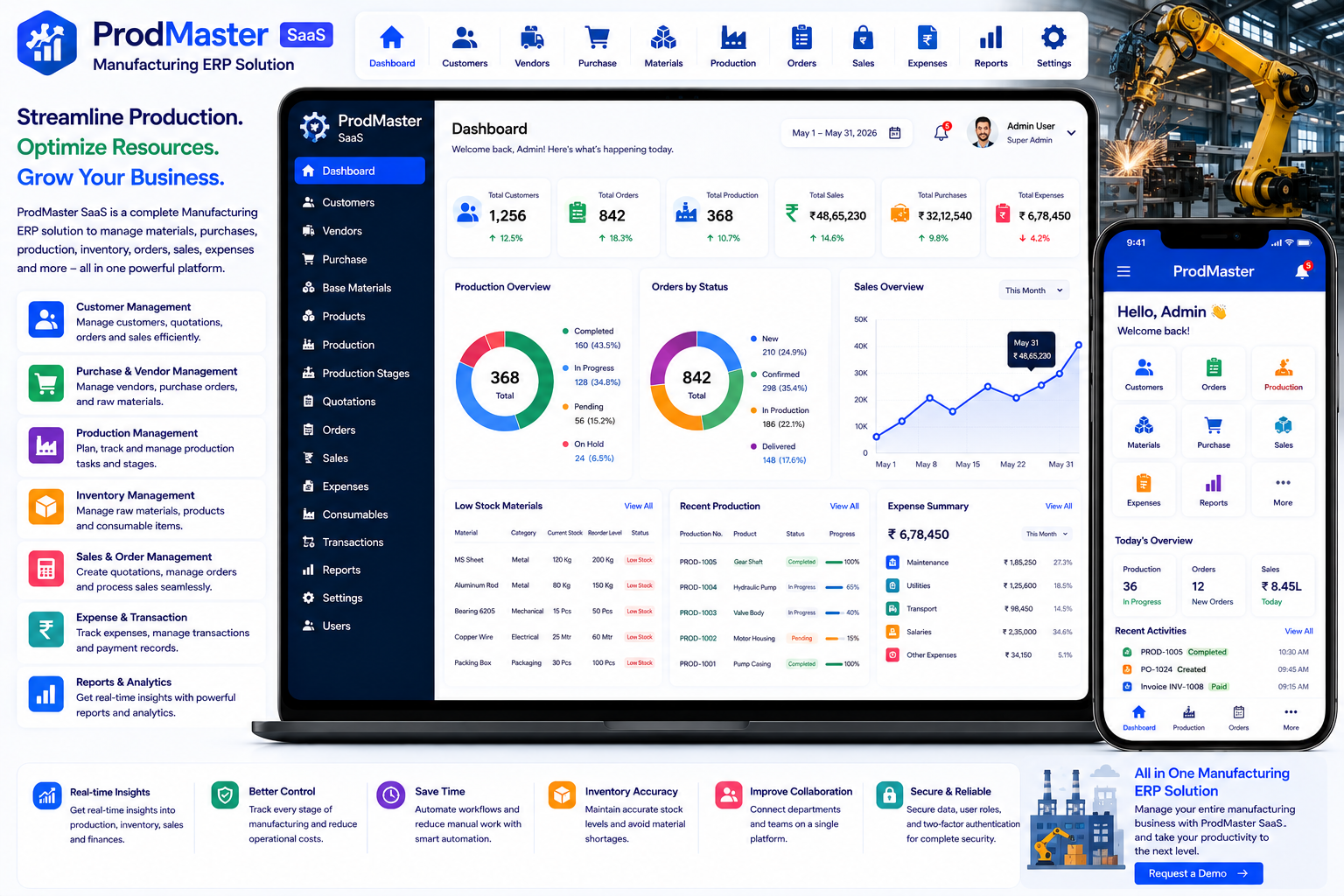
Looking for a ready-made solution?
👉Manufacturing ERP Solution
https://smartwebinfotech.com/items/prodmaster-saas-manufacturing-erp-solution/1045
Modern manufacturing businesses need to manage much more than production. A factory must coordinate raw materials, suppliers, purchases, products, production planning, work stages, quotations, customer orders, sales, expenses, consumables, and financial transactions while maintaining visibility across the entire operation.
When these activities are managed through spreadsheets, paper records, separate accounting tools, and manual communication, production teams can struggle with inventory visibility, order tracking, procurement planning, and timely delivery.
A Manufacturing ERP Solution brings these processes together in one centralized platform.
ProdMaster SaaS – Manufacturing ERP Solution is designed to streamline manufacturing operations from production planning and inventory control to procurement, order management, sales, and reporting. The product is positioned for both small workshops and larger industrial plants.
Explore ProdMaster SaaS – Manufacturing ERP Solution
What Is a Manufacturing ERP Solution?
A Manufacturing ERP Solution is business management software designed specifically for manufacturing and production organizations.
It connects different departments and workflows into a centralized system.
A typical manufacturing workflow can look like:
Customer → Quotation → Order → Production → Raw Material → Production Tasks → Finished Product → Sale → Payment
A procurement workflow may be:
Material Requirement → Vendor → Purchase → Raw Material → Inventory → Production
An expense workflow can be:
Expense → Expense Type → Transaction → Financial Report
ProdMaster SaaS is designed around these types of connected manufacturing workflows.
Why Do Manufacturing Businesses Need ERP Software?
Manufacturing operations involve many moving parts.
A typical factory may need to manage:
- Customers
- Vendors
- Raw materials
- Material categories
- Purchases
- Products
- Product categories
- Taxes
- Units
- Production
- Production stages
- Quotations
- Orders
- Sales
- Expenses
- Consumable items
- Transactions
- Reports
Managing all of these manually can create operational challenges such as:
- Incorrect inventory information
- Production delays
- Poor procurement planning
- Difficult order tracking
- Missed customer follow-ups
- Unorganized vendor records
- Difficult expense monitoring
- Lack of production visibility
- Manual reporting
- Data duplication
An ERP platform creates a centralized operational workflow so management can make decisions using more organized business information.
Key Features of Manufacturing ERP Software
1. Informative Dashboard
A manufacturing dashboard provides management with an overview of business activities.
A centralized dashboard can help monitor:
- Customers
- Vendors
- Purchases
- Raw materials
- Products
- Production
- Orders
- Sales
- Expenses
- Transactions
- Reports
ProdMaster includes an Informative Dashboard.
2. User Management
Manufacturing organizations usually have different types of users.
Examples include:
- Super Admin
- Owner
- Manager
- Production Staff
- Sales Staff
- Purchase Staff
- Other Employees
User management allows administrators to create and manage accounts for these users.
ProdMaster includes User Management.
3. User Roles & Permissions
Different departments should not necessarily have access to every ERP function.
For example:
Administrator: Full system control.
Owner: Business-wide visibility.
Production Manager: Production and production-stage management.
Purchase Manager: Vendors, materials, and purchases.
Sales Manager: Customers, quotations, orders, and sales.
Role-based permissions can help businesses protect sensitive operational and financial information.
ProdMaster includes User Roles and Permissions.
4. Customer Management
Customers are at the center of the manufacturing sales cycle.
Customer management can maintain:
- Customer Name
- Contact Information
- Address
- Quotations
- Orders
- Sales
- Transaction History
ProdMaster includes Customer Management.
5. Vendor Management
Manufacturers depend on suppliers for raw materials, components, consumables, and other resources.
Vendor management can maintain:
- Vendor Details
- Contact Information
- Purchase History
- Material Information
- Transactions
ProdMaster includes Vendor Management.
6. Base Material Management
Raw materials are essential to manufacturing operations.
Examples include:
- Steel
- Aluminum
- Plastic
- Fabric
- Chemicals
- Wood
- Electronic Components
- Packaging Materials
Base material management helps manufacturers maintain structured information about materials used in production.
ProdMaster includes Base Material & Base Material Category Management.
7. Base Material Category Management
A factory can have hundreds or thousands of materials.
Categorization helps organize them into groups.
For example:
Metal Materials
- Steel
- Aluminum
- Copper
Packaging Materials
- Boxes
- Labels
- Wrapping Material
Electrical Components
- Wires
- Switches
- Connectors
ProdMaster includes Base Material Category Management.
8. Purchase Management
Manufacturing companies regularly purchase raw materials and other items.
A purchase workflow can be:
Material Requirement → Vendor → Purchase → Receipt → Inventory → Production
ProdMaster includes Purchase Management.
9. Product Management
Manufacturers need to maintain detailed information about finished products.
Product information can include:
- Product Name
- Product Category
- Unit
- Tax
- Selling Information
- Production Information
ProdMaster includes Product Management.
10. Product Category Management
Product categories make it easier to organize large product catalogs.
For example:
- Finished Goods
- Semi-Finished Goods
- Industrial Products
- Consumer Products
- Spare Products
- Custom Products
ProdMaster includes Product & Product Category Management.
11. Tax Management
Different products and sales transactions may require different tax treatments.
ProdMaster includes tax management as part of its Product, Product Category, Tax, and Unit Management functionality.
Businesses should configure tax rules according to their applicable local regulations.
12. Unit Management
Manufacturing businesses work with different measurement units.
Examples include:
- Pieces
- Kilograms
- Grams
- Liters
- Meters
- Boxes
- Sets
- Tons
Unit management helps maintain consistent product and material measurements.
ProdMaster includes Unit Management as part of its product management functionality.
13. Production Management
Production management is the core of manufacturing ERP software.
A production workflow can include:
Production Order → Material Requirement → Production Tasks → Processing → Quality / Completion → Finished Product
ProdMaster includes Production & Production Task Stage Management.
14. Production Task Stage Management
Manufacturing operations often involve multiple production stages.
For example:
Raw Material → Cutting → Processing → Assembly → Finishing → Packing → Completed
Stage management helps production managers track where a production task currently stands.
ProdMaster includes Production Task Stage Management.
15. Production Planning
Production planning helps manufacturers organize what needs to be produced and when.
A structured production process can connect:
Customer Order → Product → Required Materials → Production → Finished Goods
This can help teams coordinate production with customer demand.
The product overview specifically highlights production planning as one of ProdMaster's core objectives.
16. Quotation Management
Before an order is confirmed, manufacturers often prepare quotations.
A quotation may include:
- Customer
- Product
- Quantity
- Unit Price
- Taxes
- Total
- Terms
- Validity
ProdMaster includes Quotation Management.
17. Order Management
Once a customer accepts a quotation, the business can move toward order processing.
A typical workflow is:
Quotation → Customer Approval → Order → Production → Delivery → Sale
ProdMaster includes Order & Order Stage Management.
18. Order Stage Management
Orders can move through multiple stages.
For example:
New → Confirmed → Production → Ready → Delivered → Completed
Stage management helps businesses understand the current status of customer orders.
19. Sales Management
Sales management connects finished products with customer transactions.
Sales records can contain:
- Customer
- Products
- Quantity
- Price
- Tax
- Total
- Payment
- Transaction Information
ProdMaster includes Sale Management.
20. Expense Management
Manufacturing businesses have many operational expenses.
Examples include:
- Electricity
- Factory Maintenance
- Transportation
- Labor-related costs
- Packaging
- Office Expenses
- Equipment Costs
- Administrative Expenses
ProdMaster includes Expense & Expense Type Management.
21. Expense Type Management
Expense categories help management understand where money is being spent.
Examples include:
Production Expense
Transportation Expense
Maintenance Expense
Utilities
Administrative Expense
Marketing Expense
Categorized expenses can make financial analysis easier.
22. Consumable Item Management
Manufacturing businesses use many consumable items that may not be part of the final product.
Examples include:
- Lubricants
- Cleaning materials
- Packaging supplies
- Gloves
- Safety materials
- Workshop consumables
ProdMaster includes Consumable Item Management.
23. Contact & Notice Board Management
Manufacturing organizations need to communicate important information to employees and other users.
A notice board can be useful for:
- Production Announcements
- Maintenance Notices
- Staff Communication
- Operational Updates
- Company Announcements
ProdMaster includes Contact & Notice Board Management.
24. Transaction Management
Manufacturing businesses handle different financial transactions.
These may include:
- Sales Payments
- Purchase Transactions
- Customer Transactions
- Vendor Transactions
- Expenses
- Other Business Transactions
ProdMaster includes Manage Transaction functionality.
25. Customer Dashboard
A customer-facing dashboard can give customers access to permitted information.
Potential information includes:
- Customer Profile
- Quotations
- Orders
- Sales
- Related Activities
ProdMaster includes a Customer Dashboard Panel.
26. Manufacturing Reports
Reporting is essential for understanding business performance.
ProdMaster includes a dedicated Report Section.
Reports can help management analyze areas such as:
- Production
- Purchases
- Sales
- Orders
- Expenses
- Customers
- Vendors
- Transactions
27. Company Settings
Manufacturing businesses can configure their company information within the platform.
Typical settings include:
- Company Name
- Logo
- Address
- Contact Information
- Business Details
ProdMaster includes Company Settings.
28. Account Settings
Account settings allow users to manage their individual account information and preferences.
ProdMaster includes Account Settings.
29. Application Settings
Administrators can configure application-level preferences.
ProdMaster includes Application Settings.
30. Email Settings
Email communication can be useful for:
- Order Notifications
- Quotation Updates
- Account Notifications
- Transaction Notifications
- System Alerts
ProdMaster includes Email Settings.
31. Email Notification Templates
Businesses may need different email templates for different events.
Examples include:
- Quotation Created
- Order Created
- Order Updated
- Payment Received
- Account Notification
ProdMaster includes Email Notification Templates.
32. SMS Notifications
SMS can be useful for important manufacturing and customer notifications.
Examples include:
- Order Confirmation
- Production Updates
- Delivery Notifications
- Payment Notifications
ProdMaster includes Twilio SMS Templates and Twilio integration for sending SMS.
33. Multi-Language Support
Manufacturing companies may operate across different regions and countries.
Multi-language support allows users to work with the platform in different languages.
ProdMaster includes Multi Languages support.
34. Payment Settings
Manufacturing businesses may need different payment methods depending on their customers and markets.
ProdMaster includes Payment Settings.
35. Payment Gateway Integration
The current ProdMaster product listing includes:
- Bank Transfer
- PayPal
- Stripe
- Flutterwave
Payment gateway availability can depend on the provider, country, and account configuration.
36. SaaS Subscription Management
ProdMaster is offered as a SaaS product, allowing software providers to create subscription packages for manufacturing businesses.
Possible plans include:
Starter
For small workshops.
Professional
For growing manufacturing companies.
Enterprise
For larger factories and industrial organizations.
ProdMaster includes Subscription Packages Management.
37. Subscription Coupon Management
Promotional coupons can help SaaS providers attract new manufacturing customers.
Examples include:
- New Customer Discount
- Annual Subscription Discount
- Launch Offer
- Seasonal Promotion
ProdMaster includes Subscription Coupon & Coupon History Management.
38. Pricing Feature Controls
Different SaaS plans may include different functionality.
For example:
Basic: Customers + Products + Orders
Professional: Production + Purchases + Inventory-related workflows + Reports
Enterprise: Full feature access and advanced integrations
ProdMaster includes Pricing Features Enabled/Disabled functionality.
39. Dynamic Landing Page CMS
A SaaS business needs a professional website to market its ERP solution.
The dynamic landing page CMS can be used to manage:
- Homepage
- Features
- Pricing
- FAQs
- Marketing Content
- Contact Information
ProdMaster includes a Dynamic Landing Page CMS.
40. SEO Settings
SEO can help manufacturing ERP software attract businesses searching for production management solutions.
ProdMaster includes Site SEO Settings.
SEO settings can include:
- Meta Titles
- Meta Descriptions
- SEO Content
- Social Sharing Information
41. Google reCAPTCHA
Public registration and inquiry forms can be targeted by automated bots.
Google reCAPTCHA provides an additional layer of protection for public-facing forms.
ProdMaster includes Google reCAPTCHA Settings.
42. Two-Factor Authentication
ERP systems can contain sensitive customer, vendor, production, and financial information.
Two-factor authentication adds another layer of protection to user accounts.
ProdMaster includes 2-Factor Authentication.
43. Light & Dark Mode
Modern ERP users may prefer different interface modes depending on their environment and preference.
ProdMaster includes Light/Dark Theme Mode.
44. Multi-Theme Colors
Businesses can customize the application appearance according to their branding.
ProdMaster includes Multi Theme Colors.
45. RTL & LTR Support
International users may require both left-to-right and right-to-left interface layouts.
ProdMaster includes RTL/LTR Theme support.
46. Multi-Font Styles
Different languages may require different font styles and configurations.
ProdMaster includes Multi Font Style settings.
47. OpenAI Integration
Artificial intelligence can assist with certain administrative and content-related tasks.
Potential applications include:
- Product Descriptions
- Customer Communication
- Quotation Content
- Notice Drafting
- Marketing Content
- FAQ Generation
ProdMaster includes OpenAI Integration.
AI-generated content should be reviewed before being used in customer-facing or operational communications.
48. n8n Workflow Automation
Manufacturing companies often use multiple applications for accounting, communication, logistics, analytics, and other processes.
n8n integration can provide a foundation for connecting ProdMaster with external systems.
For example:
New Order → Create Production Task → Notify Production Manager
Another workflow could be:
Production Completed → Update Order → Notify Sales Team → Send Customer Notification
ProdMaster includes n8n Integration.
49. Impersonation Feature
Authorized administrators may need to access a user's account to troubleshoot issues or provide support.
ProdMaster includes an Impersonate Feature.
This should be restricted to appropriately authorized administrators.
50. Owner Email Verification
Email verification can help ensure that owner accounts are associated with valid email addresses.
ProdMaster provides an option to enable or disable Owner Account Email Verification.
Benefits of Manufacturing ERP Software
Better Production Visibility
Management can gain a centralized view of production activities and stages.
Improved Material Management
Raw materials and consumables can be organized more systematically.
Better Procurement Control
Purchase and vendor management help organize procurement activities.
Improved Order Tracking
Order stages allow teams to understand where customer orders currently stand.
Better Sales Coordination
Quotations, orders, and sales can be connected within one platform.
Reduced Administrative Work
Digital workflows reduce reliance on spreadsheets and paper records.
Better Financial Visibility
Expenses and transactions can be maintained within the same business system.
Improved Decision-Making
Reports provide management with organized business information.
Scalable Business Operations
A centralized ERP platform can provide a foundation for growing manufacturing organizations.
Who Can Use Manufacturing ERP Software?
A Manufacturing ERP Solution can be useful for:
- Manufacturing Companies
- Factories
- Industrial Plants
- Engineering Companies
- Production Workshops
- Small Manufacturing Businesses
- Medium-Sized Manufacturers
- Large Industrial Organizations
- Custom Manufacturing Companies
- Component Manufacturers
- Machinery Manufacturers
- Automotive Parts Manufacturers
- Textile Manufacturers
- Packaging Manufacturers
- Electronics Manufacturers
- Furniture Manufacturers
How Different Manufacturers Can Use ProdMaster
Small Workshops
Manage customers, products, quotations, orders, purchases, production, sales, and expenses from one platform.
Medium-Sized Factories
Coordinate vendors, raw materials, production stages, orders, sales, and reporting.
Large Manufacturing Plants
Use centralized workflows to improve visibility across procurement, production, sales, and financial operations.
Custom Manufacturing Businesses
Connect customer quotations and orders with production workflows.
Component Manufacturers
Manage raw materials, products, production stages, sales, and customers.
Manufacturing ERP Software vs. Manual Management
Manual Management
Manufacturing ERP
Excel customer records
Customer Management
Separate vendor files
Vendor Management
Manual raw-material records
Base Material Management
Spreadsheet purchases
Purchase Management
Separate product lists
Product Management
Manual production register
Production Management
Paper production stages
Production Stage Management
Manual quotations
Quotation Management
Order spreadsheet
Order Management
Separate sales records
Sales Management
Manual expense sheets
Expense Management
Separate notices
Notice Board
Manual financial tracking
Transaction Management
Manual reporting
Centralized Reports
Separate customer communication
Email & SMS Notifications
How to Choose the Best Manufacturing ERP Solution
Before selecting manufacturing ERP software, consider:
- Dashboard
- User Management
- User Roles & Permissions
- Customer Management
- Vendor Management
- Base Material Management
- Material Categories
- Purchase Management
- Product Management
- Product Categories
- Tax Management
- Unit Management
- Production Management
- Production Task Stages
- Quotation Management
- Order Management
- Order Stages
- Sales Management
- Expense Management
- Expense Types
- Consumable Items
- Contact Management
- Notice Board
- Transaction Management
- Customer Portal
- Reports
- Email Notifications
- SMS Notifications
- Payment Gateways
- SaaS Subscription Plans
- Coupon Management
- Pricing Feature Controls
- Multi-Language Support
- RTL/LTR
- Theme Customization
- Light/Dark Mode
- Two-Factor Authentication
- AI Integration
- n8n Automation
- Landing Page CMS
- SEO Settings
- Google reCAPTCHA
The best ERP should match the company's actual production process, material flow, procurement cycle, sales process, and reporting requirements.
Why Choose ProdMaster SaaS?
If you're looking for a ready-to-use Manufacturing ERP Solution, ProdMaster SaaS by Smartweb Infotech brings manufacturing, procurement, sales, order management, production, customers, vendors, materials, products, expenses, and reporting into one centralized platform.
The current product page lists 46 main features, including production and production-stage management, raw materials, purchases, products, quotations, orders, sales, expenses, consumables, customer dashboard, reports, SaaS subscriptions, payment integrations, SMS, OpenAI, and n8n integration.
Key Features
- Informative Dashboard
- User Management
- User Roles & Permissions
- Customer Management
- Vendor Management
- Base Material & Material Category Management
- Purchase Management
- Product & Product Category Management
- Tax Management
- Unit Management
- Production Management
- Production Task Stage Management
- Quotation Management
- Order & Order Stage Management
- Sales Management
- Expense & Expense Type Management
- Consumable Item Management
- Contact & Notice Board Management
- Company Settings
- Account Settings
- Application Settings
- Email Settings
- Multi-Language Support
- Payment Settings
- Transaction Management
- Subscription Packages
- Subscription Coupons
- Landing Page Controls
- Registration Page Controls
- Multi-Theme Colors
- RTL/LTR Theme
- SEO Settings
- Google reCAPTCHA
- Bank Transfer, PayPal, Stripe & Flutterwave
- Email Notification Controls
- Email Notification Templates
- Dynamic Landing Page CMS
- Pricing Feature Controls
- Two-Factor Authentication
- Light/Dark Mode
- Multi-Font Styles
- Impersonation
- Customer Dashboard
- Reports
- Twilio SMS Templates
- Twilio Integration
- OpenAI Integration
- n8n Integration
Manufacturing ERP for Modern Factories
A traditional manufacturing workflow may look like:
Excel + Paper Registers + Phone Calls + Separate Accounting + Manual Production Tracking
A centralized ERP workflow can become:
Customer → Quotation → Order → Production → Materials → Production Stages → Finished Product → Sale → Transaction
Procurement can follow:
Material Requirement → Vendor → Purchase → Material → Production
And management can monitor:
Production + Purchases + Sales + Orders + Expenses + Transactions → Reports
This connected approach can give manufacturers better visibility into their overall business process.
Frequently Asked Questions
What is Manufacturing ERP Software?
Manufacturing ERP Software is a centralized business management platform designed to manage production, materials, purchases, products, orders, sales, customers, vendors, expenses, and other manufacturing workflows.
Can I manage raw materials?
Yes. ProdMaster includes Base Material and Base Material Category Management.
Can I manage suppliers?
Yes. Vendor Management is included.
Can I manage purchases?
Yes. Purchase Management is included.
Can I manage products and categories?
Yes. Product, Product Category, Tax, and Unit Management are included.
Can I manage production?
Yes. ProdMaster includes Production and Production Task Stage Management.
Can I manage quotations?
Yes. Quotation Management is included.
Can I manage customer orders?
Yes. Order and Order Stage Management are included.
Can I manage sales?
Yes. Sales Management is included.
Can I manage expenses?
Yes. Expense and Expense Type Management are included.
Can customers access their information?
Yes. ProdMaster includes a Customer Dashboard Panel.
Does it provide reports?
Yes. The product includes a dedicated Report Section.
Does it support SMS?
Yes. Twilio SMS templates and Twilio integration are included.
Does it support online payments?
The current product listing includes Bank Transfer, PayPal, Stripe, and Flutterwave integrations.
Does it support multiple languages?
Yes. Multi-language support is included.
Does it support AI?
Yes. OpenAI integration is included.
Can I automate workflows?
Yes. n8n integration provides a foundation for connecting ProdMaster with external applications and automating workflows.
Can ProdMaster be offered as SaaS?
Yes. ProdMaster includes subscription packages, subscription coupons, pricing feature controls, and payment integrations, providing a foundation for a SaaS business model.
Final Thoughts
Manufacturing businesses need to coordinate materials, suppliers, purchases, production, products, customers, orders, sales, expenses, and financial transactions every day.
When these activities are spread across multiple spreadsheets, paper registers, and disconnected applications, it can become difficult to maintain accurate information and respond quickly to changing production requirements.
A modern Manufacturing ERP Solution brings these workflows together.
With Customer Management, Vendor Management, Raw Material Management, Purchase Management, Product Management, Production Management, Production Stages, Quotations, Orders, Sales, Expenses, Consumables, Transactions, Reports, Notifications, AI, and Automation, ProdMaster SaaS – Manufacturing ERP Solution provides a broad foundation for digitizing manufacturing operations.
For small workshops, growing factories, custom manufacturers, industrial plants, and larger manufacturing organizations, ProdMaster can help create a more connected and structured workflow from procurement to production and sales.
Comments (0)