
Looking for a ready-made solution?
👉Construction & Real Estate ERP Platform
https://smartwebinfotech.com/items/buildflow-saas-multi-tenant-construction-real-estate-erp-platform/1048
Construction and real estate businesses manage complex workflows involving land, projects, plots, units, customers, bookings, contractors, materials, procurement, site operations, documents, payments, and financial reporting.
When these activities are handled using spreadsheets, paper files, messaging apps, and disconnected software, project managers can struggle to maintain accurate information and keep every team aligned.
A Construction & Real Estate ERP Platform brings these workflows together in one centralized system.
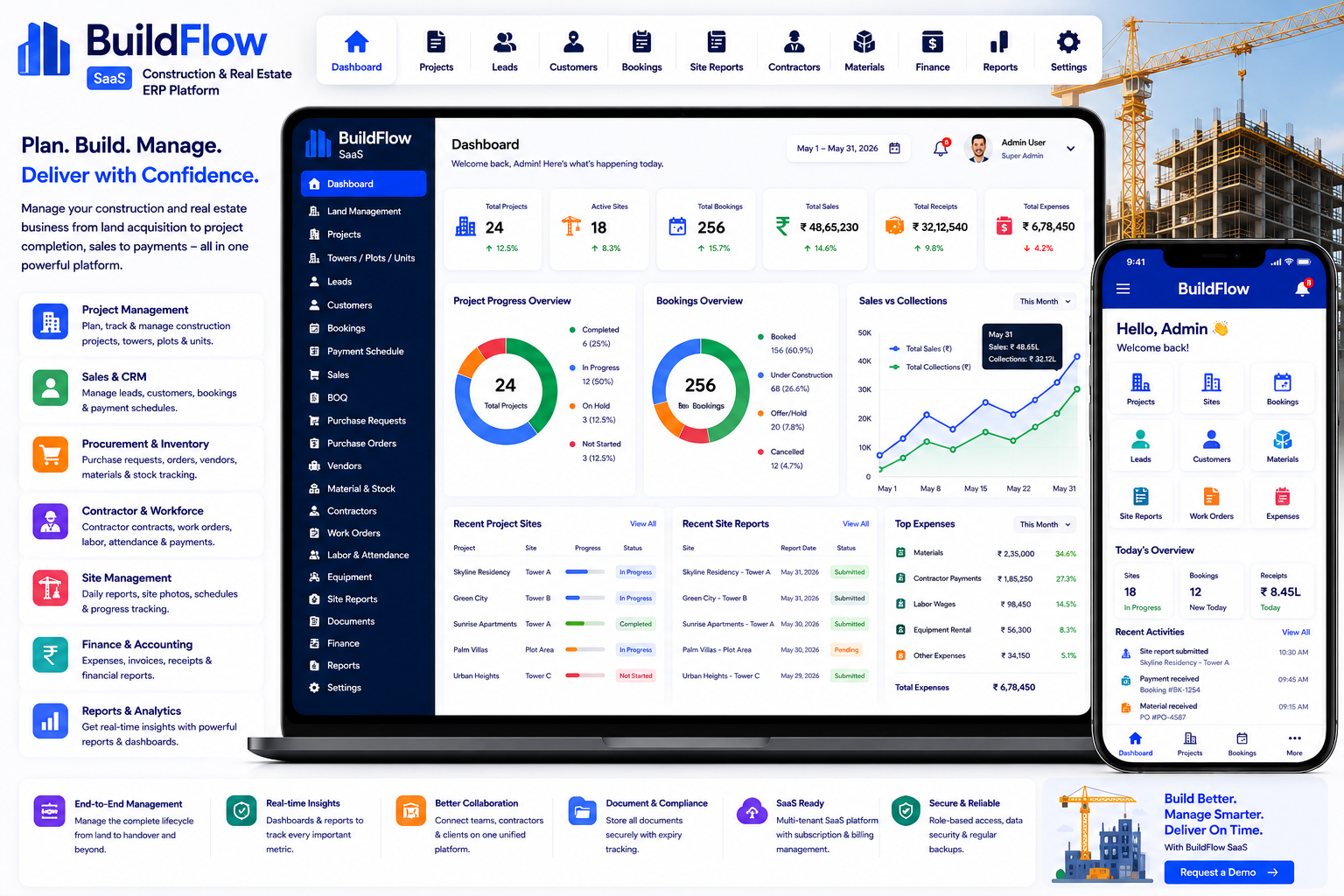
BuildFlow SaaS – Construction & Real Estate ERP Platform is designed to manage the complete project lifecycle, from land acquisition and BOQ planning to procurement, contractor management, site operations, customer bookings, billing, and payments. The product is built with Laravel and React and includes a SaaS architecture, role-based access, client portal, subscriptions, payment gateways, REST API, and extensive configuration options.
Explore BuildFlow SaaS – Construction & Real Estate ERP Platform
What Is a Construction & Real Estate ERP Platform?
A Construction & Real Estate ERP Platform is business management software designed to connect construction project management and real estate operations within a single system.
A typical construction workflow can be:
Land → Project → BOQ → Procurement → Materials → Contractors → Site Operations → Project Completion
A real estate workflow can be:
Lead → Customer → Project → Tower / Plot → Unit → Booking → Payment Schedule → Receipt
By connecting these processes, businesses can reduce data duplication and gain better visibility across projects.
BuildFlow is specifically designed to cover the construction and real estate project lifecycle in one platform.
Why Do Construction & Real Estate Businesses Need ERP Software?
Construction and property businesses have many moving parts.
A single project can involve:
- Landowners
- Developers
- Customers
- Contractors
- Vendors
- Site Engineers
- Project Managers
- Architects
- Materials
- Equipment
- Labor
- Purchase Orders
- BOQs
- Work Orders
- Payments
- Legal Documents
- Government Approvals
- Customer Bookings
Managing all of these manually can result in:
- Delayed project updates
- Procurement problems
- Material shortages
- Difficult contractor tracking
- Unorganized documents
- Missed payment schedules
- Poor customer visibility
- Difficult financial reporting
- Duplicate data
- Limited management visibility
An ERP platform creates a centralized workflow connecting project, sales, procurement, workforce, site, and financial information.
Key Features of Construction ERP Software
1. Multi-Tenant SaaS Architecture
BuildFlow is designed as a multi-tenant SaaS ERP, with database-per-tenant isolation so that each company's data is separated. It also includes self-service signup and subscription billing capabilities.
This architecture is particularly useful for SaaS providers who want to offer the platform to multiple construction and real estate companies.
2. Guided Installation Wizard
Deploying business software can be complicated for non-technical users.
BuildFlow includes a guided installation wizard that checks server requirements, configures the database, and creates the platform administrator account.
This can make initial deployment easier.
3. Demo Mode
A realistic demo is useful when selling SaaS software to potential customers.
BuildFlow includes a one-click demo mode with populated examples such as:
- Projects
- Leads
- Contracts
- Financial information
This allows prospective users to understand the system before using their own data.
4. Role-Based Dashboards
Different construction users need different information.
For example:
Company Admin
Business-wide overview.
Project Manager
Project progress, contractors, materials, and schedules.
Site Engineer
Site operations, reports, schedules, and photos.
Sales Team
Leads, customers, bookings, and payments.
Client
Own bookings, documents, and payment information.
BuildFlow provides role-based access and dashboards so users can work with information relevant to their responsibilities.
5. Role-Based Access Control
Construction ERP systems can contain sensitive:
- Customer information
- Project data
- Financial information
- Contracts
- Vendor details
- Legal documents
BuildFlow provides fine-grained permissions and custom roles for each company using role-based access control.
6. Multi-Language Support
Construction and real estate companies may operate across different regions.
BuildFlow allows administrators to add and manage languages and translations from the admin panel, including RTL support.
This can make the platform more suitable for international businesses.
7. Dynamic Landing Page & CMS
A SaaS business needs a professional public website to promote its product.
BuildFlow includes a dynamic landing page and CMS for managing:
- Pages
- Pricing
- FAQs
- Marketing content
The public marketing website can therefore be managed without directly modifying code.
8. REST API
Modern construction companies may need to integrate ERP software with other systems.
BuildFlow includes a token-authenticated REST API using Laravel Sanctum.
This can provide a foundation for integrations with:
- Mobile Applications
- Accounting Systems
- CRM Systems
- Reporting Tools
- External Websites
- Automation Platforms
CRM & Sales Management
9. Lead Management
Real estate companies generate leads through:
- Website
- Advertising
- Social Media
- Property Portals
- Referrals
- Sales Teams
- Marketing Campaigns
Lead management helps track prospects from their first interaction through conversion.
BuildFlow includes lead management with activity tracking.
A typical workflow is:
Lead → Follow-Up → Qualified → Customer → Booking
10. Customer Management
Customer information can be centralized in one location.
A customer record can connect with:
- Leads
- Bookings
- Projects
- Units
- Payments
- Documents
BuildFlow includes customer management with links to bookings and projects.
11. Booking Management
Real estate businesses need to track unit bookings accurately.
A booking workflow can be:
Customer → Project → Tower / Plot → Unit → Booking → Payment Schedule
BuildFlow includes unit bookings with configurable installment and payment schedules.
12. Payment Schedule Management
Real estate purchases often involve multiple installments.
For example:
Booking → 10% Initial Payment → 20% Construction Payment → 30% Milestone Payment → Final Payment
Configurable payment schedules allow businesses to structure installment plans according to their sales process.
BuildFlow supports configurable payment schedules and receipts for bookings.
13. Client Portal
Customers need visibility into their own property transactions.
BuildFlow provides a dedicated client portal where customers can track:
- Their bookings
- Documents
- Payments
Access is restricted to the client's own information.
This can reduce the need for customers to repeatedly contact the sales team for basic updates.
Land & Project Management
14. Land Management
Land acquisition is often the first stage of a real estate development project.
Land management can help track parcels from:
Acquisition → Planning → Development → Project
BuildFlow includes Land Management for tracking land parcels throughout development.
15. Project Management
A construction company may manage multiple projects simultaneously.
Each project can contain:
- Project Details
- Towers
- Plots
- Units
- BOQ
- Contractors
- Materials
- Site Operations
- Documents
- Reports
BuildFlow includes project management as part of its construction and real estate workflow.
16. Tower Management
Residential and commercial developments may contain multiple towers or buildings.
For example:
Project
→ Tower A
→ Tower B
→ Tower C
Each tower can then contain multiple units.
BuildFlow supports project structures including towers, plots, and units.
17. Plot Management
For plotted developments, businesses need to manage individual plots.
A structure could be:
Project → Block → Plot → Customer → Booking → Payment
BuildFlow supports plot management as part of its project structure.
18. Unit Management
For apartments, commercial properties, or other developments, individual units can be managed within a project.
Unit information can be connected with:
- Tower
- Customer
- Booking
- Payment Schedule
- Documents
BuildFlow supports individual unit management.
19. Bill of Quantities (BOQ)
A Bill of Quantities (BOQ) is an important part of construction planning.
A BOQ can contain:
- Materials
- Quantities
- Units
- Rates
- Estimated Costs
- Work Items
BuildFlow allows businesses to create and manage itemized BOQs for projects.
Procurement & Material Management
20. Purchase Requests
Construction projects require continuous procurement of materials and services.
A purchase request workflow can be:
Material Requirement → Purchase Request → Approval → Purchase Order
BuildFlow includes purchase requests with an approval-driven procurement workflow.
21. Purchase Orders
Once a purchase request is approved, the business can create a purchase order for the vendor.
Purchase orders help formalize:
- Vendor
- Material
- Quantity
- Rate
- Project
- Delivery Information
BuildFlow includes Purchase Orders as part of its procurement workflow.
22. Vendor Management
Construction businesses may work with dozens or hundreds of suppliers.
Vendor management helps maintain:
- Vendor Profiles
- Contact Details
- Purchase History
- Materials
- Orders
BuildFlow includes a vendor directory linked with purchase history.
23. Material & Stock Tracking
Material shortages can delay construction projects.
Real-time stock visibility can help project teams understand what materials are available at each project.
BuildFlow supports material and stock tracking per project with transaction history.
24. Goods Receipt
When materials arrive at a construction site or warehouse, the receipt should be recorded.
A typical workflow is:
Purchase Order → Delivery → Goods Receipt → Stock Update
BuildFlow includes goods receipt functionality connected to purchase orders.
Contractor & Workforce Management
25. Contractor Management
Construction companies frequently work with specialized contractors.
Examples include:
- Civil Contractors
- Electrical Contractors
- Plumbing Contractors
- Flooring Contractors
- Painting Contractors
- HVAC Contractors
BuildFlow includes contractor contract and work-order management.
26. Contractor Contracts
A construction company may have multiple contracts with different contractors.
Contract records can help organize:
- Contractor
- Project
- Contract Details
- Work Scope
- Payment Information
- Work Orders
BuildFlow supports contractor contracts.
27. Contractor Work Orders
Work orders define specific work assigned to contractors.
For example:
Electrical Contractor → Tower B → Electrical Installation → Work Order
BuildFlow supports work orders under contractor agreements.
28. Contractor Billing & Payments
Contractor payments are a major part of construction financial management.
BuildFlow allows businesses to track contractor bills and payments against individual contracts.
This helps connect:
Contract → Work Order → Bill → Payment
29. Labor & Attendance
Construction sites depend heavily on labor.
Labor management can help businesses track workforce attendance.
BuildFlow includes labor and attendance tracking.
This can support:
- Daily Attendance
- Workforce Monitoring
- Labor Records
- Project-Level Workforce Tracking
30. Equipment Management
Construction projects often use expensive equipment.
Examples include:
- Excavators
- Cranes
- Loaders
- Concrete Mixers
- Generators
- Compressors
- Vehicles
BuildFlow includes equipment management with maintenance schedules and rental tracking.
Site Operations
31. Site Scheduling
Construction projects involve multiple activities that must happen at the right time.
Site scheduling can help plan:
- Activities
- Milestones
- Contractors
- Work
- Project Events
BuildFlow includes site scheduling for project-level planning.
32. Site Reports
Daily site reports are useful for monitoring actual project progress.
A site report can include:
- Date
- Project
- Site Activity
- Progress
- Issues
- Workforce
- Materials
- Notes
- Photos
BuildFlow includes daily site reports organized by project.
33. Site Photos
Construction progress is often easier to understand visually.
Site photos can document:
- Construction Progress
- Completed Work
- Site Conditions
- Quality Issues
- Milestones
- Work Activities
BuildFlow supports photo documentation within site reports.
34. Legal Documents & Compliance
Construction and real estate projects involve many legal and regulatory documents.
Examples include:
- Land Documents
- Licenses
- Approvals
- Permits
- Contracts
- Certificates
- Compliance Documents
BuildFlow provides legal document and compliance management, including expiry-date tracking.
35. Document Management
A project can contain hundreds of documents.
A centralized repository can organize:
- Contracts
- BOQs
- Purchase Orders
- Bills
- Approvals
- Site Reports
- Customer Documents
- Legal Documents
BuildFlow provides a project-linked document repository.
Reporting & Analytics
36. Rich Dashboards
Management needs a quick overview of project and business performance.
BuildFlow provides role-aware dashboards with project, financial, and operational statistics.
Different users can see information relevant to their responsibilities.
37. Cross-Module Reports
Construction ERP reporting should not be limited to a single department.
BuildFlow includes reports covering areas such as:
- Projects
- Sales
- Procurement
- Finance
This helps management analyze the business from multiple perspectives.
SaaS Subscription & Billing
38. Subscription Plans
BuildFlow is designed as a SaaS platform, allowing the platform owner to define subscription plans with:
- Pricing
- Features
- Usage Limits
- User Limits
- Project Limits
- Storage Limits
This gives SaaS providers flexibility when creating pricing packages.
39. Free Trials
Free trials can help potential customers evaluate construction ERP software before purchasing.
BuildFlow supports configurable trial periods.
A typical customer journey can be:
Signup → Free Trial → Evaluation → Subscription → Renewal
40. Upgrades & Downgrades
Businesses can change their subscription as their requirements grow.
For example:
Starter → Professional → Enterprise
BuildFlow supports self-service upgrades and downgrades, with safeguards when usage exceeds the limits of a lower plan.
41. Payment Gateway Integration
BuildFlow supports four payment options:
- Stripe
- Razorpay
- PayPal
- Manual / Offline Payment
The platform administrator can select the available payment gateways.
This is particularly useful for SaaS businesses operating across different markets.
42. Coupons & Discounts
Promotional discounts can help SaaS providers acquire customers.
Examples include:
- Launch Discount
- Annual Subscription Discount
- New Customer Coupon
- Promotional Campaign
- Partner Discount
BuildFlow includes coupon and discount management with usage limits and redemption tracking.
43. Automatic Invoicing
Subscription payments can automatically generate invoices.
This can reduce manual billing work for SaaS administrators.
BuildFlow supports automatic invoice generation after successful payments.
44. Subscription Lifecycle Automation
Managing subscriptions manually can become difficult as customer numbers grow.
BuildFlow automates subscription lifecycle events such as:
- Trials
- Renewals
- Grace Periods
- Suspensions
Administration & Configuration
45. Dynamic SMTP Settings
Email configuration often requires technical server access.
BuildFlow allows administrators to configure outbound SMTP settings directly from the admin panel.
This makes email configuration easier for SaaS administrators.
46. Dynamic Payment Gateway Settings
Payment gateway credentials can be configured from the administration panel.
BuildFlow supports dynamic payment gateway settings, with saved secrets masked after configuration.
47. Platform Settings
Centralized platform settings can help administrators control:
- Tax Rates
- Invoice Numbering
- Trial Defaults
- Other SaaS Configuration
BuildFlow provides platform-level settings for these areas.
48. Complete Documentation
Documentation is important for installation, configuration, and day-to-day use.
BuildFlow includes standalone documentation covering:
- Installation
- Modules
- API
- Troubleshooting
The product page states that the documentation contains more than 50 pages.
Benefits of Construction ERP Software
Better Project Visibility
Management can monitor projects, operations, procurement, and financial information from a centralized system.
Better Procurement Planning
Purchase requests, purchase orders, vendors, materials, and goods receipts can be connected.
Better Material Control
Project-level stock tracking provides better visibility into material availability.
Improved Contractor Management
Contracts, work orders, bills, and contractor payments can be connected.
Better Site Monitoring
Daily reports and photos provide management with structured site updates.
Better Customer Experience
The client portal provides customers with visibility into their own bookings, documents, and payments.
Improved Real Estate Sales
Lead, customer, booking, and payment workflows can be managed together.
Better Compliance Tracking
Legal documents and expiry dates can be centrally managed.
Better Reporting
Cross-module reports provide management with broader operational visibility.
Scalable SaaS Business Model
Subscription plans, trials, payment gateways, coupons, automatic invoicing, and subscription automation provide a foundation for selling the platform as SaaS.
Who Can Use Construction & Real Estate ERP Software?
A platform like BuildFlow can be useful for:
- Construction Companies
- Real Estate Developers
- Property Developers
- Builders
- Infrastructure Companies
- Civil Contractors
- Real Estate Agencies
- Residential Developers
- Commercial Developers
- Plotting Developers
- Property Management Businesses
- Engineering Companies
- Construction Project Management Firms
How Different Businesses Can Use BuildFlow
Real Estate Developers
Manage:
Lead → Customer → Project → Unit → Booking → Payment
This can provide a centralized real estate sales workflow.
Residential Developers
Manage:
- Towers
- Apartments
- Customers
- Bookings
- Installments
- Documents
- Project Progress
Plotting Developers
Manage:
Land → Project → Plots → Customers → Bookings → Payments
This structure is useful for plotted development projects.
Commercial Developers
Manage commercial projects with:
- Buildings
- Units
- Customers
- Bookings
- Payment Schedules
- Documents
Construction Companies
Manage:
Project → BOQ → Procurement → Materials → Contractors → Workforce → Site Operations → Reports
This provides a complete construction workflow.
Construction ERP vs. Manual Management
Manual Management
Construction ERP
Excel projects
Project Management
Paper BOQs
Digital BOQ
Manual purchase requests
Approval-based procurement
Separate vendor files
Vendor Management
Manual material registers
Project Stock Tracking
Paper goods receipts
Digital Goods Receipt
Separate contractor files
Contractor Contracts
Manual work orders
Contractor Work Orders
Manual contractor payment records
Contractor Billing & Payments
Paper attendance
Labor Attendance
Equipment spreadsheets
Equipment Management
WhatsApp site updates
Site Reports & Photos
Physical legal documents
Document Management
Manual customer booking records
Booking Management
Manual installment tracking
Payment Schedules
Customer phone calls
Client Portal
Separate reports
Cross-Module Reporting
How to Choose the Best Construction ERP Platform
Before selecting construction and real estate ERP software, consider:
- Project Management
- Land Management
- Tower Management
- Plot Management
- Unit Management
- BOQ Management
- Lead Management
- Customer Management
- Booking Management
- Payment Schedules
- Client Portal
- Purchase Requests
- Purchase Orders
- Vendor Management
- Material Management
- Stock Tracking
- Goods Receipt
- Contractor Management
- Contractor Contracts
- Work Orders
- Contractor Billing
- Contractor Payments
- Labor Management
- Attendance
- Equipment Management
- Equipment Maintenance
- Equipment Rentals
- Site Scheduling
- Site Reports
- Site Photos
- Legal Documents
- Compliance Tracking
- Document Management
- Dashboards
- Reports
- Subscription Plans
- Free Trials
- Upgrades / Downgrades
- Payment Gateways
- Coupons
- Automatic Invoicing
- Subscription Automation
- SMTP Settings
- Payment Gateway Settings
- Multi-Language
- RTL
- REST API
- Dynamic Landing Page CMS
- Role-Based Permissions
The right ERP should match the company's actual construction workflow rather than forcing the business to completely change its operational process.
Why Choose BuildFlow SaaS?
BuildFlow SaaS – Construction & Real Estate ERP Platform brings construction management and real estate operations into a single platform.
Its feature set covers the complete lifecycle:
Land → Project → BOQ → Procurement → Materials → Contractors → Site Operations → Customer → Booking → Payment → Reporting
The product also includes a SaaS layer for providers who want to sell the system to multiple companies, including subscription plans, free trials, upgrades/downgrades, payment gateways, coupons, automatic invoicing, and subscription lifecycle automation.
Key Features
- Multi-Tenant SaaS Architecture
- Database-per-Tenant Isolation
- Guided Installation Wizard
- Demo Mode
- One-Click Demo Login
- Role-Based Access Control
- Custom Roles & Permissions
- Multi-Language Support
- RTL Support
- Dynamic Landing Page & CMS
- REST API
- Lead Management
- Customer Management
- Bookings
- Payment Schedules
- Client Portal
- Land Management
- Project Management
- Tower Management
- Plot Management
- Unit Management
- BOQ Management
- Purchase Requests
- Purchase Orders
- Vendor Management
- Material & Stock Tracking
- Goods Receipt
- Contractor Contracts
- Contractor Work Orders
- Contractor Billing
- Contractor Payments
- Labor Management
- Attendance
- Equipment Management
- Equipment Maintenance Schedules
- Equipment Rentals
- Site Scheduling
- Site Reports
- Site Photos
- Legal Documents
- Compliance Tracking
- Document Management
- Rich Dashboards
- Cross-Module Reports
- Subscription Plans
- Free Trials
- Upgrades & Downgrades
- Stripe
- Razorpay
- PayPal
- Manual Payments
- Coupons & Discounts
- Automatic Invoicing
- Subscription Lifecycle Automation
- Dynamic SMTP Settings
- Dynamic Payment Gateway Settings
- Platform Settings
- Complete Documentation
A Modern Construction ERP Workflow
A traditional construction workflow may look like:
Excel + Paper Files + WhatsApp + Separate Accounting + Manual Reports
A centralized ERP workflow can become:
Project → BOQ → Purchase Request → Approval → Purchase Order → Vendor → Goods Receipt → Stock → Contractor → Site Work → Site Report → Project Progress
For real estate sales:
Lead → Customer → Project → Tower / Plot → Unit → Booking → Installment Schedule → Payment → Receipt → Client Portal
For contractor management:
Contract → Work Order → Work Completion → Contractor Bill → Payment
For SaaS management:
Signup → Trial → Subscription → Payment → Invoice → Renewal → Grace Period → Suspension
This connected approach can significantly improve operational visibility.
Frequently Asked Questions
What is a Construction ERP Platform?
A Construction ERP Platform is software designed to manage construction projects, procurement, materials, contractors, labor, equipment, site operations, documents, financial workflows, and reporting from one centralized system.
What is a Real Estate ERP?
A Real Estate ERP manages property development and sales workflows such as projects, towers, plots, units, leads, customers, bookings, payment schedules, documents, and client portals.
Can I manage land parcels?
Yes. BuildFlow includes Land Management for tracking land parcels from acquisition through development.
Can I manage apartments and units?
Yes. The platform supports projects, towers, plots, and individual units.
Can I manage BOQs?
Yes. BuildFlow includes itemized Bill of Quantities management for projects.
Can I manage construction materials?
Yes. Material and stock tracking is available at the project level, including transaction history.
Can I manage purchase orders?
Yes. BuildFlow supports purchase requests and purchase orders with an approval-driven procurement workflow.
Can I manage contractors?
Yes. Contractor contracts, work orders, billing, and payments are included.
Can I track labor attendance?
Yes. Labor and attendance management is included.
Can I manage construction equipment?
Yes. Equipment Management includes maintenance schedules and rental tracking.
Can I create daily site reports?
Yes. BuildFlow supports daily site reports with photo documentation.
Can customers track their property bookings?
Yes. The Client Portal allows customers to track their own bookings, documents, and payments.
Does it support installment payments?
Yes. Bookings can have configurable installment and payment schedules with receipts.
Does it support online payments?
Yes. BuildFlow supports Stripe, Razorpay, PayPal, and manual/offline payments for its SaaS billing functionality.
Does it support subscriptions?
Yes. SaaS subscription plans, trials, upgrades, downgrades, coupons, invoicing, and subscription lifecycle automation are included.
Does it support multiple languages?
Yes. Languages and translations can be managed from the admin panel, including RTL support.
Does it have an API?
Yes. BuildFlow includes a token-authenticated REST API using Laravel Sanctum.
Can I customize user permissions?
Yes. The platform supports role-based access control, fine-grained permissions, and custom roles.
Is documentation included?
Yes. The product includes standalone documentation covering installation, modules, API usage, and troubleshooting.
Final Thoughts
Construction and real estate businesses need to coordinate multiple departments and workflows simultaneously. Land, projects, BOQs, procurement, materials, contractors, labor, equipment, site operations, customers, bookings, payments, documents, and reporting are all interconnected.
Managing these processes through disconnected tools can make it difficult to maintain a complete picture of the business.
A modern Construction & Real Estate ERP Platform brings these workflows together:
Land → Project → BOQ → Procurement → Materials → Contractors → Site Operations → Customer → Booking → Payment → Reports
With its construction management, real estate sales, procurement, contractor, workforce, site, document, reporting, client portal, and SaaS capabilities, BuildFlow SaaS provides a broad platform for digitizing construction and property-development operations.
For builders, real estate developers, construction companies, infrastructure businesses, plotted-development companies, residential developers, and commercial property developers, an integrated ERP can provide better visibility, stronger process control, and a more organized way to manage projects from planning through completion.
Explore BuildFlow SaaS – Construction & Real Estate ERP Platform
Comments (0)