
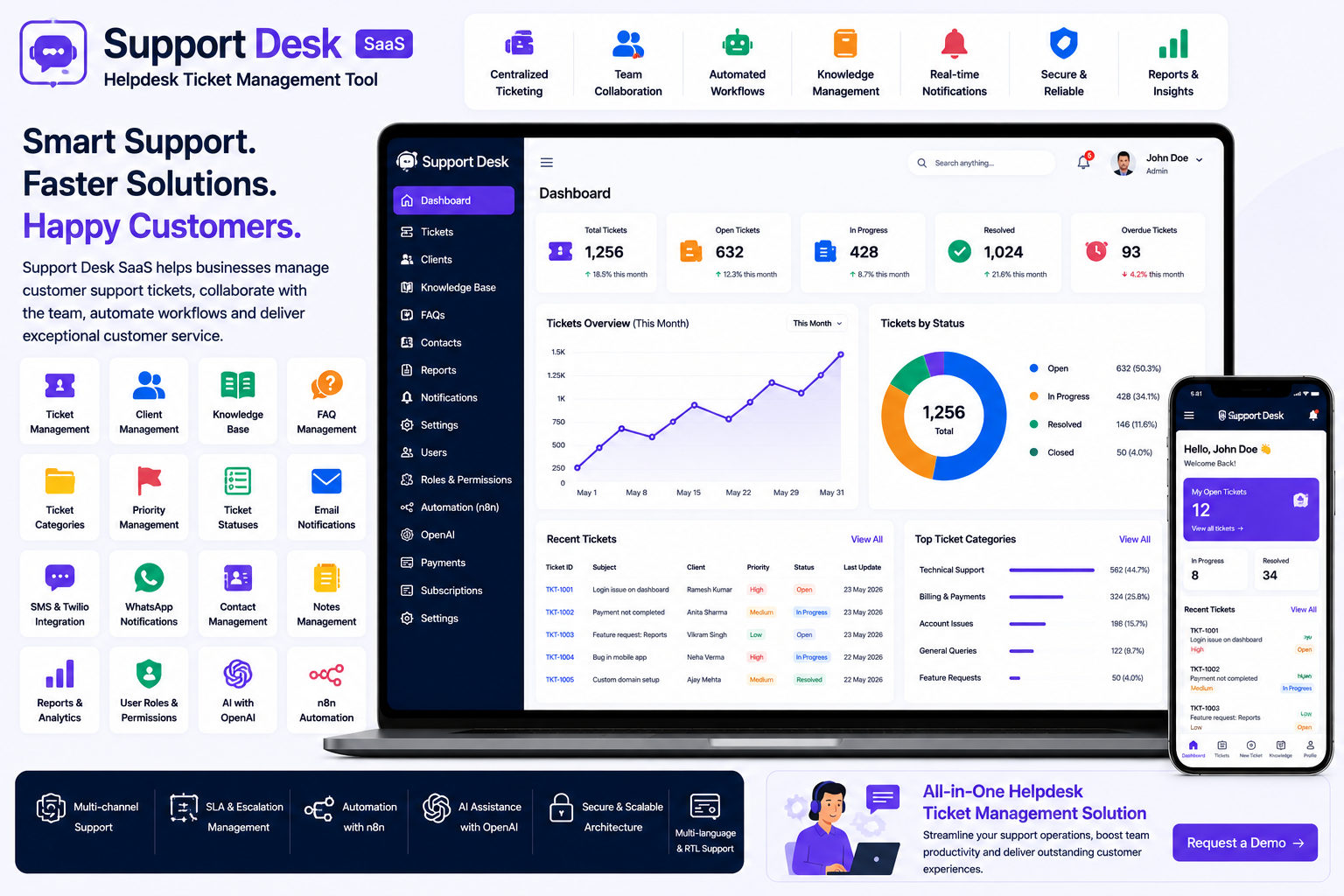
Looking for a ready-made solution?
👉Helpdesk Ticket Management Tool
https://smartwebinfotech.com/items/support-desk-saas-helpdesk-ticket-management-tool/1015
Providing fast and organized customer support is essential for businesses of every size. As the number of customers and support requests increases, managing customer queries through email, phone calls, WhatsApp messages, and spreadsheets can quickly become difficult.
A Helpdesk Ticket Management Tool provides a centralized platform where businesses can receive, organize, assign, track, and resolve customer support requests.
Instead of losing customer queries across different communication channels, support teams can manage conversations through structured support tickets.
In this guide, we'll explore what Helpdesk Ticket Management Software is, its key features, benefits, and how Support Desk SaaS can help businesses build a more organized customer support operation.
What Is a Helpdesk Ticket Management Tool?
A Helpdesk Ticket Management Tool is software that helps businesses manage customer support requests through tickets.
When a customer reports an issue or asks a question, a support ticket can be created and tracked until the issue is resolved.
A typical workflow looks like:
Customer Request → Ticket Created → Ticket Assigned → Support Response → Resolution → Ticket Closed
This provides support teams with a structured way to manage customer queries instead of relying on scattered emails or manual records.
Support Desk is designed to streamline customer support operations by helping businesses manage incoming support requests, track ticket status, and provide timely assistance.
Why Do Businesses Need Helpdesk Software?
As a business grows, customer support can become increasingly complex.
Common challenges include:
- Lost customer requests
- Unanswered emails
- Duplicate support requests
- Difficulty assigning tickets
- Poor ticket status visibility
- Slow response times
- Lack of support history
- Difficulty measuring support performance
- Repeated customer questions
A centralized helpdesk system helps businesses organize support requests and provide a more consistent customer experience.
Key Features of a Helpdesk Ticket Management Tool
1. Support Dashboard
A centralized dashboard gives support managers an overview of customer service operations.
It can provide visibility into support activities and help users quickly access tickets, clients, knowledge articles, FAQs, and other important modules.
This makes it easier for support teams to understand what requires attention.
2. Ticket Management
Ticket management is the core feature of a helpdesk system.
Support teams can create and manage tickets containing information such as:
- Customer
- Subject
- Description
- Category
- Priority
- Status
- Assigned Support User
- Ticket History
- Responses
A structured ticket workflow helps ensure that customer requests don't get forgotten.
Support Desk includes dedicated Ticket Management functionality.
3. Ticket Categories
Different customers may contact support for different reasons.
Categories help businesses organize tickets according to their subject or department.
Examples include:
- Technical Support
- Billing
- Account Issues
- Product Questions
- Sales
- General Support
- Feature Requests
Ticket categories can make filtering and reporting easier.
4. Ticket Priority Management
Not every support request requires the same level of urgency.
A helpdesk system can use priorities such as:
- High
- Medium
- Low
Priority management helps support teams focus on urgent customer issues first.
5. Ticket Status Tracking
A ticket typically moves through several stages.
For example:
New → Open → In Progress → Waiting for Customer → Resolved → Closed
Status tracking gives support teams a clear understanding of the current state of each request.
This also helps managers identify tickets that have remained unresolved for too long.
6. Client Management
Customer information is closely connected to support tickets.
A client management module can maintain:
- Customer Details
- Contact Information
- Support Tickets
- Communication History
- Notes
- Account Information
Support agents can therefore understand the customer's history before responding to a new request.
Support Desk includes dedicated Client Management functionality.
7. Client Dashboard
A customer-facing dashboard can provide customers with a convenient way to interact with the support system.
Customers can use a portal to manage their support-related activities instead of relying entirely on email communication.
The current Support Desk product includes a Client Dashboard Panel.
This can improve transparency and provide customers with a self-service support experience.
8. FAQ Management
Many customer questions are repetitive.
A Frequently Asked Questions section can provide answers to common queries without requiring a support agent to respond individually every time.
FAQ management can cover topics such as:
- Account Setup
- Billing
- Product Usage
- Troubleshooting
- General Questions
Support Desk includes FAQs Management.
9. Knowledge Base / Knowledge Articles
A knowledge base provides customers and support teams with useful documentation.
Knowledge articles can contain:
- How-to Guides
- Troubleshooting Instructions
- Product Documentation
- Setup Instructions
- Best Practices
- Frequently Used Solutions
A strong knowledge base can reduce repetitive support requests and help customers solve simple issues themselves.
Support Desk includes Knowledge Article functionality.
10. Contact Management
Businesses communicate with customers, prospects, vendors, and other stakeholders.
Contact management helps keep important contact information organized.
This can be particularly useful for businesses where support teams also handle customer relationships.
11. Notes Management
Support agents may need to maintain internal notes about customers or tickets.
Notes can help teams record important information that may be useful for future support interactions.
This is especially valuable when multiple support agents work with the same customer.
Support Desk includes Notes Management.
12. Email Notifications
Email remains one of the most important customer support communication channels.
Automated email notifications can be used for events such as:
- New Ticket
- Ticket Assignment
- Ticket Response
- Ticket Status Update
- Ticket Resolution
- Account Notifications
Support Desk provides configurable email notification settings and notification templates.
13. SMS & Twilio Integration
Some support situations require faster communication than email.
SMS can be useful for:
- Ticket Updates
- Important Alerts
- Account Notifications
- Customer Communication
Support Desk includes Twilio SMS templates and Twilio integration for sending SMS.
14. WhatsApp Notifications
WhatsApp is widely used by businesses for customer communication.
Support Desk includes WhatsApp integration for sending notifications, providing another communication channel for customer support workflows.
This can be useful for businesses that want to communicate important support updates through a familiar messaging platform.
15. AI Integration with OpenAI
Artificial intelligence can help businesses automate repetitive support activities.
Support Desk includes OpenAI integration, creating opportunities for AI-assisted support workflows.
Depending on implementation, AI can potentially assist with tasks such as:
- Drafting support responses
- Creating FAQ content
- Summarizing customer requests
- Generating knowledge articles
- Categorizing support information
Businesses should configure AI workflows according to their specific support requirements and data policies.
16. n8n Workflow Automation
Businesses often use multiple applications to manage their operations.
n8n can connect applications and automate workflows.
Support Desk includes n8n integration, allowing businesses to create automation workflows around their support processes.
For example, a business could build workflows that connect support tickets with other business systems.
17. Payment Gateway Integration
Some businesses may charge customers for premium support, subscriptions, or services.
Support Desk includes payment integrations such as:
- Bank Transfer
- PayPal
- Stripe
- Flutterwave
- Paystack
- Razorpay
The product's current listing includes Razorpay integration as well as other payment options.
18. Subscription Package Management
A helpdesk platform can also be offered as a SaaS product.
Businesses can create different subscription packages based on:
- Number of Users
- Number of Clients
- Available Features
- Support Requirements
- Automation Features
Support Desk includes Subscription Packages Management.
19. Coupon & Promotion Management
SaaS businesses may want to offer promotional discounts to attract new customers.
Coupon management allows administrators to create and manage promotional offers.
Support Desk includes subscription coupon and coupon history management.
20. Dynamic Landing Page CMS
A professional helpdesk SaaS platform needs a strong public-facing website.
A dynamic landing page CMS allows administrators to manage website content without making every change manually through code.
Support Desk includes a Dynamic Landing Page CMS and options to enable or disable the landing page.
21. SEO Settings
SEO can help a support platform attract organic traffic through search engines.
SEO settings can be used to configure important website metadata and improve the discoverability of public-facing pages.
Support Desk includes Site SEO Settings.
22. Multi-Language Support
Businesses serving customers across different countries may require multiple languages.
Multi-language support can make a helpdesk more accessible to international users.
Support Desk includes Multi-Language functionality.
23. RTL & LTR Support
Businesses serving markets using right-to-left languages can benefit from RTL support.
Support Desk includes both RTL and LTR themes, making it more adaptable to different language environments.
24. Role-Based Permissions
Different members of a support organization may need different levels of access.
For example:
- Super Admin
- Owner
- Support Staff
- Manager
- Client
Role and permission management allows administrators to control what different users can access.
Support Desk includes User Roles and Permissions.
25. Two-Factor Authentication
Support systems can contain customer information and internal business data.
Two-factor authentication adds another layer of account security.
Support Desk includes 2-Factor Authentication.
Benefits of Helpdesk Ticket Management Software
Centralize Customer Support
Manage support requests from one centralized platform instead of scattered communication channels.
Improve Response Times
Ticket priorities and organized workflows help teams focus on important requests.
Reduce Missed Requests
Every customer request can be converted into a trackable ticket.
Improve Customer Experience
Customers can receive structured updates and access their support information through a dedicated portal.
Reduce Repetitive Questions
FAQs and knowledge articles can help customers solve common problems themselves.
Improve Team Collaboration
Support agents can share ticket information, notes, and customer history.
Automate Support Workflows
Integrations such as OpenAI and n8n can help automate repetitive processes.
Build a Scalable Support Business
SaaS subscription functionality allows entrepreneurs to offer helpdesk software to multiple businesses.
Who Can Use Helpdesk Ticket Management Software?
A Helpdesk Ticket Management Tool can be useful for:
- SaaS Companies
- IT Companies
- Software Companies
- E-commerce Businesses
- Digital Agencies
- Hosting Companies
- Educational Platforms
- Financial Services
- Healthcare Businesses
- Service Providers
- Customer Support Centers
- Online Marketplaces
Almost any business that regularly receives customer support requests can benefit from a structured ticketing system.
How to Choose the Best Helpdesk Ticket Management Tool
Before selecting helpdesk software, consider:
- Ticket Management
- Ticket Categories
- Ticket Priorities
- Ticket Statuses
- Client Management
- Client Portal
- FAQs
- Knowledge Base
- Contact Management
- Internal Notes
- Email Notifications
- SMS Integration
- WhatsApp Integration
- User Roles & Permissions
- Reports
- Payment Integration
- AI Integration
- Workflow Automation
- Multi-Language Support
- Security
- SaaS Capabilities
- Customization Options
The best helpdesk platform should match your support team's workflow and provide enough flexibility to scale with your business.
Why Choose Support Desk SaaS?
If you're looking for a ready-to-use Helpdesk Ticket Management Tool, Support Desk SaaS by Smartweb Infotech provides a centralized platform for managing customer support tickets, clients, FAQs, knowledge articles, notifications, subscriptions, and support operations.
The product currently includes ticket management, ticket categories, client management, FAQs, knowledge articles, contact and notes management, notifications, SaaS subscriptions, payment integrations, OpenAI, n8n, WhatsApp, and Razorpay integration.
Key Features
- Informative Dashboard
- User Management
- User Roles & Permissions
- Client Management
- Ticket Management
- Ticket Category Management
- FAQ Management
- Knowledge Articles
- Contact Management
- Notes Management
- Company Settings
- Account Settings
- Application Settings
- Email Settings
- Multi-Language Support
- Payment Settings
- Transaction Management
- Subscription Packages
- Coupon & Coupon History
- Dynamic Landing Page CMS
- SEO Settings
- Google reCAPTCHA
- Email Notification Templates
- SMS / Twilio Integration
- WhatsApp Notifications
- OpenAI Integration
- n8n Integration
- Razorpay
- PayPal
- Stripe
- Flutterwave
- Paystack
- Two-Factor Authentication
- Light/Dark Themes
- RTL/LTR Support
- Impersonation Feature
The current product listing shows the software is built with Laravel, supports PHP 8.x and MySQL, and the latest listed update added WhatsApp notifications, Razorpay, and UI/dashboard improvements in July 2026.
Frequently Asked Questions
What is a Helpdesk Ticket Management Tool?
A Helpdesk Ticket Management Tool is software that helps businesses create, assign, track, respond to, and resolve customer support requests through a structured ticketing system.
What is a support ticket?
A support ticket is a digital record of a customer's question, problem, request, or issue. It remains trackable until the support team resolves and closes it.
Can customers create support tickets?
Yes. A customer-facing helpdesk can allow clients to submit support requests and track their status through a client portal.
Can I manage FAQs and a knowledge base?
Yes. Support Desk includes FAQ Management and Knowledge Article functionality.
Can I send support notifications through WhatsApp?
Yes. The current version includes WhatsApp integration for sending notifications.
Can I send SMS notifications?
Yes. Support Desk includes Twilio SMS templates and Twilio integration.
Can AI be integrated into a helpdesk?
Yes. Support Desk includes OpenAI integration, which can be used as a foundation for AI-assisted support workflows.
Can I automate helpdesk workflows?
Yes. n8n integration allows businesses to create automated workflows connecting the helpdesk with other applications and services.
Can Helpdesk Software be offered as SaaS?
Yes. Support Desk includes subscription packages, coupons, pricing feature controls, and SaaS-oriented functionality.
Is Helpdesk Ticket Management Software suitable for small businesses?
Yes. A helpdesk can be useful even for a small business because it provides a structured way to organize customer requests and build a searchable support history.
Final Thoughts
Customer support is no longer simply about answering emails. Businesses need an organized system for managing customer requests, assigning tickets, tracking progress, sharing knowledge, and measuring support operations.
A Helpdesk Ticket Management Tool provides a centralized way to manage the complete support lifecycle—from the first customer request to final resolution.
For businesses looking for a ready-to-use solution, Support Desk SaaS – Helpdesk Ticket Management Tool provides ticket management, client management, FAQs, knowledge articles, notifications, customer dashboards, AI integration, workflow automation, and SaaS capabilities in one platform
Comments (0)