This item is also available on Envato. You can also purchase it directly using the link below:
👉 Envato Link
Overview
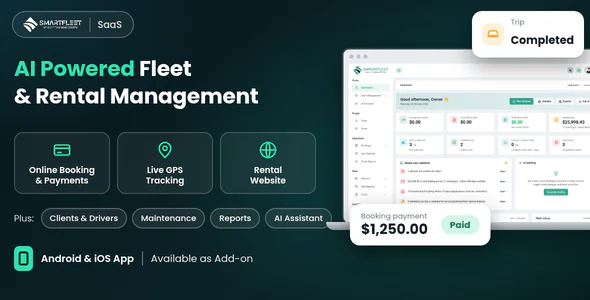
Smart Fleet SaaS is a complete fleet and vehicle rental management platform you can run as your own SaaS business. Rental companies and fleet owners sign up, choose a subscription plan and manage everything in one place: vehicles, drivers, clients, bookings, live tracking, maintenance, fuel, expenses, reports and their own online rental website.
Each owner's data is kept completely separate. Managers, clients and drivers each get their own portal with only the menus they need, and the built-in API powers the Android and iOS apps for customers and drivers (available as an add-on).
Built with Laravel, fully responsive, with RTL support, and ready to sell with subscription plans, free trials, coupons and 6 payment options.
Demo Details
Preview Video : Click here to open the demo preview video
Demo URL: Demo Link
Documentation: Documentation Link
Super Admin
Email : superadmin@gmail.com
Password : 123456
Owner
Email : owner@gmail.com
Password : 123456
Manager
Email : manager@gmail.com
Password : 123456
Mobile App (Add-on)
Android & iOS App – Available as Add-on. Flutter source code for two apps that connect to your Smart Fleet website through the built-in API. A ready-to-use mobile web app (works in the phone's browser, can be added to the home screen) is included with the system.
Customer app
- Browse the owner's vehicles with photos, features and day / week / month rates; search, filter and save favourites
- Pick dates to see only the vehicles that are free, with a live price estimate (days, rate, tax, deposit) before sending the request
- Send a booking request; follow it from request to confirmation, trip start and completion
- Trip details page: progress timeline, route with directions, driver name and call button, vehicle details, full payment breakdown with every payment, trip log (distance, fuel), agreement status, rating
- Pay what is due through the owner's secure payment page, open the invoice, see the payments statement
- Live tracking of a running trip, and a live link to share the vehicle's position with the person being picked up
- Cancel inside the free window, rate finished trips, upload licence / ID photos
- Edit profile and password, push notifications, dark mode
Driver app
- Today's job, upcoming trips and a trip details page with one-tap navigation to pick-up and drop-off, customer call button and notes
- Start and finish trips with odometer, fuel level, handover checklist, notes and up to 4 photos
- Live location during a trip, also in the background, with a clear notice and a notification (store app); stops when the trip ends
- SOS button and problem reports (breakdown, damage, accident) with photos and position; history of reports and the office's replies
- Daily vehicle check, fuel and expense entries with receipt photos
- Works without signal: text entries are saved on the phone and sent when the connection returns
One app serves every owner: customers and drivers scan the owner's QR code or type the app code, and after sign-in they see that owner's logo, colours and contact buttons. The Super Admin controls the live app (versions, maintenance, features, push) from the Mobile App Console.
Who Is It For?
- SaaS founders – launch your own fleet management software and sell monthly, quarterly or yearly plans.
- Car, van and bike rental companies – take bookings online, assign drivers and keep every vehicle earning.
- Fleet owners and transport companies – track vehicles, drivers, fuel, service and costs in one dashboard.
User Roles
- Super Admin – runs the platform: customers, packages, coupons, transactions, landing page, scheduler, backups and settings.
- Owner – full control of their fleet business.
- Manager / Staff – default Manager role, plus unlimited custom roles with permissions.
- Client – requests bookings, pays online, sees trips, invoices and statements, uploads documents.
- Driver – sees only the trips assigned to them, starts and finishes them, reports problems.
Main Features
Vehicles & Fleet
- Vehicle management with types, registration, engine, colour, kilometres and speed limit
- Vehicle inspections with inspection types
- Parts inventory linked to services, and vendor management
- Fines & tolls, accidents and insurance claims
- Fleet status, utilisation and "needs attention" alerts on the dashboard
Bookings & Clients
- Booking management with availability check (no double bookings)
- Booking requests from clients – approve to create the booking
- Client management and client portal: trips, statement, invoices, documents, reviews
- Rental agreements for clients and drivers with digital signature
- Invoices with automatic paid / due status
- Client documents (licence, ID, passport) with approval and expiry
- Live trip share link for the person being picked up
Payments
- Online payment on invoices: Stripe, PayPal, Flutterwave, Paystack, Razorpay and Bank Transfer
- Payment checks: a gateway reference can credit a booking only once, and never more than the amount due
- Subscription payments for your own SaaS plans with the same gateways
Drivers & Tracking
- Driver management with licence expiry and driver score
- Driver app: today's trips, start / finish with odometer, fuel level and photos
- Handover checklist at pick-up and return, with notes and photos
- SOS and problem reports (breakdown, damage, accident) with position and photos
- Live tracking map from the driver app or GPS / OBD devices
- Geofence entry / exit and speeding alerts
- Driver reports and fuel / expense entries with receipt photos
Live Tracking & Safety
- Live map of all vehicles with last position, speed and update time; vehicles with no signal for 15 minutes are shown as offline
- Two ways to get positions: the driver's phone during a trip, or any GPS / OBD device through a secure per-vehicle token API
- Speeding alerts against each vehicle's own speed limit
- Geofences: draw zones and get alerts when a vehicle enters or leaves them
- SOS alerts from drivers shown on the map, by email and by SMS (Twilio)
- Alerts by email through notification rules; daily expiry digest
- Share a trip: clients create a read-only live link for the person being picked up and can turn it off any time
- Clients follow their own running trip on a map in the portal and in the apps
- Handover checklist with photos at start and finish, odometer and fuel readings, trip distance
- Driver score from speeding alerts and trips
- Privacy built in: drivers are asked first, tracking runs only during a trip, and old points are deleted automatically after 90 days
AI Features
- AI Assistant: ask in plain language about vehicles, bookings, availability, costs, fuel anomalies, expiring documents, drivers and tracking alerts. It answers from your own data only
- Booking helper: the assistant prepares a booking from a sentence and checks it for clashes; you confirm it
- Scan a document: read a photo of a licence or registration and pull out the details
- Damage check: compare a before and an after photo from the same angle to spot new damage
- Daily AI briefing on the dashboard: what is urgent, what changed and what to do first
- Weekly AI summary emailed to the owner
- Your choice of AI service: OpenAI (ChatGPT), Anthropic Claude, Google Gemini, Mistral, DeepSeek, Groq, OpenRouter or any OpenAI-compatible address. Each owner uses their own key and can test it from Settings
- Plan-based: AI is a package feature, with a monthly allowance per owner and a usage log
- Maintenance forecast: the next service is estimated from the service history and flagged when due or overdue
Maintenance, Fuel & Costs
- Service management with parts used and next-service forecast
- Expiration reminders (registration, insurance, licence) with calendar and email digest
- Fuel management and expense management
- Cost analytics per vehicle
Owner Website (Front-End)
- Every owner gets a rental website – no coding needed
- Page builder with 17 section types: hero, stats, fleet, steps, features, pricing, gallery, team, testimonials, FAQ, map, video and more
- 6 colour themes, custom pages in the menu, logo and hero image
- Vehicle pages with photo gallery, features, details, day / week / month rates
- Online booking with live price quote, extras, discount codes, tax and deposit
- Availability search by dates, enquiry and contact forms with spam protection
- SEO ready: meta tags, sitemap, structured data, Google Analytics, Facebook Pixel
- Custom domain per owner with DNS check (enabled per subscription plan)
- WhatsApp and call buttons, announcement bar, opening hours and rental terms
- Enquiries and booking requests inbox with email alerts
Dashboards & Reports
- Informative dashboard for every role
- Invoice, Expense, Income, Vehicle Availability and Profit & Loss reports
- Report Center with CSV export
Notifications, AI & Automation
- Email notification templates with enable / disable option and notification rules
- SMS notification template with Twilio and WhatsApp notifications
- Push notifications to the mobile apps
- AI assistant and AI briefing of the day
- AI providers: OpenAI (ChatGPT), Anthropic Claude and Google Gemini – each owner uses their own key, enabled per plan
- n8n webhook integration
- Daily automation (cron job): reminders, digests and the scheduled database backup
SaaS & Administration
- Subscription packages with user, driver and client limits
- Free trial plans
- Plan features: logged history, AI, n8n, website and custom domain
- Coupons and coupon history
- Transactions with bank transfer approval
- Pricing enable / disable option
- Dynamic landing page CMS, FAQ and footer
- Landing page and register page enable / disable options
- Owner email verification enable / disable option
- Impersonate (log in as an owner to help)
- Audit log and logged history (login activity)
- Scheduler page for the Super Admin – the exact cron line for your server, proof it is running, and a secret URL for hosts that can only call a web address
- Automatic and on-demand database backups with download
- Mobile App Console for the Super Admin: app versions, store links, maintenance, features and push
Settings & Security
- Company, account, application and email (SMTP) settings
- 2-factor authentication
- Google reCAPTCHA
- Site SEO settings
- Multi languages and RTL / LTR
- Theme settings: multiple theme colours with custom colour picker, light / dark mode, font styles
- Private storage for client ID documents and backups – not reachable by URL
System Requirements
- PHP >= 8.1
- MySQL / MariaDB database
- BCMath PHP Extension
- Ctype PHP Extension
- cURL PHP Extension
- Fileinfo PHP Extension
- GD PHP Extension (images and PDF signatures)
- JSON PHP Extension
- Mbstring PHP Extension
- OpenSSL PHP Extension
- PDO PHP Extension
- Tokenizer PHP Extension
- XML PHP Extension
- Cron job support (for reminders, digests and automatic backups)
- SSL certificate (HTTPS) recommended – required for online payments, push notifications and the mobile apps
What You Get
- Full Laravel source code
- Web installer – install in a few minutes
- Documentation with installation steps
- Future updates
- Support through our ticket system
Need Assistance?
If you have any queries, please create a support ticket here, and our support team will respond as soon as possible.
Installation Guidelines
Software Installation & Upgrade Documentation : Click here to open the video