Overview
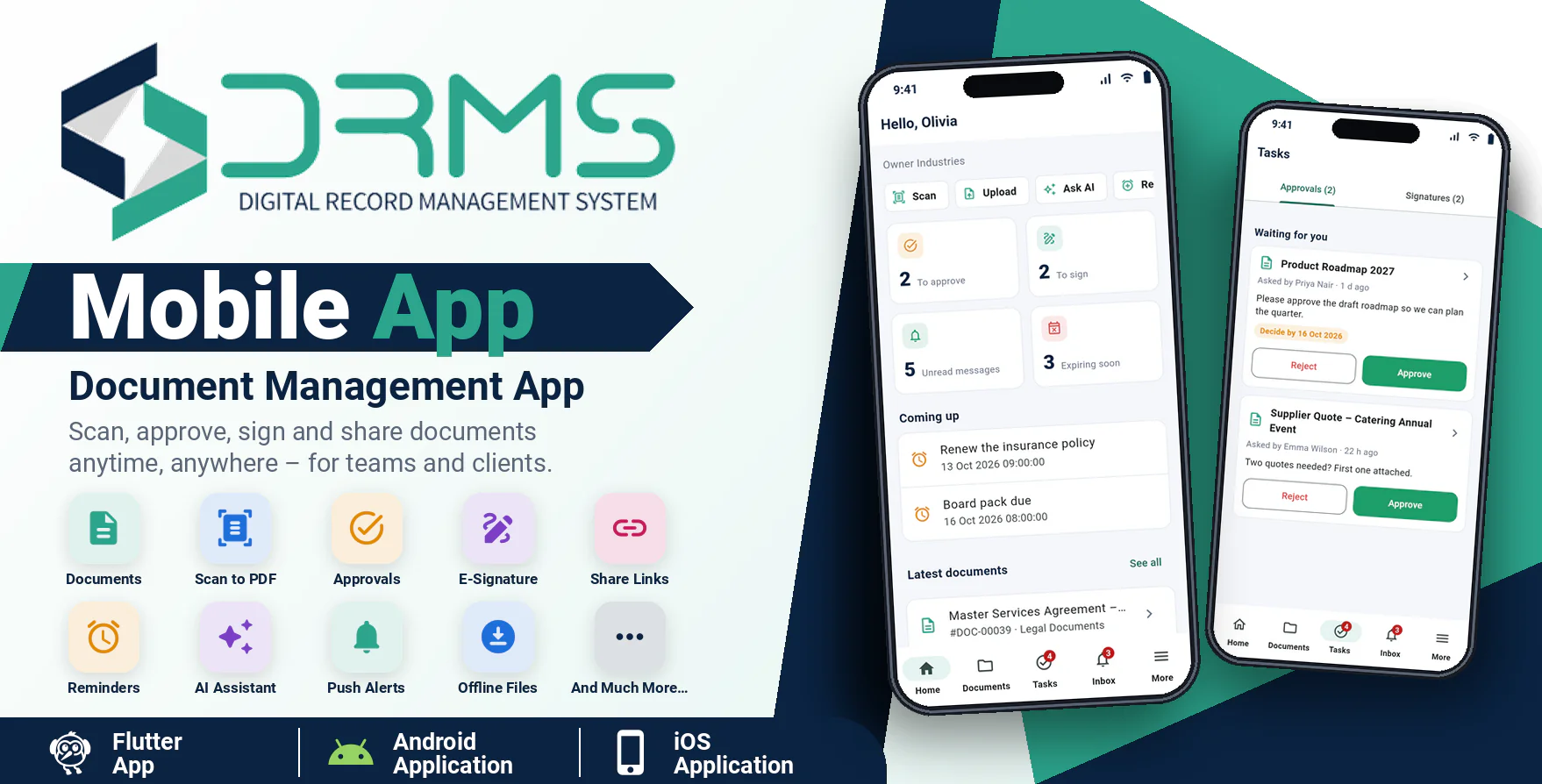
Smart DMS Mobile App is a modern Android and iOS application designed as a companion mobile app for the Smart DMS SaaS - Document & Records Management System. It gives owners, staff and clients convenient mobile access to their documents, approvals, signatures and reminders.
With Smart DMS Mobile App, a team can scan paper documents into PDFs, search and open documents, approve or reject requests in one tap, sign with a finger, share documents with secure links, set reminders and ask the AI assistant questions about their documents. Clients get a simple, private view of their own documents where they can upload files and sign.
The application is developed using Flutter and Dart and communicates securely with the Smart DMS SaaS website through API integration. Every company sees its own name, colour and logo in the app.
Important Requirement
This mobile application requires Smart DMS SaaS v3.0 or newer installed on an HTTPS-enabled domain. The Smart DMS SaaS web application is required and is sold separately.
Demo Details
Demo Application: Download Demo Application
Android Documentation: Open Documentation
IOS Documentation: Open Documentation
Admin Demo URL : Smart DMS SaaS Web/Admin URL
How to connect the demo app: open the Admin Demo URL on a computer, sign in as the owner, choose Mobile app in the menu and scan the QR code with the app.
Owner
Email : owner@gmail.com
Password : 123456
Employee
Email : employee@gmail.com
Password : 123456
Why Choose Smart DMS Mobile App?
- Access your documents from anywhere.
- Dedicated mobile experience for owners, staff and clients.
- Scan paper documents straight into PDFs with the camera.
- Approve, reject and sign in seconds.
- Receive real-time push notifications.
- Share documents with password-protected links.
- Ask the AI assistant questions about your documents.
- Fingerprint / face lock keeps documents private.
- Your company name, colour and logo inside the app.
- Secure API-based communication with Smart DMS SaaS.
- Modern and responsive Flutter-based mobile interface.
Owner & Staff Features
Dashboard
The dashboard shows what needs attention the moment the app opens.
- Approvals waiting for you.
- Documents waiting for your signature.
- Unread messages.
- Documents expiring soon.
- Upcoming reminders.
- Latest documents.
- Quick actions: scan, upload, ask AI, add reminder.
Documents
Find and manage documents on the go.
- Search by name, number, tag or category.
- Filter by category, folder or expiring soon.
- Folder browser with restricted folders respected.
- Open PDFs and pictures inside the app; other files in your phone's own viewer.
- View versions, tags, AI summary and activity history.
- Add comments.
- Edit name, description, category, stage, folder, tags and expiry date.
- Upload a new version.
- Archive, unarchive and move to trash.
- Restore documents from the trash.
- Keep important files on the phone for offline reading.
- Share a file with other apps.
Scan & Upload
Turn paper into documents with the phone camera.
- Camera document scanner with edge detection.
- Join several pages into one PDF.
- Convert photos from the gallery into a PDF.
- Upload a file from the phone.
- Choose category and folder while saving.
- Plan limits, storage quota and virus scan apply as on the website.
Approvals
Decide on documents without opening a computer.
- See approvals waiting for you.
- Approve or reject with a reason.
- Ask colleagues to approve a document, one after the other or all at once.
- Set a due date and note.
- Cancel your own request.
- Track the status of requests you made.
E-Signature
Sign and collect signatures with a finger.
- See signature requests waiting for you.
- Read the PDF before signing.
- Draw your signature and choose the page and position.
- Decline with a reason.
- Ask staff and clients to sign a PDF, in order or in any order.
- Cancel a signature request.
- Clients can sign PDFs assigned to them.
Share Links
Share a document with someone outside your company.
- Make a public link.
- Set an end date.
- Protect it with a password.
- Limit the number of views.
- Allow or block download.
- Copy or share the link.
- Switch a link off at any time.
Reminders
Never forget a deadline.
- List coming up and earlier reminders.
- Add a reminder with date, time and repeat.
- Assign a reminder to team members.
- Delete your reminders.
- Get a push message when it is time.
AI Assistant
The mobile app gives access to the AI assistant configured in Smart DMS SaaS.
- Ask questions about your documents and get answers with sources.
- Ask how to do things in the system.
- Get counts such as approvals and expiring documents.
- Create reminders from a plain sentence and confirm them.
- Write an AI summary of a document.
- Consent screen before the assistant reads your documents.
Inbox & Push Notifications
Smart DMS Mobile App supports Firebase Cloud Messaging for real-time push notifications.
- Approval requests and decisions.
- Signature requests, progress and completion.
- Document expiry alerts.
- Reminders.
- Client activity.
- Unread count and mark all as read.
- Choose which kinds of messages you want.
Client Features
Client Portal
Clients see only what was shared with them.
- View documents assigned to them.
- Open and share documents.
- Send a document, scan or photo to the company.
- Sign PDFs assigned to them.
- Answer signature requests.
- Receive push notifications.
Account & Security
The application follows the authentication and permission system of Smart DMS SaaS.
- Email and password login.
- Two-factor authentication support.
- Fingerprint / face lock.
- Edit profile and change password (other devices are signed out).
- See signed-in devices and sign any of them out.
- Secure token storage on the phone.
- HTTPS API communication.
- Permission-based access: people only see what they may see on the website.
Company Branding & Connect
Smart DMS Mobile App can be used by many companies.
- Connect the app by scanning a QR code or tapping an invite link from the website.
- Company name, colour and logo set by the owner (More > Branding).
- Company-specific data, currency and date format.
- Multiple companies can use the same app.
Additional Features
- Flutter-based Android and iOS application.
- Modern and responsive mobile UI.
- Camera and gallery support.
- PDF and image viewer.
- Offline copies of chosen files.
- Pull to refresh, search and filters.
- Session persistence.
- Works with the Smart DMS mobile API (documented).
Technology
- Framework: Flutter
- Programming Language: Dart
- Platform: Android and iOS
- Backend: Smart DMS SaaS mobile API
- Push Notification: Firebase Cloud Messaging
- Authentication: Secure token authentication
Requirements
- Smart DMS SaaS v3.0 or newer.
- Smart DMS SaaS installed on your server.
- HTTPS / SSL-enabled domain.
- Firebase project for push notifications.
- Flutter development environment.
- Android Studio and Android SDK for the Android app; JDK 17 or newer.
- A Mac with Xcode for the iOS app.
- Google Play and Apple developer accounts to publish.
Perfect For
- Companies managing contracts, HR files and finance records.
- Law, accounting and consulting firms.
- Agencies sharing documents with clients.
- Real estate and property companies.
- Healthcare and education offices.
- SaaS owners who want to offer a branded app to their customers.
What You Get
- Flutter source code for Android.
- Flutter source code for iOS.
- Setup script for each platform.
- Application assets and app icons.
- Firebase notification configuration guide.
- API reference.
- Android installation, build and Google Play publishing guide.
- iOS installation, build and App Store publishing guide.
Important Note
Smart DMS Mobile App is a companion mobile application for Smart DMS SaaS - Document & Records Management System.
The mobile application requires Smart DMS SaaS v3.0 or newer and communicates with the Smart DMS SaaS website through API integration.
The main Smart DMS SaaS web application handles the core document management operations, settings and reports, while this mobile application provides convenient mobile access for owners, staff and clients. The super administrator continues to use the web application.
Smart DMS SaaS
Smart DMS Mobile App works together with Smart DMS SaaS to provide a complete document management solution for companies, teams and their clients.
Demo URL : Smart DMS SaaS Demo URL
Before Purchase
Please read the complete item description and requirements before purchasing. Smart DMS Mobile App is a companion application for Smart DMS SaaS and requires Smart DMS SaaS v3.0 or newer.
The purchase includes the mobile application source code and the features described in this item. Third-party accounts, subscriptions, platform fees, hosting, domain, SSL, payment gateway charges and other external service costs are not included. Publishing on Google Play and the App Store needs your own developer accounts.
Existing application bugs are covered under support. New features, customizations, major changes, deployment services and third-party account setup may require an additional fee.
Need Assistance?
If you have any queries, please create a support ticket here, and our support team will respond as soon as possible.