Overview
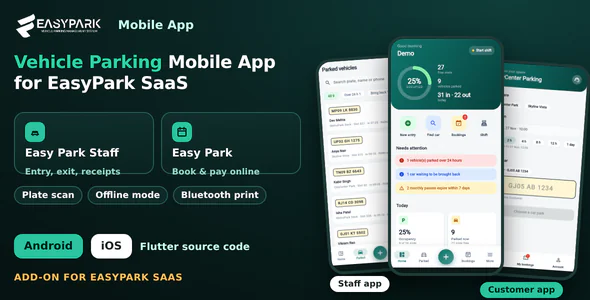
EasyPark Mobile Apps are two modern Android and iOS applications designed as companion apps for the EasyPark SaaS - AI Powered Vehicle Parking Management System: Easy Park Staff for the people who run your car parks and Easy Park for your customers (drivers).
With Easy Park Staff, the team at the gate registers vehicle entry and exit, scans number plates with the camera, prints receipts on a Bluetooth printer, checks in reservations, sells monthly passes, runs shifts and sees the day's numbers, even with a weak signal. With Easy Park, drivers sign in with just their phone number, book a space, pay online, cancel and keep their vehicles.
The applications are developed using Flutter and Dart and communicate securely with the EasyPark SaaS website through API integration. One published build serves every company on your platform: after sign-in the app shows that company's logo, colour and name.
Important Requirement
These mobile applications require EasyPark SaaS v2.1 or newer installed on an HTTPS-enabled domain. The EasyPark SaaS web application is required and is sold separately. For customer sign-in by SMS, the car park needs a Twilio account.
Demo Details
Admin Demo URL : EasyPark SaaS Web/Admin URL
Android Documentation: Open Documentation
IOS Documentation: Open Documentation
Staff Demo Application: Download Staff Demo Application
Owner (Easy Park Staff)
Email : owner@gmail.com
Password : 123456
Customer Demo Application: Download Customer Demo Application
Customer (Easy Park)
Tap "Try the demo" on the sign-in screen (sample data, no phone number needed)
Why Choose EasyPark Mobile Apps?
- Two apps in one package: Easy Park Staff and Easy Park (customer), each for Android and iPhone.
- Run your car park from your pocket: entry, exit, receipts, passes and reservations.
- Customers sign in with only their phone number and an SMS code: no email, no password, no sign-up form.
- Works with a weak signal: new vehicle entries are kept on the phone and uploaded automatically.
- One app for every company: after sign-in the app wears the company's own logo and colour.
- Number plate scan with the camera and receipts on a Bluetooth thermal printer.
- Push notifications for staff (Firebase), PIN lock and four languages including Arabic (right-to-left).
- Secure API-based communication with EasyPark SaaS.
- Modern and responsive Flutter-based mobile interface.
- Tested code: unit and screen tests included.
Staff Features (Easy Park Staff)
Home & Parked Vehicles
The team sees the car park at a glance and finds any vehicle in seconds.
- Live occupancy, free slots, vehicles parked, entries and exits today and income.
- "Needs attention" cards: vehicles parked too long, cars waiting to be brought back, passes about to expire.
- Parked vehicles with search by plate, name or phone, and filters.
- One-tap call and WhatsApp to the driver.
- Photo of a number plate to find a parked car or start an entry.
Entry, Exit & Receipts
The everyday work at the gate, in a few taps.
- New entry with car park, vehicle type, floor, slot and driver details.
- Number plate scan by camera.
- Checkout with the fee from your rate card and the payment method.
- Receipt as PDF or text, shared by WhatsApp or email.
- Receipt printed on a Bluetooth thermal printer (58 mm or 80 mm).
- Bring-back requests (valet) and EV charging with meter readings.
Reservations, Passes & Shifts
Everything that is planned ahead.
- Upcoming, arrived and past reservations; check in, cancel and mark paid.
- Monthly passes: create, renew, search and filter (active, ending soon, expired).
- EV bay map: free, occupied and charging.
- Shifts: count the drawer at the start and end, and see the difference.
Money & Business
- Expenses with a photo of the receipt.
- Reports with CSV share: income, occupancy, overstays and more.
- Website enquiries: call back, WhatsApp, email and mark contacted or closed.
Offline Mode, Security & Alerts
The app keeps working with a weak or missing connection.
- New entries are saved on the phone with their real arrival time and uploaded automatically when the connection returns.
- PIN lock asked when the app opens and after a minute in the background.
- Push notifications for new bookings, bring-back requests, overstaying vehicles and new enquiries.
- Forgot password with a code sent by email.
Customer Features (Easy Park)
Sign in
- Phone number and a 6-digit SMS code. No email, no password.
- The first sign-in creates the customer for that car park, and earlier bookings made with the same number appear automatically.
- The same number written differently (+91, spaces, leading 0) is the same customer.
Book, Pay & Manage
- Choose car park, vehicle type and times; see live availability and the estimated price.
- Pick one of up to 10 saved vehicles with a tap.
- My bookings: kept on the server, so they follow the number to any phone.
- Pay online on the secure payment page, or cancel a booking.
- Contact the car park by call, WhatsApp or email.
- English, Hindi, Arabic (right-to-left) and Spanish.
Branding & Control from the Website
- Owner: app name, colour, logo, welcome text, support contacts and which customer features are on (Settings → Branding & Mobile App).
- Super admin: store links (shown on every owner's website), minimum app version, maintenance message, switch the apps on or off per company, and the server address the apps use.
- "Back soon" and "Please update" screens when you need them.
Included in the Package
- Easy Park Staff – Android source code (Flutter) and Easy Park Staff – iPhone source code (Flutter).
- Easy Park (customer) – Android source code (Flutter) and Easy Park (customer) – iPhone source code (Flutter).
- Detailed documentation for Android and for iPhone: install, run, build, sign and publish on Google Play and the App Store.
- Unit and screen tests.
- Future updates and support through our ticket system.
Need Assistance?
If you have any queries, please create a support ticket here, and our support team will respond as soon as possible.