Overview
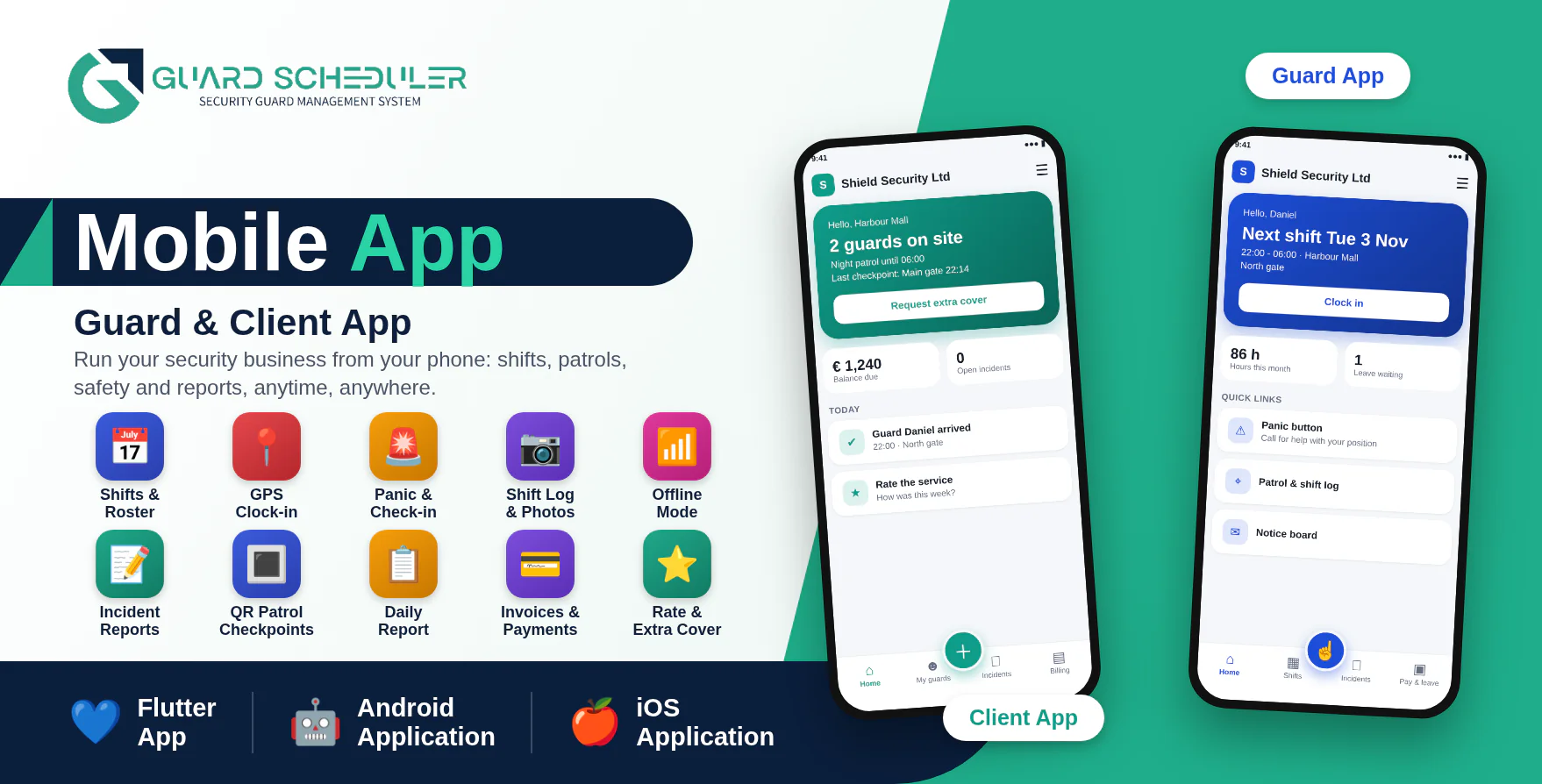
GuardScheduler Mobile Apps are two modern Android and iOS applications designed as companion apps for the GuardScheduler SaaS - AI Powered Security Guard Management System: Guard App for your security officers and Client App for the sites you protect.
With the Guard App, officers see their shifts, accept or decline them, clock in with GPS, scan patrol checkpoints, write the shift log with photos, report incidents, ask for leave, read salary slips and call for help with a panic button, even without internet. With the Client App, customers see who is on site, read the daily report and patrol rounds, follow incidents, pay invoices online, sign contracts, request extra cover and rate the service.
The applications are developed using Flutter and Dart and communicate securely with the GuardScheduler SaaS website through API integration. One published build serves every company: guards and clients enter the company code (or scan its QR code) and the app shows that company's logo and colour.
Important Requirement
These mobile applications require the latest GuardScheduler SaaS installed on an HTTPS-enabled domain, with the database migrations run and the cron job (php artisan schedule:run) set up. The GuardScheduler SaaS web application is required and is sold separately.
Demo Details
Admin Demo URL : GuardScheduler SaaS Web/Admin URL
Android Documentation: Open Documentation
IOS Documentation: Open Documentation
Guard Demo Application: Download Guard Demo Application
Guard (Guard App)
Email : guard@gmail.com
Password : 123456
Client Demo Application: Download Client Demo Application
Client (Client App)
Email : client@gmail.com
Password : 123456
Why Choose GuardScheduler Mobile Apps?
- Two apps in one package: Guard App and Client App, each for Android and iPhone.
- Run your guarding business from anywhere.
- Works offline: shifts, clock-ins, reports, scans and requests are saved on the phone and sent automatically when the connection returns.
- One app for every company: company code, QR code or invite link, with the company's own logo and colour.
- Safety built in: panic button with position and lone-worker check-ins that alert the owner when missed.
- Real-time push notifications for shifts, leave, notices, extra cover and guard arrivals.
- Fingerprint / face lock on the phone.
- Secure API-based communication with GuardScheduler SaaS.
- Modern and responsive Flutter-based mobile interface.
- Tested code: unit tests included.
Guard Features (Guard App)
Home & Shifts
Guards see their day at a glance.
- Next shift, hours this month and leave waiting.
- Upcoming shifts for the next two weeks.
- Accept or decline a shift.
- Attendance history.
- Notice board from the company.
Clock In & Out
Timesheets without paperwork.
- One-tap clock in and out.
- GPS position saved with the clock-in.
- The real time of the tap is kept, so pay starts then, even when the phone had no signal.
- Clock-in sends the client a "Guard on site" notification.
Safety & Patrol
Look after the guard and prove the round was done.
- Panic button that emails the owner with the guard's position.
- Lone-worker check-in: tap "I am OK" at the interval the company sets.
- Patrol rounds: scan the QR code at each checkpoint.
- Shift log with up to three photos per entry.
Reports, Leave & Pay
Everything else from the phone.
- Incident reports with photos.
- Leave requests and their status.
- Salary slips.
- My permits and trainings with days left.
Offline Mode
The app keeps working with a weak or missing connection.
- Clock-ins, incident reports, leave requests, panic alerts, checkpoint scans and log entries saved on the phone.
- Automatic upload in the right order when the connection returns.
- Nothing is ever created twice.
- Waiting-to-send list under More.
Notices & Notifications
Never miss a change.
- Company notice board.
- Push notifications for new shifts, answered leave and new notices.
Client Features (Client App)
Home
Customers see what needs their attention.
- Guards on site now.
- Balance due and overdue invoices.
- Open incidents and contract dates.
- Quick action to request extra cover.
Guards, Reports & Patrols
Know what is happening at the site.
- Guards on site now and the roster for the next 7 days.
- Daily report: who was on, guard notes with photos, checkpoints scanned and incidents.
- Patrol rounds per checkpoint.
- Incidents at the sites.
- Rate the service or a single guard.
Billing & Contracts
Pay and sign from the phone.
- Invoices with totals, payments and balance.
- Pay online through the company's secure payment page, already signed in.
- Contracts with a drawn signature.
- Request extra cover and follow the answer.
Notifications
Stay informed.
- Push notifications when a guard arrives and when an extra cover request is answered.
- Company notice board.
- Tabs follow the modules the company has turned on.
Company Code & Branding
- Sign in with a company code, a scanned QR code or an invite link.
- The app shows the company's logo, name, colour and welcome text before sign-in.
- The owner edits the branding under Website, Mobile App, and prints the QR code from there.
- Owners also choose what clients can see and the lone-worker check-in interval.
- The super admin controls the apps-live switch, store links, minimum versions, maintenance mode and per-company access.
- Invite links open the app (guardschedulerguard:// and guardschedulerclient://).
For the Owner (in the Web Dashboard)
- Safety Alerts with a badge for open ones, and a line on the dashboard.
- Patrol Checkpoints with printable QR codes.
- Field Reports: patrol scans, shift logs with photos and client ratings.
- Website section "Get our app" with your QR code and store buttons.
Technical Details
- Flutter and Dart, one code base per app.
- Four projects: guard_app/android_app, guard_app/iphone_app, client_app/android_app, client_app/iphone_app.
- GuardScheduler SaaS REST API (Sanctum tokens), calls listed in docs/API.md.
- Push notifications through Firebase (optional).
- Secure storage for the session.
- Flutter SDK required to build; iPhone builds need a Mac with Xcode. The android/ and ios/ platform folders are created with flutter create as described in the documentation.
What You Get
- Full Flutter source code of the Guard App and Client App for Android and iPhone.
- Android and iOS setup documentation with build, permission and push notification steps.
- API notes (docs/API.md) and unit tests.
- Store screenshots.
- Future updates.
- Support through our ticket system.
Need Assistance?
If you have any queries, please create a support ticket here, and our support team will respond as soon as possible.