Overview
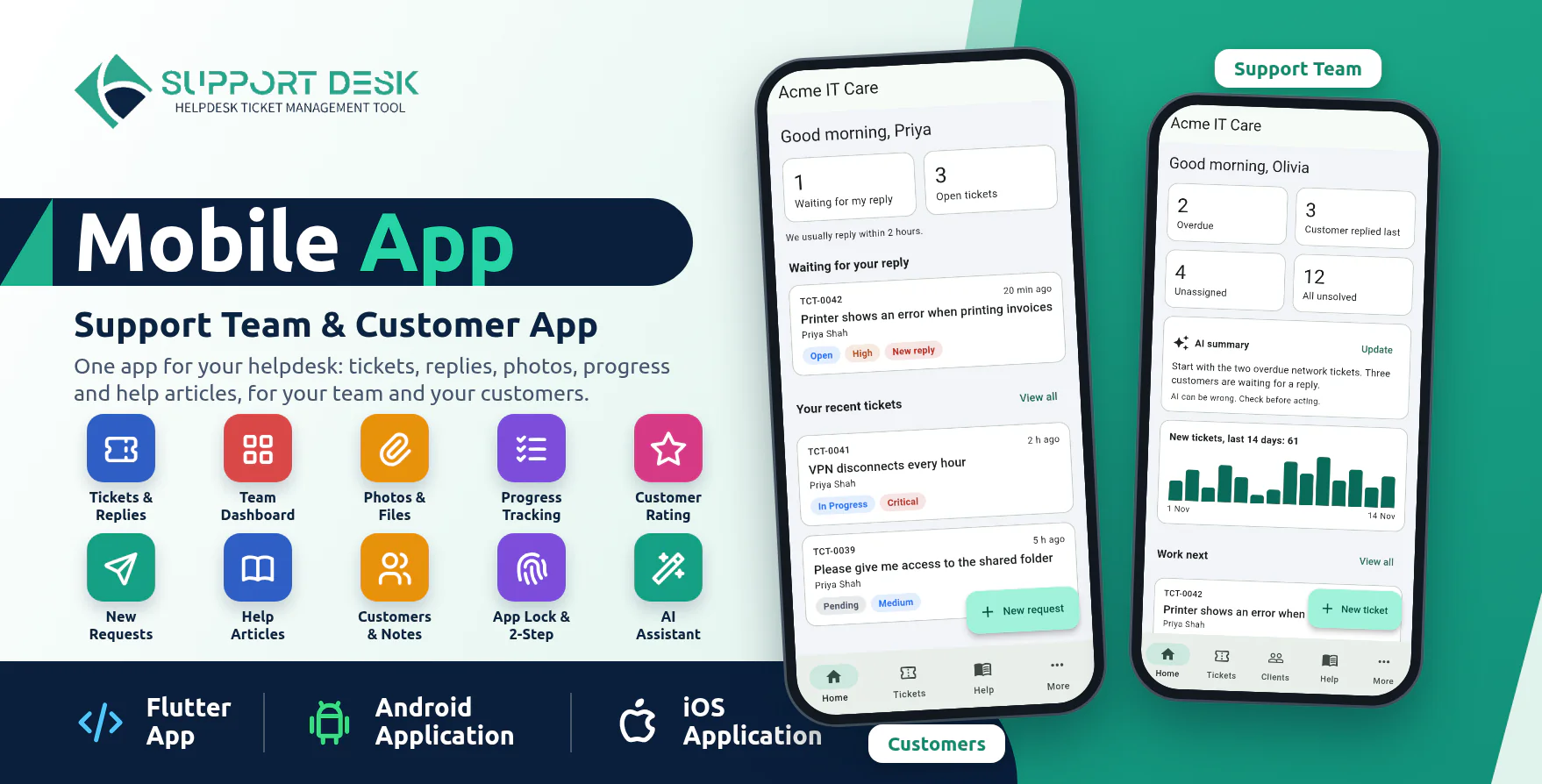
Support Desk Mobile App is a modern Android and iOS application designed as the companion app for the Support Desk SaaS - Helpdesk Ticket Management System. It is one app for your support team and your customers: what each person sees follows their account and permissions.
With the app, your team sees what needs attention first, replies to tickets with photos and files, changes stage, importance and assignee, adds internal notes, manages customers and gets AI help. Customers send requests, follow the progress, reply, mark tickets as solved or reopen them, rate the support and read help articles.
The application is developed using Flutter and Dart and communicates securely with the Support Desk SaaS website through API integration. One published build serves every company: people sign in with their email and password, and the app shows their company's name, logo and colour.
Important Requirement
This mobile application requires Support Desk SaaS v1.9 or newer installed on an HTTPS-enabled domain. The Support Desk SaaS web application is required and is sold separately. Alerts, internal notes, service time targets and ratings need the optional modules of the website, switched on with one command.
Demo Details
Admin Demo URL : Support Desk SaaS Web/Admin URL
Android Documentation: Open Documentation
IOS Documentation: Open Documentation
Demo Application: Download Support Desk Demo Application
Owner (Support Team)
Email : owner@gmail.com
Password : 123456
Manager (Support Team)
Email : manager@gmail.com
Password : 123456
Client (Customer)
Email : client@gmail.com
Password : 123456
Why Choose Support Desk Mobile App?
- One app for the support team and customers, for Android and iPhone.
- Access helpdesk features from anywhere.
- Simple sign-in with email and password: no server address or code to type.
- One app for every company, with the company's own name, logo and colour.
- Customers can follow every request and solve or reopen it themselves.
- Unsent ticket and reply text is kept as a draft.
- Fingerprint / face lock and two-factor sign-in.
- Secure API-based communication with Support Desk SaaS.
- Modern and responsive Flutter-based mobile interface, with light and dark mode.
- Tested code: unit and screen tests included.
Support Team Features
Home & Dashboard
The team sees what needs attention and opens any ticket in one tap.
- Queues for overdue, customer replied last, unassigned and unsolved tickets.
- "Work next" list of tickets.
- New tickets over the last 14 days.
- AI summary of what to handle first (when AI is enabled for the company).
- Free trial status for owners.
- Quick button to create a new ticket.
Tickets & Replies
Find any ticket and answer it from the phone.
- Ticket list with search, views and sorting.
- Create a ticket for a customer, with category, importance, assignee and custom fields.
- Full conversation with the customer.
- Reply with camera photos, pictures and files.
- Open and download attachments.
- Unsent replies are kept as drafts.
Ticket Actions & AI
Everything needed to work a ticket, in one screen.
- Change stage, importance and assignee.
- Internal notes that only the team can see.
- Call or email the customer in one tap.
- AI ticket summary.
- AI reply draft and improve my reply.
- AI priority and category suggestion.
- AI text is never sent to a customer automatically.
Customers
Customer details whenever the team needs them.
- Search customers.
- Customer profile with ticket counts and latest tickets.
- Add a new customer.
Alerts & Notices
Stay informed about changes.
- In-app alerts that open the right ticket.
- Mark all alerts as read.
- Company notice board.
Customer Features
Home
Customers see what needs their attention.
- Tickets waiting for their reply.
- Open and solved ticket counts.
- Usual reply time.
- Ratings waiting.
- Announcements, common questions and contact details.
- Quick button to send a new request.
Requests
Ask for help from the phone.
- New request with category and importance.
- Photos and files with each request.
- Matching help articles suggested while typing.
- Unsent requests are kept as drafts.
- Edit a request before the first answer.
Progress & Rating
Follow the work until it is solved.
- Request list with search.
- Four-step progress view.
- See who is looking after the request.
- Read replies and answer, with files.
- Mark as solved or reopen.
- Rate a solved ticket when the company asks.
Help & Announcements
Find answers without waiting.
- Search and read help articles.
- Announcements with attachments.
- Call, email or message the company.
- Sections follow what the company has turned on.
Company Branding
- After sign-in the app shows the company's name, logo and colour, and keeps them on that phone's sign-in screen.
- The owner edits the branding in Settings, Branding & Mobile App, and chooses what customers see.
- Invite page with store buttons and a printable QR code.
- Company websites show "Get our app" once the store links are added.
- The super admin controls store links, minimum version, maintenance mode and per-company access.
Technical Details
- Flutter and Dart, one code base.
- Two projects: android_app and iphone_app.
- Support Desk SaaS REST API (Sanctum tokens), reference included as openapi.yaml.
- Secure storage for the session.
- The website address is set when you build the app.
- Android 7.0 or newer; iPhone with iOS 15 or newer.
- Flutter SDK required to build; iPhone builds need a Mac with Xcode.
- Push notifications and offline use are not included.
What You Get
- Full Flutter source code of the app for Android and iPhone.
- Documentation with build, signing and store publishing steps.
- API reference (openapi.yaml) and screenshots.
- Future updates.
- Support through our ticket system.
Need Assistance?
If you have any queries, please create a support ticket here, and our support team will respond as soon as possible.